> ## Documentation Index
> Fetch the complete documentation index at: https://docs-dev-actions-triggers-prototype.mintlify.site/llms.txt
> Use this file to discover all available pages before exploring further.
> Describes how to unlink devices assigned to a user using the Auth0 Dashboard.
# Unlink Devices from Users
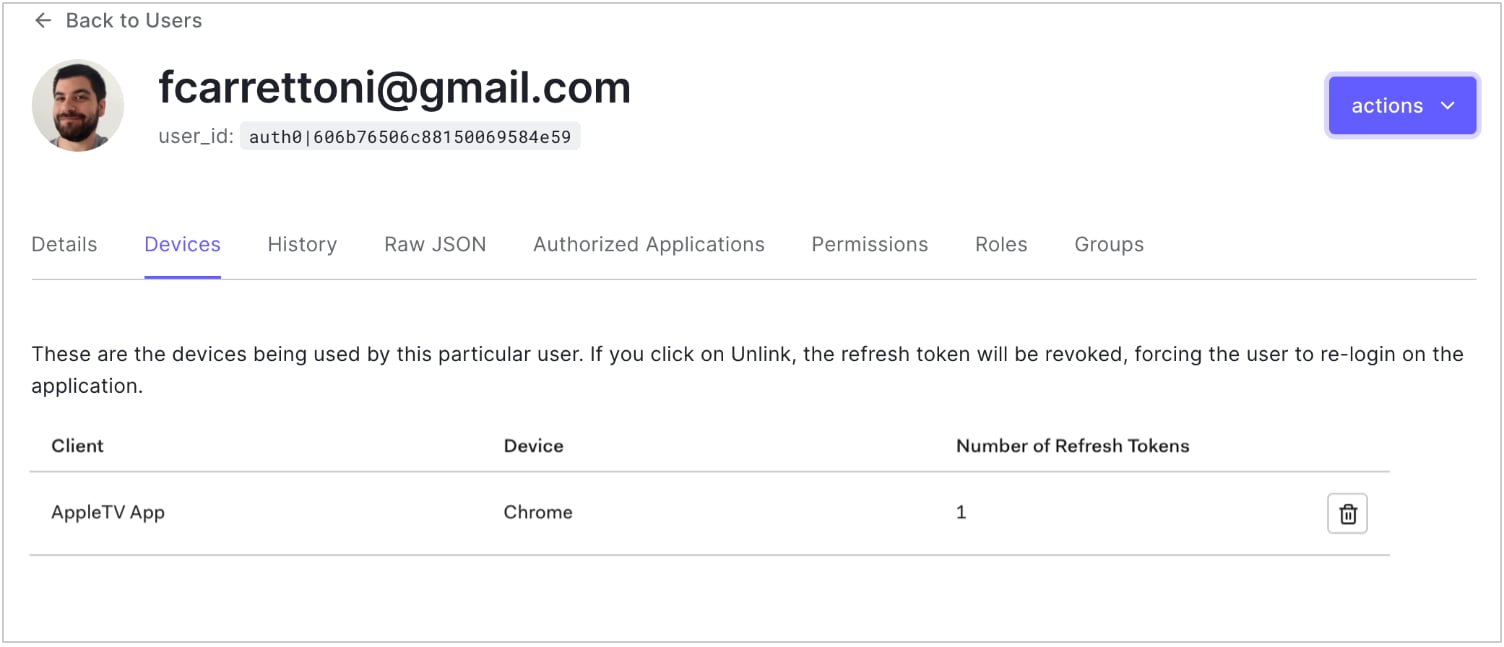
You can unlink the devices assigned to a user using the Auth0 Dashboard. This revokes the refresh token for the selected device.
1. Go to [Dashboard > User Management > Users](https://manage.auth0.com/#/users) and click the name of the user.
2. Click the **Devices** view, then click the trashcan icon next to the device you want to unlink, and confirm.
 ## Learn more
* [Configure Device User Code Settings](/docs/get-started/tenant-settings/configure-device-user-code-settings)
* [Device Authorization Flow](/docs/get-started/authentication-and-authorization-flow/device-authorization-flow)
## Learn more
* [Configure Device User Code Settings](/docs/get-started/tenant-settings/configure-device-user-code-settings)
* [Device Authorization Flow](/docs/get-started/authentication-and-authorization-flow/device-authorization-flow)