> ## Documentation Index
> Fetch the complete documentation index at: https://docs-dev-actions-triggers-prototype.mintlify.site/llms.txt
> Use this file to discover all available pages before exploring further.
> Learn how you can empower your users to manage their own account information with the My Account API.
# My Account API
export const AuthCodeGroup = ({children, dropdown}) => {
const [processedChildren, setProcessedChildren] = useState(children);
useEffect(() => {
let unsubscribe = null;
function init() {
unsubscribe = window.autorun(() => {
const processChildren = node => {
if (typeof node === "string") {
let processedNode = node;
for (const [key, value] of window.rootStore.variableStore.values.entries()) {
const escapedKey = key.replaceAll(/[.*+?^${}()|[\]\\]/g, (String.raw)`\$&`);
processedNode = processedNode.replaceAll(new RegExp(escapedKey, "g"), value);
}
return processedNode;
} else if (Array.isArray(node)) {
return node.map(processChildren);
} else if (node && node.props && node.props.children) {
return {
...node,
props: {
...node.props,
children: processChildren(node.props.children)
}
};
}
return node;
};
setProcessedChildren(processChildren(children));
});
}
if (window.rootStore) {
init();
} else {
window.addEventListener("adu:storeReady", init);
}
return () => {
window.removeEventListener("adu:storeReady", init);
unsubscribe?.();
};
}, [children]);
return {processedChildren};
};
export const AuthCodeBlock = ({filename, icon, language, highlight, children}) => {
const [displayText, setDisplayText] = useState(children);
const [copyText, setCopyText] = useState(children);
const wrapperRef = React.useRef(null);
useEffect(() => {
let unsubscribe = null;
function init() {
if (!window.autorun || !window.rootStore) {
return;
}
unsubscribe = window.autorun(() => {
let processedChildrenForDisplay = children;
let processedChildrenForCopy = children;
for (const [key, value] of window.rootStore.variableStore.values.entries()) {
const escapedKey = key.replaceAll(/[.*+?^${}()|[\]\\]/g, (String.raw)`\$&`);
let displayValue = value;
if (key === "{yourClientSecret}" && value !== "{yourClientSecret}") {
displayValue = value.substring(0, 3) + "*****MASKED*****";
}
processedChildrenForDisplay = processedChildrenForDisplay.replaceAll(new RegExp(escapedKey, "g"), displayValue);
processedChildrenForCopy = processedChildrenForCopy.replaceAll(new RegExp(escapedKey, "g"), value);
}
setDisplayText(processedChildrenForDisplay);
setCopyText(processedChildrenForCopy);
});
}
if (window.rootStore) {
init();
} else {
window.addEventListener("adu:storeReady", init);
}
return () => {
window.removeEventListener("adu:storeReady", init);
unsubscribe?.();
};
}, [children]);
useEffect(() => {
if (!wrapperRef.current) return;
const originalWriteText = navigator.clipboard.writeText.bind(navigator.clipboard);
let isOverriding = false;
const handleClick = e => {
const button = e.target.closest('[data-testid="copy-code-button"]');
if (!button || !wrapperRef.current.contains(button)) return;
isOverriding = true;
navigator.clipboard.writeText = text => {
if (isOverriding) {
isOverriding = false;
navigator.clipboard.writeText = originalWriteText;
return originalWriteText(copyText);
}
return originalWriteText(text);
};
setTimeout(() => {
if (isOverriding) {
isOverriding = false;
navigator.clipboard.writeText = originalWriteText;
}
}, 100);
};
const wrapper = wrapperRef.current;
wrapper.addEventListener('click', handleClick, true);
return () => {
wrapper.removeEventListener('click', handleClick, true);
if (navigator.clipboard.writeText !== originalWriteText) {
navigator.clipboard.writeText = originalWriteText;
}
};
}, [copyText]);
return
{displayText}
;
};
The My Account API is available in Early Access. To request access, contact your Auth0 account manager or contact [Auth0 Support](https://support.auth0.com). To learn more about Auth0's product release cycle, read [Product Release Stages](/docs/troubleshoot/product-lifecycle/product-release-stages).
The Auth0 My Account API provides a dedicated set of endpoints for users to manage their own account information. Customers can use these APIs to build self-service experiences in their applications or progressively add details to a user account.
The My Account API operates within the context of the currently logged-in user and can be used directly within user-facing applications.
**Using Auth0 domain vs. custom domain**
The My Account API supports using your canonical Auth0 domain or your custom domain, but you must use the same one throughout the entire process, including:
* Getting an access token
* Setting the `audience` value
* Calling the My Account API endpoint
For more information, read [Custom Domains](/docs/customize/custom-domains).
## Activate the My Account API
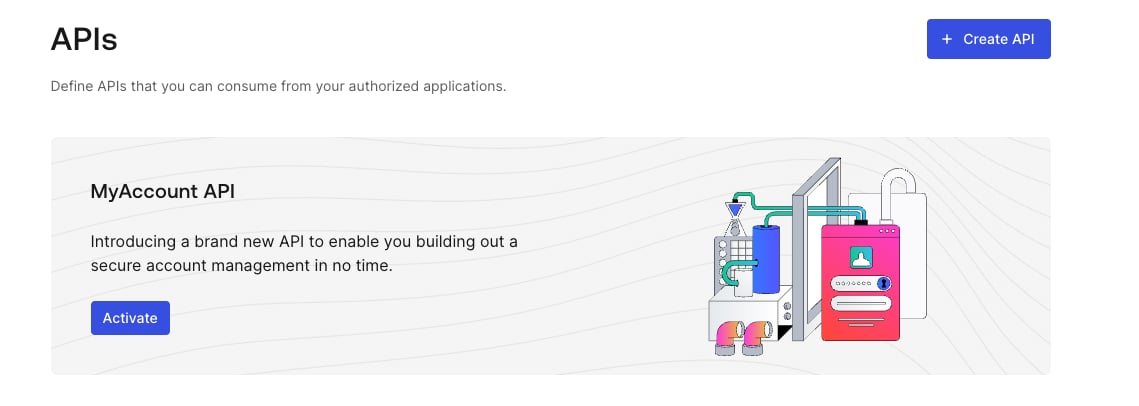
You can activate the My Account API for your tenant in the Auth0 Dashboard:
1. Navigate to **Applications > APIs**.
2. Locate the **MyAccount API** banner.
3. Select **Activate**.
 By default, the My Account API is created with the following application API access policies:
* `require_client_grant` for user flows
* `deny_all` for client (machine-to-machine) flows
For an application to access the My Account API on the user's behalf, you must explicitly create a client grant for that application, which allows you to define the maximum scopes the application can request. Alternatively, you can change the policy for user access flows to `allow_all`, which allows any application in your tenant to request any scope from the My Account API.
Auth0 does not recommend using `allow_all` for user access flows because the My Account API exposes sensitive information and operations. You should follow a least privilege principle with My Account API to ensure applications only get access to what they truly need, minimizing potential security risks.
The final permissions granted to the application will be determined by the intersection of the scopes allowed by the application API access policy, the Role-Based Access Control (RBAC) permissions assigned to the end user, and any user consent given (if applicable).
You cannot update the application API policy for client access to the My Account API, which means you cannot access the My Account API using the Client Credentials Flow.
To learn more about how to manage application API access policies and their associated client grants, read [Application Access to APIs: Client Grants](/docs/get-started/applications/application-access-to-apis-client-grants).
## Default Policy setting
Authentication Assurance for the **My Account API** is currently in Early Access with a single-option policy. By using this feature, you agree to the applicable Free Trial terms in Okta’s [Master Subscription Agreement](https://www.okta.com/legal). To learn more about Auth0’s product release cycle, read [Product Release Stages](/docs/troubleshoot/product-lifecycle/product-release-stages). To participate in the program, contact [Auth0 Support](https://support.auth0.com).
The Default Policy provides built-in authentication assurance for the My Account API by requiring [Step-up Authentication](/docs/secure/multi-factor-authentication/step-up-authentication). When enabled, Auth0 automatically enforces that users have authenticated recently and with a second factor.
The policy enforces 2FA within 15 minutes. Auth0 applies this rule at login and on every Refresh Token exchange:
* If a user has an enrolled MFA factor, 2FA must be completed at login and again when their tokens are older than 15 minutes.
* If a user has no enrollable factor, Auth0 allows initial access but returns an `unmet_authentication_requirements` error on refresh token exchanges after 15 minutes.
The Default Policy is not compatible with Classic Login. Enable this feature if your tenant uses Universal Login or a supported embedded flow ([Resource Owner Password Flow](/docs/get-started/authentication-and-authorization-flow/resource-owner-password-flow) or [native passkeys](/docs/authenticate/database-connections/passkeys/native-passkeys-api)).
### Enable Default Policy
To enable the Default Policy for the My Account API:
1. Navigate to [**Applications > APIs**](https://manage.auth0.com/#/apis), then select the **My Account API**.
2. Select the **Settings** tab.
3. Under **Default Policy**, toggle on **Require 2FA**.
4. Select **Save**.
When your tenant has the Default Policy enabled, it is automatically attached whenever a new My Account API is created.
### Authentication requirements hierarchy
The Default Policy sits between the tenant-level MFA policy and any MFA logic you define in Actions:
1. **Tenant MFA policy** — the base default applied across all authentication on your tenant
2. **Default Policy** — overrides the tenant level specifically for the My Account API
3. **Actions** — any MFA commands in Actions always take precedence over both
### Default Policy behavior
The behavior depends on whether the user has an enrollable second factor.
**Users with an enrolled MFA factor**
For users enrolled with TOTP, email, or another supported factor:
1. At login, Auth0 challenges the user with their enrolled factor before issuing tokens.
2. The refresh token records the authentication method and timestamp (AMR).
3. On refresh token exchange within 15 minutes of the last challenge, Auth0 issues a new access token without re-challenging.
4. On refresh token exchange after 15 minutes, Auth0 challenges the user again before issuing tokens.
**Users without an enrolled MFA factor**
For users with no verified email and no enrolled factor:
1. At login, Auth0 allows access without a second factor.
2. On refresh token exchange within 15 minutes, Auth0 issues a new access token without challenge.
3. On refresh token exchange after 15 minutes, Auth0 returns an `unmet_authentication_requirements` error.
When `unmet_authentication_requirements` is returned on a refresh token exchange, the token cannot be refreshed. Your application must restart the full authentication flow to obtain new tokens.
The same error is returned for a silent login (`prompt=none`) when the user cannot satisfy the policy after 15 minutes.
## Get an access token
You can get an access token for the My Account API in the same way you’d get an access token for one of your own APIs.
If you need authentication assurance beyond the Default Policy — for example, to require a specific factor or to apply requirements to only certain operations — you can use [step-up authentication](/docs/secure/multi-factor-authentication/step-up-authentication) with [Actions](/docs/customize/actions) to define custom MFA logic. Note that Actions always override the Default Policy.
If you’re using Universal Login, read the following articles:
* [Call Your API Using the Authorization Code Flow](/docs/get-started/authentication-and-authorization-flow/authorization-code-flow/call-your-api-using-the-authorization-code-flow)
* [Call Your API Using the Authorization Code Flow with PKCE](/docs/get-started/authentication-and-authorization-flow/authorization-code-flow-with-pkce/call-your-api-using-the-authorization-code-flow-with-pkce)
If you’re using embedded login, read the following articles:
* [Call Your API Using Resource Owner Password Flow](/docs/get-started/authentication-and-authorization-flow/resource-owner-password-flow/call-your-api-using-resource-owner-password-flow)
* [Login Flow with Native Passkeys API](/docs/authenticate/database-connections/passkeys/native-passkeys-api#login-flow)
### Audience
The audience of the My Account API is `https://{yourDomain}/me/`.
### Scope
The My Account API supports the following scopes:
| Scope | Description |
| ---------------------------------- | ---------------------------------------------------------- |
| `create:me:authentication_methods` | Allows the user to enroll a new authentication method. |
| `read:me:authentication_methods` | Allows the user to view existing authentication methods. |
| `update:me:authentication_methods` | Allows the user to modify existing authentication methods. |
| `delete:me:authentication_methods` | Allows the user to modify existing authentication methods. |
| `read:me:factors` | Allows the user to view the factors they can enroll. |
For [Connected Accounts with Token Vault](/docs/secure/call-apis-on-users-behalf/token-vault/connected-accounts-for-token-vault), the My Account API supports the following scopes:
| Scope | Description |
| ------------------------------ | ------------------------------------------------------------------------------------- |
| `create:me:connected_accounts` | Allows the user to connect a new account to their user profile. |
| `read:me:connected_accounts` | Allows the user to view the existing connected accounts linked to their user profile. |
| `delete:me:connected_accounts` | Allows the user to delete a connected account from their user profile. |
### Examples
#### Universal Login with authorization code flow
##### Step 1: Request authorization code
```bash cURL theme={null}
curl --request GET \
--url 'https://{yourDomain}/authorize?response_type=code&client_id={yourClientId}&redirect_uri=%7ByourRedirectUri%7D&scope=create%3Ame%3Aauthentication_methods&offline_access=&audience=https%3A%2F%2F{yourDomain}%2Fme%2F'
```
```csharp C# theme={null}
var client = new RestClient("https://{yourDomain}/authorize?response_type=code&client_id={yourClientId}&redirect_uri=%7ByourRedirectUri%7D&scope=create%3Ame%3Aauthentication_methods&offline_access=&audience=https%3A%2F%2F{yourDomain}%2Fme%2F");
var request = new RestRequest(Method.GET);
IRestResponse response = client.Execute(request);
```
```go Go theme={null}
package main
import (
"fmt"
"net/http"
"io/ioutil"
)
func main() {
url := "https://{yourDomain}/authorize?response_type=code&client_id={yourClientId}&redirect_uri=%7ByourRedirectUri%7D&scope=create%3Ame%3Aauthentication_methods&offline_access=&audience=https%3A%2F%2F{yourDomain}%2Fme%2F"
req, _ := http.NewRequest("GET", url, nil)
res, _ := http.DefaultClient.Do(req)
defer res.Body.Close()
body, _ := ioutil.ReadAll(res.Body)
fmt.Println(res)
fmt.Println(string(body))
}
```
```java Java theme={null}
HttpResponse response = Unirest.get("https://{yourDomain}/authorize?response_type=code&client_id={yourClientId}&redirect_uri=%7ByourRedirectUri%7D&scope=create%3Ame%3Aauthentication_methods&offline_access=&audience=https%3A%2F%2F{yourDomain}%2Fme%2F")
.asString();
```
```javascript Node.JS theme={null}
var axios = require("axios").default;
var options = {
method: 'GET',
url: 'https://{yourDomain}/authorize',
params: {
response_type: 'code',
client_id: '{yourClientId}',
redirect_uri: '{yourRedirectUri}',
scope: 'create:me:authentication_methods',
offline_access: '',
audience: 'https://{yourDomain}/me/'
}
};
axios.request(options).then(function (response) {
console.log(response.data);
}).catch(function (error) {
console.error(error);
});
```
```php PHP theme={null}
$curl = curl_init();
curl_setopt_array($curl, [
CURLOPT_URL => "https://{yourDomain}/authorize?response_type=code&client_id={yourClientId}&redirect_uri=%7ByourRedirectUri%7D&scope=create%3Ame%3Aauthentication_methods&offline_access=&audience=https%3A%2F%2F{yourDomain}%2Fme%2F",
CURLOPT_RETURNTRANSFER => true,
CURLOPT_ENCODING => "",
CURLOPT_MAXREDIRS => 10,
CURLOPT_TIMEOUT => 30,
CURLOPT_HTTP_VERSION => CURL_HTTP_VERSION_1_1,
CURLOPT_CUSTOMREQUEST => "GET",
]);
$response = curl_exec($curl);
$err = curl_error($curl);
curl_close($curl);
if ($err) {
echo "cURL Error #:" . $err;
} else {
echo $response;
}
```
```python Python theme={null}
import http.client
conn = http.client.HTTPSConnection("")
conn.request("GET", "/{yourDomain}/authorize?response_type=code&client_id={yourClientId}&redirect_uri=%7ByourRedirectUri%7D&scope=create%3Ame%3Aauthentication_methods&offline_access=&audience=https%3A%2F%2F{yourDomain}%2Fme%2F")
res = conn.getresponse()
data = res.read()
print(data.decode("utf-8"))
```
```ruby Ruby theme={null}
require 'uri'
require 'net/http'
require 'openssl'
url = URI("https://{yourDomain}/authorize?response_type=code&client_id={yourClientId}&redirect_uri=%7ByourRedirectUri%7D&scope=create%3Ame%3Aauthentication_methods&offline_access=&audience=https%3A%2F%2F{yourDomain}%2Fme%2F")
http = Net::HTTP.new(url.host, url.port)
http.use_ssl = true
http.verify_mode = OpenSSL::SSL::VERIFY_NONE
request = Net::HTTP::Get.new(url)
response = http.request(request)
puts response.read_body
```
##### Step 2: Exchange code for access token
```bash cURL theme={null}
curl --request POST \
--url 'https://{yourDomain}/oauth/token' \
--header 'content-type: application/json' \
--data '{"grant_type": "authorization_code","client_id": "{yourClientId}","client_secret": "{yourClientId}","code": "{yourAuthorizationCode}","redirect_uri": "{yourRedirectUri}","audience": "{yourAudience}","scope": "create:me:authentication_methods","offline_access": ""}'
```
```csharp C# theme={null}
var client = new RestClient("https://{yourDomain}/oauth/token");
var request = new RestRequest(Method.POST);
request.AddHeader("content-type", "application/json");
request.AddParameter("application/json", "{"grant_type": "authorization_code","client_id": "{yourClientId}","client_secret": "{yourClientId}","code": "{yourAuthorizationCode}","redirect_uri": "{yourRedirectUri}","audience": "{yourAudience}","scope": "create:me:authentication_methods","offline_access": ""}", ParameterType.RequestBody);
IRestResponse response = client.Execute(request);
```
```go Go theme={null}
package main
import (
"fmt"
"strings"
"net/http"
"io/ioutil"
)
func main() {
url := "https://{yourDomain}/oauth/token"
payload := strings.NewReader("{"grant_type": "authorization_code","client_id": "{yourClientId}","client_secret": "{yourClientId}","code": "{yourAuthorizationCode}","redirect_uri": "{yourRedirectUri}","audience": "{yourAudience}","scope": "create:me:authentication_methods","offline_access": ""}")
req, _ := http.NewRequest("POST", url, payload)
req.Header.Add("content-type", "application/json")
res, _ := http.DefaultClient.Do(req)
defer res.Body.Close()
body, _ := ioutil.ReadAll(res.Body)
fmt.Println(res)
fmt.Println(string(body))
}
```
```java Java theme={null}
HttpResponse response = Unirest.post("https://{yourDomain}/oauth/token")
.header("content-type", "application/json")
.body("{"grant_type": "authorization_code","client_id": "{yourClientId}","client_secret": "{yourClientId}","code": "{yourAuthorizationCode}","redirect_uri": "{yourRedirectUri}","audience": "{yourAudience}","scope": "create:me:authentication_methods","offline_access": ""}")
.asString();
```
```javascript Node.JS theme={null}
var axios = require("axios").default;
var options = {
method: 'POST',
url: 'https://{yourDomain}/oauth/token',
headers: {'content-type': 'application/json'},
data: {
grant_type: 'authorization_code',
client_id: '{yourClientId}',
client_secret: '{yourClientId}',
code: '{yourAuthorizationCode}',
redirect_uri: '{yourRedirectUri}',
audience: '{yourAudience}',
scope: 'create:me:authentication_methods',
offline_access: ''
}
};
axios.request(options).then(function (response) {
console.log(response.data);
}).catch(function (error) {
console.error(error);
});
```
```php PHP theme={null}
$curl = curl_init();
curl_setopt_array($curl, [
CURLOPT_URL => "https://{yourDomain}/oauth/token",
CURLOPT_RETURNTRANSFER => true,
CURLOPT_ENCODING => "",
CURLOPT_MAXREDIRS => 10,
CURLOPT_TIMEOUT => 30,
CURLOPT_HTTP_VERSION => CURL_HTTP_VERSION_1_1,
CURLOPT_CUSTOMREQUEST => "POST",
CURLOPT_POSTFIELDS => "{"grant_type": "authorization_code","client_id": "{yourClientId}","client_secret": "{yourClientId}","code": "{yourAuthorizationCode}","redirect_uri": "{yourRedirectUri}","audience": "{yourAudience}","scope": "create:me:authentication_methods","offline_access": ""}",
CURLOPT_HTTPHEADER => [
"content-type: application/json"
],
]);
$response = curl_exec($curl);
$err = curl_error($curl);
curl_close($curl);
if ($err) {
echo "cURL Error #:" . $err;
} else {
echo $response;
}
```
```python Python theme={null}
import http.client
conn = http.client.HTTPSConnection("")
payload = "{"grant_type": "authorization_code","client_id": "{yourClientId}","client_secret": "{yourClientId}","code": "{yourAuthorizationCode}","redirect_uri": "{yourRedirectUri}","audience": "{yourAudience}","scope": "create:me:authentication_methods","offline_access": ""}"
headers = { 'content-type': "application/json" }
conn.request("POST", "/{yourDomain}/oauth/token", payload, headers)
res = conn.getresponse()
data = res.read()
print(data.decode("utf-8"))
```
```ruby Ruby theme={null}
require 'uri'
require 'net/http'
require 'openssl'
url = URI("https://{yourDomain}/oauth/token")
http = Net::HTTP.new(url.host, url.port)
http.use_ssl = true
http.verify_mode = OpenSSL::SSL::VERIFY_NONE
request = Net::HTTP::Post.new(url)
request["content-type"] = 'application/json'
request.body = "{"grant_type": "authorization_code","client_id": "{yourClientId}","client_secret": "{yourClientId}","code": "{yourAuthorizationCode}","redirect_uri": "{yourRedirectUri}","audience": "{yourAudience}","scope": "create:me:authentication_methods","offline_access": ""}"
response = http.request(request)
puts response.read_body
```
#### Embedded login with native passkeys
##### Step 1: Request login challenge
```bash cURL theme={null}
curl --request POST \
--url 'https://{yourDomain}/passkey/challenge' \
--header 'content-type: application/json' \
--data '{"client_id": "{yourDomain}"}'
```
```csharp C# theme={null}
var client = new RestClient("https://{yourDomain}/passkey/challenge");
var request = new RestRequest(Method.POST);
request.AddHeader("content-type", "application/json");
request.AddParameter("application/json", "{"client_id": "{yourDomain}"}", ParameterType.RequestBody);
IRestResponse response = client.Execute(request);
```
```go Go theme={null}
package main
import (
"fmt"
"strings"
"net/http"
"io/ioutil"
)
func main() {
url := "https://{yourDomain}/passkey/challenge"
payload := strings.NewReader("{"client_id": "{yourDomain}"}")
req, _ := http.NewRequest("POST", url, payload)
req.Header.Add("content-type", "application/json")
res, _ := http.DefaultClient.Do(req)
defer res.Body.Close()
body, _ := ioutil.ReadAll(res.Body)
fmt.Println(res)
fmt.Println(string(body))
}
```
```java Java theme={null}
HttpResponse response = Unirest.post("https://{yourDomain}/passkey/challenge")
.header("content-type", "application/json")
.body("{"client_id": "{yourDomain}"}")
.asString();
```
```javascript Node.JS theme={null}
var axios = require("axios").default;
var options = {
method: 'POST',
url: 'https://{yourDomain}/passkey/challenge',
headers: {'content-type': 'application/json'},
data: {client_id: '{yourDomain}'}
};
axios.request(options).then(function (response) {
console.log(response.data);
}).catch(function (error) {
console.error(error);
});
```
```php PHP theme={null}
$curl = curl_init();
curl_setopt_array($curl, [
CURLOPT_URL => "https://{yourDomain}/passkey/challenge",
CURLOPT_RETURNTRANSFER => true,
CURLOPT_ENCODING => "",
CURLOPT_MAXREDIRS => 10,
CURLOPT_TIMEOUT => 30,
CURLOPT_HTTP_VERSION => CURL_HTTP_VERSION_1_1,
CURLOPT_CUSTOMREQUEST => "POST",
CURLOPT_POSTFIELDS => "{"client_id": "{yourDomain}"}",
CURLOPT_HTTPHEADER => [
"content-type: application/json"
],
]);
$response = curl_exec($curl);
$err = curl_error($curl);
curl_close($curl);
if ($err) {
echo "cURL Error #:" . $err;
} else {
echo $response;
}
```
```python Python theme={null}
import http.client
conn = http.client.HTTPSConnection("")
payload = "{"client_id": "{yourDomain}"}"
headers = { 'content-type': "application/json" }
conn.request("POST", "/{yourDomain}/passkey/challenge", payload, headers)
res = conn.getresponse()
data = res.read()
print(data.decode("utf-8"))
```
```ruby Ruby theme={null}
require 'uri'
require 'net/http'
require 'openssl'
url = URI("https://{yourDomain}/passkey/challenge")
http = Net::HTTP.new(url.host, url.port)
http.use_ssl = true
http.verify_mode = OpenSSL::SSL::VERIFY_NONE
request = Net::HTTP::Post.new(url)
request["content-type"] = 'application/json'
request.body = "{"client_id": "{yourDomain}"}"
response = http.request(request)
puts response.read_body
```
##### Step 2: Authenticate existing user
```bash cURL theme={null}
curl --request POST \
--url 'https://{yourDomain}/oauth/token' \
--header 'content-type: application/json' \
--data '{ "grant_type": "urn:okta:params:oauth:grant-type:webauthn", "client_id": "{yourClientId}", "scope": "create:me:authentication_methods offline_access", "audience": "https://{yourDomain}/me/" "auth_session": "{sessionIdFromTheFirstRequest}", "authn_response": "{authenticatorResponse}"}'
```
```csharp C# theme={null}
var client = new RestClient("https://{yourDomain}/oauth/token");
var request = new RestRequest(Method.POST);
request.AddHeader("content-type", "application/json");
request.AddParameter("application/json", "{ "grant_type": "urn:okta:params:oauth:grant-type:webauthn", "client_id": "{yourClientId}", "scope": "create:me:authentication_methods offline_access", "audience": "https://{yourDomain}/me/" "auth_session": "{sessionIdFromTheFirstRequest}", "authn_response": "{authenticatorResponse}"}", ParameterType.RequestBody);
IRestResponse response = client.Execute(request);
```
```go Go theme={null}
package main
import (
"fmt"
"strings"
"net/http"
"io/ioutil"
)
func main() {
url := "https://{yourDomain}/oauth/token"
payload := strings.NewReader("{ "grant_type": "urn:okta:params:oauth:grant-type:webauthn", "client_id": "{yourClientId}", "scope": "create:me:authentication_methods offline_access", "audience": "https://{yourDomain}/me/" "auth_session": "{sessionIdFromTheFirstRequest}", "authn_response": "{authenticatorResponse}"}")
req, _ := http.NewRequest("POST", url, payload)
req.Header.Add("content-type", "application/json")
res, _ := http.DefaultClient.Do(req)
defer res.Body.Close()
body, _ := ioutil.ReadAll(res.Body)
fmt.Println(res)
fmt.Println(string(body))
}
```
```java Java theme={null}
HttpResponse response = Unirest.post("https://{yourDomain}/oauth/token")
.header("content-type", "application/json")
.body("{ "grant_type": "urn:okta:params:oauth:grant-type:webauthn", "client_id": "{yourClientId}", "scope": "create:me:authentication_methods offline_access", "audience": "https://{yourDomain}/me/" "auth_session": "{sessionIdFromTheFirstRequest}", "authn_response": "{authenticatorResponse}"}")
.asString();
```
```javascript Node.JS theme={null}
var axios = require("axios").default;
var options = {
method: 'POST',
url: 'https://{yourDomain}/oauth/token',
headers: {'content-type': 'application/json'},
data: '{ "grant_type": "urn:okta:params:oauth:grant-type:webauthn", "client_id": "{yourClientId}", "scope": "create:me:authentication_methods offline_access", "audience": "https://{yourDomain}/me/" "auth_session": "{sessionIdFromTheFirstRequest}", "authn_response": "{authenticatorResponse}"}'
};
axios.request(options).then(function (response) {
console.log(response.data);
}).catch(function (error) {
console.error(error);
});
```
```php PHP theme={null}
$curl = curl_init();
curl_setopt_array($curl, [
CURLOPT_URL => "https://{yourDomain}/oauth/token",
CURLOPT_RETURNTRANSFER => true,
CURLOPT_ENCODING => "",
CURLOPT_MAXREDIRS => 10,
CURLOPT_TIMEOUT => 30,
CURLOPT_HTTP_VERSION => CURL_HTTP_VERSION_1_1,
CURLOPT_CUSTOMREQUEST => "POST",
CURLOPT_POSTFIELDS => "{ "grant_type": "urn:okta:params:oauth:grant-type:webauthn", "client_id": "{yourClientId}", "scope": "create:me:authentication_methods offline_access", "audience": "https://{yourDomain}/me/" "auth_session": "{sessionIdFromTheFirstRequest}", "authn_response": "{authenticatorResponse}"}",
CURLOPT_HTTPHEADER => [
"content-type: application/json"
],
]);
$response = curl_exec($curl);
$err = curl_error($curl);
curl_close($curl);
if ($err) {
echo "cURL Error #:" . $err;
} else {
echo $response;
}
```
```python Python theme={null}
import http.client
conn = http.client.HTTPSConnection("")
payload = "{ "grant_type": "urn:okta:params:oauth:grant-type:webauthn", "client_id": "{yourClientId}", "scope": "create:me:authentication_methods offline_access", "audience": "https://{yourDomain}/me/" "auth_session": "{sessionIdFromTheFirstRequest}", "authn_response": "{authenticatorResponse}"}"
headers = { 'content-type': "application/json" }
conn.request("POST", "/{yourDomain}/oauth/token", payload, headers)
res = conn.getresponse()
data = res.read()
print(data.decode("utf-8"))
```
```ruby Ruby theme={null}
rrequire 'uri'
require 'net/http'
require 'openssl'
url = URI("https://{yourDomain}/oauth/token")
http = Net::HTTP.new(url.host, url.port)
http.use_ssl = true
http.verify_mode = OpenSSL::SSL::VERIFY_NONE
request = Net::HTTP::Post.new(url)
request["content-type"] = 'application/json'
request.body = "{ "grant_type": "urn:okta:params:oauth:grant-type:webauthn", "client_id": "{yourClientId}", "scope": "create:me:authentication_methods offline_access", "audience": "https://{yourDomain}/me/" "auth_session": "{sessionIdFromTheFirstRequest}", "authn_response": "{authenticatorResponse}"}"
response = http.request(request)
puts response.read_body
```
## Cross-Origin Requests
If you intend to call the My Account API directly from a browser-based application (like a Single Page Application) running on a different domain than your Auth0 tenant, you will encounter browser security policies known as Cross-Origin Resource Sharing (CORS). By default, browsers block these cross-origin requests.
To allow your application to successfully make requests to the API, you must add your application's domain (its "origin") to your client's configuration:
1. Navigate to [Dashboard > Applications](https://manage.auth0.com/#/applications). Select the application to view.
2. Under Cross-Origin Authentication, toggle on Allow Cross-Origin Authentication.
3. Locate **Allowed Origins (CORS)**, and enter your application's origin URL.
4. Select **Save**.
To learn more, read [Configure Cross-Origin Resource Sharing](/docs/get-started/applications/set-up-cors).
If you do not need to use CORS for your application, ensure that Allow Cross-Origin Authentication is toggled off. Adding your application's URL to this list tells Auth0 to trust requests from that origin, allowing your client-side application to access the API.
By default, the My Account API is created with the following application API access policies:
* `require_client_grant` for user flows
* `deny_all` for client (machine-to-machine) flows
For an application to access the My Account API on the user's behalf, you must explicitly create a client grant for that application, which allows you to define the maximum scopes the application can request. Alternatively, you can change the policy for user access flows to `allow_all`, which allows any application in your tenant to request any scope from the My Account API.
Auth0 does not recommend using `allow_all` for user access flows because the My Account API exposes sensitive information and operations. You should follow a least privilege principle with My Account API to ensure applications only get access to what they truly need, minimizing potential security risks.
The final permissions granted to the application will be determined by the intersection of the scopes allowed by the application API access policy, the Role-Based Access Control (RBAC) permissions assigned to the end user, and any user consent given (if applicable).
You cannot update the application API policy for client access to the My Account API, which means you cannot access the My Account API using the Client Credentials Flow.
To learn more about how to manage application API access policies and their associated client grants, read [Application Access to APIs: Client Grants](/docs/get-started/applications/application-access-to-apis-client-grants).
## Default Policy setting
Authentication Assurance for the **My Account API** is currently in Early Access with a single-option policy. By using this feature, you agree to the applicable Free Trial terms in Okta’s [Master Subscription Agreement](https://www.okta.com/legal). To learn more about Auth0’s product release cycle, read [Product Release Stages](/docs/troubleshoot/product-lifecycle/product-release-stages). To participate in the program, contact [Auth0 Support](https://support.auth0.com).
The Default Policy provides built-in authentication assurance for the My Account API by requiring [Step-up Authentication](/docs/secure/multi-factor-authentication/step-up-authentication). When enabled, Auth0 automatically enforces that users have authenticated recently and with a second factor.
The policy enforces 2FA within 15 minutes. Auth0 applies this rule at login and on every Refresh Token exchange:
* If a user has an enrolled MFA factor, 2FA must be completed at login and again when their tokens are older than 15 minutes.
* If a user has no enrollable factor, Auth0 allows initial access but returns an `unmet_authentication_requirements` error on refresh token exchanges after 15 minutes.
The Default Policy is not compatible with Classic Login. Enable this feature if your tenant uses Universal Login or a supported embedded flow ([Resource Owner Password Flow](/docs/get-started/authentication-and-authorization-flow/resource-owner-password-flow) or [native passkeys](/docs/authenticate/database-connections/passkeys/native-passkeys-api)).
### Enable Default Policy
To enable the Default Policy for the My Account API:
1. Navigate to [**Applications > APIs**](https://manage.auth0.com/#/apis), then select the **My Account API**.
2. Select the **Settings** tab.
3. Under **Default Policy**, toggle on **Require 2FA**.
4. Select **Save**.
When your tenant has the Default Policy enabled, it is automatically attached whenever a new My Account API is created.
### Authentication requirements hierarchy
The Default Policy sits between the tenant-level MFA policy and any MFA logic you define in Actions:
1. **Tenant MFA policy** — the base default applied across all authentication on your tenant
2. **Default Policy** — overrides the tenant level specifically for the My Account API
3. **Actions** — any MFA commands in Actions always take precedence over both
### Default Policy behavior
The behavior depends on whether the user has an enrollable second factor.
**Users with an enrolled MFA factor**
For users enrolled with TOTP, email, or another supported factor:
1. At login, Auth0 challenges the user with their enrolled factor before issuing tokens.
2. The refresh token records the authentication method and timestamp (AMR).
3. On refresh token exchange within 15 minutes of the last challenge, Auth0 issues a new access token without re-challenging.
4. On refresh token exchange after 15 minutes, Auth0 challenges the user again before issuing tokens.
**Users without an enrolled MFA factor**
For users with no verified email and no enrolled factor:
1. At login, Auth0 allows access without a second factor.
2. On refresh token exchange within 15 minutes, Auth0 issues a new access token without challenge.
3. On refresh token exchange after 15 minutes, Auth0 returns an `unmet_authentication_requirements` error.
When `unmet_authentication_requirements` is returned on a refresh token exchange, the token cannot be refreshed. Your application must restart the full authentication flow to obtain new tokens.
The same error is returned for a silent login (`prompt=none`) when the user cannot satisfy the policy after 15 minutes.
## Get an access token
You can get an access token for the My Account API in the same way you’d get an access token for one of your own APIs.
If you need authentication assurance beyond the Default Policy — for example, to require a specific factor or to apply requirements to only certain operations — you can use [step-up authentication](/docs/secure/multi-factor-authentication/step-up-authentication) with [Actions](/docs/customize/actions) to define custom MFA logic. Note that Actions always override the Default Policy.
If you’re using Universal Login, read the following articles:
* [Call Your API Using the Authorization Code Flow](/docs/get-started/authentication-and-authorization-flow/authorization-code-flow/call-your-api-using-the-authorization-code-flow)
* [Call Your API Using the Authorization Code Flow with PKCE](/docs/get-started/authentication-and-authorization-flow/authorization-code-flow-with-pkce/call-your-api-using-the-authorization-code-flow-with-pkce)
If you’re using embedded login, read the following articles:
* [Call Your API Using Resource Owner Password Flow](/docs/get-started/authentication-and-authorization-flow/resource-owner-password-flow/call-your-api-using-resource-owner-password-flow)
* [Login Flow with Native Passkeys API](/docs/authenticate/database-connections/passkeys/native-passkeys-api#login-flow)
### Audience
The audience of the My Account API is `https://{yourDomain}/me/`.
### Scope
The My Account API supports the following scopes:
| Scope | Description |
| ---------------------------------- | ---------------------------------------------------------- |
| `create:me:authentication_methods` | Allows the user to enroll a new authentication method. |
| `read:me:authentication_methods` | Allows the user to view existing authentication methods. |
| `update:me:authentication_methods` | Allows the user to modify existing authentication methods. |
| `delete:me:authentication_methods` | Allows the user to modify existing authentication methods. |
| `read:me:factors` | Allows the user to view the factors they can enroll. |
For [Connected Accounts with Token Vault](/docs/secure/call-apis-on-users-behalf/token-vault/connected-accounts-for-token-vault), the My Account API supports the following scopes:
| Scope | Description |
| ------------------------------ | ------------------------------------------------------------------------------------- |
| `create:me:connected_accounts` | Allows the user to connect a new account to their user profile. |
| `read:me:connected_accounts` | Allows the user to view the existing connected accounts linked to their user profile. |
| `delete:me:connected_accounts` | Allows the user to delete a connected account from their user profile. |
### Examples
#### Universal Login with authorization code flow
##### Step 1: Request authorization code
```bash cURL theme={null}
curl --request GET \
--url 'https://{yourDomain}/authorize?response_type=code&client_id={yourClientId}&redirect_uri=%7ByourRedirectUri%7D&scope=create%3Ame%3Aauthentication_methods&offline_access=&audience=https%3A%2F%2F{yourDomain}%2Fme%2F'
```
```csharp C# theme={null}
var client = new RestClient("https://{yourDomain}/authorize?response_type=code&client_id={yourClientId}&redirect_uri=%7ByourRedirectUri%7D&scope=create%3Ame%3Aauthentication_methods&offline_access=&audience=https%3A%2F%2F{yourDomain}%2Fme%2F");
var request = new RestRequest(Method.GET);
IRestResponse response = client.Execute(request);
```
```go Go theme={null}
package main
import (
"fmt"
"net/http"
"io/ioutil"
)
func main() {
url := "https://{yourDomain}/authorize?response_type=code&client_id={yourClientId}&redirect_uri=%7ByourRedirectUri%7D&scope=create%3Ame%3Aauthentication_methods&offline_access=&audience=https%3A%2F%2F{yourDomain}%2Fme%2F"
req, _ := http.NewRequest("GET", url, nil)
res, _ := http.DefaultClient.Do(req)
defer res.Body.Close()
body, _ := ioutil.ReadAll(res.Body)
fmt.Println(res)
fmt.Println(string(body))
}
```
```java Java theme={null}
HttpResponse response = Unirest.get("https://{yourDomain}/authorize?response_type=code&client_id={yourClientId}&redirect_uri=%7ByourRedirectUri%7D&scope=create%3Ame%3Aauthentication_methods&offline_access=&audience=https%3A%2F%2F{yourDomain}%2Fme%2F")
.asString();
```
```javascript Node.JS theme={null}
var axios = require("axios").default;
var options = {
method: 'GET',
url: 'https://{yourDomain}/authorize',
params: {
response_type: 'code',
client_id: '{yourClientId}',
redirect_uri: '{yourRedirectUri}',
scope: 'create:me:authentication_methods',
offline_access: '',
audience: 'https://{yourDomain}/me/'
}
};
axios.request(options).then(function (response) {
console.log(response.data);
}).catch(function (error) {
console.error(error);
});
```
```php PHP theme={null}
$curl = curl_init();
curl_setopt_array($curl, [
CURLOPT_URL => "https://{yourDomain}/authorize?response_type=code&client_id={yourClientId}&redirect_uri=%7ByourRedirectUri%7D&scope=create%3Ame%3Aauthentication_methods&offline_access=&audience=https%3A%2F%2F{yourDomain}%2Fme%2F",
CURLOPT_RETURNTRANSFER => true,
CURLOPT_ENCODING => "",
CURLOPT_MAXREDIRS => 10,
CURLOPT_TIMEOUT => 30,
CURLOPT_HTTP_VERSION => CURL_HTTP_VERSION_1_1,
CURLOPT_CUSTOMREQUEST => "GET",
]);
$response = curl_exec($curl);
$err = curl_error($curl);
curl_close($curl);
if ($err) {
echo "cURL Error #:" . $err;
} else {
echo $response;
}
```
```python Python theme={null}
import http.client
conn = http.client.HTTPSConnection("")
conn.request("GET", "/{yourDomain}/authorize?response_type=code&client_id={yourClientId}&redirect_uri=%7ByourRedirectUri%7D&scope=create%3Ame%3Aauthentication_methods&offline_access=&audience=https%3A%2F%2F{yourDomain}%2Fme%2F")
res = conn.getresponse()
data = res.read()
print(data.decode("utf-8"))
```
```ruby Ruby theme={null}
require 'uri'
require 'net/http'
require 'openssl'
url = URI("https://{yourDomain}/authorize?response_type=code&client_id={yourClientId}&redirect_uri=%7ByourRedirectUri%7D&scope=create%3Ame%3Aauthentication_methods&offline_access=&audience=https%3A%2F%2F{yourDomain}%2Fme%2F")
http = Net::HTTP.new(url.host, url.port)
http.use_ssl = true
http.verify_mode = OpenSSL::SSL::VERIFY_NONE
request = Net::HTTP::Get.new(url)
response = http.request(request)
puts response.read_body
```
##### Step 2: Exchange code for access token
```bash cURL theme={null}
curl --request POST \
--url 'https://{yourDomain}/oauth/token' \
--header 'content-type: application/json' \
--data '{"grant_type": "authorization_code","client_id": "{yourClientId}","client_secret": "{yourClientId}","code": "{yourAuthorizationCode}","redirect_uri": "{yourRedirectUri}","audience": "{yourAudience}","scope": "create:me:authentication_methods","offline_access": ""}'
```
```csharp C# theme={null}
var client = new RestClient("https://{yourDomain}/oauth/token");
var request = new RestRequest(Method.POST);
request.AddHeader("content-type", "application/json");
request.AddParameter("application/json", "{"grant_type": "authorization_code","client_id": "{yourClientId}","client_secret": "{yourClientId}","code": "{yourAuthorizationCode}","redirect_uri": "{yourRedirectUri}","audience": "{yourAudience}","scope": "create:me:authentication_methods","offline_access": ""}", ParameterType.RequestBody);
IRestResponse response = client.Execute(request);
```
```go Go theme={null}
package main
import (
"fmt"
"strings"
"net/http"
"io/ioutil"
)
func main() {
url := "https://{yourDomain}/oauth/token"
payload := strings.NewReader("{"grant_type": "authorization_code","client_id": "{yourClientId}","client_secret": "{yourClientId}","code": "{yourAuthorizationCode}","redirect_uri": "{yourRedirectUri}","audience": "{yourAudience}","scope": "create:me:authentication_methods","offline_access": ""}")
req, _ := http.NewRequest("POST", url, payload)
req.Header.Add("content-type", "application/json")
res, _ := http.DefaultClient.Do(req)
defer res.Body.Close()
body, _ := ioutil.ReadAll(res.Body)
fmt.Println(res)
fmt.Println(string(body))
}
```
```java Java theme={null}
HttpResponse response = Unirest.post("https://{yourDomain}/oauth/token")
.header("content-type", "application/json")
.body("{"grant_type": "authorization_code","client_id": "{yourClientId}","client_secret": "{yourClientId}","code": "{yourAuthorizationCode}","redirect_uri": "{yourRedirectUri}","audience": "{yourAudience}","scope": "create:me:authentication_methods","offline_access": ""}")
.asString();
```
```javascript Node.JS theme={null}
var axios = require("axios").default;
var options = {
method: 'POST',
url: 'https://{yourDomain}/oauth/token',
headers: {'content-type': 'application/json'},
data: {
grant_type: 'authorization_code',
client_id: '{yourClientId}',
client_secret: '{yourClientId}',
code: '{yourAuthorizationCode}',
redirect_uri: '{yourRedirectUri}',
audience: '{yourAudience}',
scope: 'create:me:authentication_methods',
offline_access: ''
}
};
axios.request(options).then(function (response) {
console.log(response.data);
}).catch(function (error) {
console.error(error);
});
```
```php PHP theme={null}
$curl = curl_init();
curl_setopt_array($curl, [
CURLOPT_URL => "https://{yourDomain}/oauth/token",
CURLOPT_RETURNTRANSFER => true,
CURLOPT_ENCODING => "",
CURLOPT_MAXREDIRS => 10,
CURLOPT_TIMEOUT => 30,
CURLOPT_HTTP_VERSION => CURL_HTTP_VERSION_1_1,
CURLOPT_CUSTOMREQUEST => "POST",
CURLOPT_POSTFIELDS => "{"grant_type": "authorization_code","client_id": "{yourClientId}","client_secret": "{yourClientId}","code": "{yourAuthorizationCode}","redirect_uri": "{yourRedirectUri}","audience": "{yourAudience}","scope": "create:me:authentication_methods","offline_access": ""}",
CURLOPT_HTTPHEADER => [
"content-type: application/json"
],
]);
$response = curl_exec($curl);
$err = curl_error($curl);
curl_close($curl);
if ($err) {
echo "cURL Error #:" . $err;
} else {
echo $response;
}
```
```python Python theme={null}
import http.client
conn = http.client.HTTPSConnection("")
payload = "{"grant_type": "authorization_code","client_id": "{yourClientId}","client_secret": "{yourClientId}","code": "{yourAuthorizationCode}","redirect_uri": "{yourRedirectUri}","audience": "{yourAudience}","scope": "create:me:authentication_methods","offline_access": ""}"
headers = { 'content-type': "application/json" }
conn.request("POST", "/{yourDomain}/oauth/token", payload, headers)
res = conn.getresponse()
data = res.read()
print(data.decode("utf-8"))
```
```ruby Ruby theme={null}
require 'uri'
require 'net/http'
require 'openssl'
url = URI("https://{yourDomain}/oauth/token")
http = Net::HTTP.new(url.host, url.port)
http.use_ssl = true
http.verify_mode = OpenSSL::SSL::VERIFY_NONE
request = Net::HTTP::Post.new(url)
request["content-type"] = 'application/json'
request.body = "{"grant_type": "authorization_code","client_id": "{yourClientId}","client_secret": "{yourClientId}","code": "{yourAuthorizationCode}","redirect_uri": "{yourRedirectUri}","audience": "{yourAudience}","scope": "create:me:authentication_methods","offline_access": ""}"
response = http.request(request)
puts response.read_body
```
#### Embedded login with native passkeys
##### Step 1: Request login challenge
```bash cURL theme={null}
curl --request POST \
--url 'https://{yourDomain}/passkey/challenge' \
--header 'content-type: application/json' \
--data '{"client_id": "{yourDomain}"}'
```
```csharp C# theme={null}
var client = new RestClient("https://{yourDomain}/passkey/challenge");
var request = new RestRequest(Method.POST);
request.AddHeader("content-type", "application/json");
request.AddParameter("application/json", "{"client_id": "{yourDomain}"}", ParameterType.RequestBody);
IRestResponse response = client.Execute(request);
```
```go Go theme={null}
package main
import (
"fmt"
"strings"
"net/http"
"io/ioutil"
)
func main() {
url := "https://{yourDomain}/passkey/challenge"
payload := strings.NewReader("{"client_id": "{yourDomain}"}")
req, _ := http.NewRequest("POST", url, payload)
req.Header.Add("content-type", "application/json")
res, _ := http.DefaultClient.Do(req)
defer res.Body.Close()
body, _ := ioutil.ReadAll(res.Body)
fmt.Println(res)
fmt.Println(string(body))
}
```
```java Java theme={null}
HttpResponse response = Unirest.post("https://{yourDomain}/passkey/challenge")
.header("content-type", "application/json")
.body("{"client_id": "{yourDomain}"}")
.asString();
```
```javascript Node.JS theme={null}
var axios = require("axios").default;
var options = {
method: 'POST',
url: 'https://{yourDomain}/passkey/challenge',
headers: {'content-type': 'application/json'},
data: {client_id: '{yourDomain}'}
};
axios.request(options).then(function (response) {
console.log(response.data);
}).catch(function (error) {
console.error(error);
});
```
```php PHP theme={null}
$curl = curl_init();
curl_setopt_array($curl, [
CURLOPT_URL => "https://{yourDomain}/passkey/challenge",
CURLOPT_RETURNTRANSFER => true,
CURLOPT_ENCODING => "",
CURLOPT_MAXREDIRS => 10,
CURLOPT_TIMEOUT => 30,
CURLOPT_HTTP_VERSION => CURL_HTTP_VERSION_1_1,
CURLOPT_CUSTOMREQUEST => "POST",
CURLOPT_POSTFIELDS => "{"client_id": "{yourDomain}"}",
CURLOPT_HTTPHEADER => [
"content-type: application/json"
],
]);
$response = curl_exec($curl);
$err = curl_error($curl);
curl_close($curl);
if ($err) {
echo "cURL Error #:" . $err;
} else {
echo $response;
}
```
```python Python theme={null}
import http.client
conn = http.client.HTTPSConnection("")
payload = "{"client_id": "{yourDomain}"}"
headers = { 'content-type': "application/json" }
conn.request("POST", "/{yourDomain}/passkey/challenge", payload, headers)
res = conn.getresponse()
data = res.read()
print(data.decode("utf-8"))
```
```ruby Ruby theme={null}
require 'uri'
require 'net/http'
require 'openssl'
url = URI("https://{yourDomain}/passkey/challenge")
http = Net::HTTP.new(url.host, url.port)
http.use_ssl = true
http.verify_mode = OpenSSL::SSL::VERIFY_NONE
request = Net::HTTP::Post.new(url)
request["content-type"] = 'application/json'
request.body = "{"client_id": "{yourDomain}"}"
response = http.request(request)
puts response.read_body
```
##### Step 2: Authenticate existing user
```bash cURL theme={null}
curl --request POST \
--url 'https://{yourDomain}/oauth/token' \
--header 'content-type: application/json' \
--data '{ "grant_type": "urn:okta:params:oauth:grant-type:webauthn", "client_id": "{yourClientId}", "scope": "create:me:authentication_methods offline_access", "audience": "https://{yourDomain}/me/" "auth_session": "{sessionIdFromTheFirstRequest}", "authn_response": "{authenticatorResponse}"}'
```
```csharp C# theme={null}
var client = new RestClient("https://{yourDomain}/oauth/token");
var request = new RestRequest(Method.POST);
request.AddHeader("content-type", "application/json");
request.AddParameter("application/json", "{ "grant_type": "urn:okta:params:oauth:grant-type:webauthn", "client_id": "{yourClientId}", "scope": "create:me:authentication_methods offline_access", "audience": "https://{yourDomain}/me/" "auth_session": "{sessionIdFromTheFirstRequest}", "authn_response": "{authenticatorResponse}"}", ParameterType.RequestBody);
IRestResponse response = client.Execute(request);
```
```go Go theme={null}
package main
import (
"fmt"
"strings"
"net/http"
"io/ioutil"
)
func main() {
url := "https://{yourDomain}/oauth/token"
payload := strings.NewReader("{ "grant_type": "urn:okta:params:oauth:grant-type:webauthn", "client_id": "{yourClientId}", "scope": "create:me:authentication_methods offline_access", "audience": "https://{yourDomain}/me/" "auth_session": "{sessionIdFromTheFirstRequest}", "authn_response": "{authenticatorResponse}"}")
req, _ := http.NewRequest("POST", url, payload)
req.Header.Add("content-type", "application/json")
res, _ := http.DefaultClient.Do(req)
defer res.Body.Close()
body, _ := ioutil.ReadAll(res.Body)
fmt.Println(res)
fmt.Println(string(body))
}
```
```java Java theme={null}
HttpResponse response = Unirest.post("https://{yourDomain}/oauth/token")
.header("content-type", "application/json")
.body("{ "grant_type": "urn:okta:params:oauth:grant-type:webauthn", "client_id": "{yourClientId}", "scope": "create:me:authentication_methods offline_access", "audience": "https://{yourDomain}/me/" "auth_session": "{sessionIdFromTheFirstRequest}", "authn_response": "{authenticatorResponse}"}")
.asString();
```
```javascript Node.JS theme={null}
var axios = require("axios").default;
var options = {
method: 'POST',
url: 'https://{yourDomain}/oauth/token',
headers: {'content-type': 'application/json'},
data: '{ "grant_type": "urn:okta:params:oauth:grant-type:webauthn", "client_id": "{yourClientId}", "scope": "create:me:authentication_methods offline_access", "audience": "https://{yourDomain}/me/" "auth_session": "{sessionIdFromTheFirstRequest}", "authn_response": "{authenticatorResponse}"}'
};
axios.request(options).then(function (response) {
console.log(response.data);
}).catch(function (error) {
console.error(error);
});
```
```php PHP theme={null}
$curl = curl_init();
curl_setopt_array($curl, [
CURLOPT_URL => "https://{yourDomain}/oauth/token",
CURLOPT_RETURNTRANSFER => true,
CURLOPT_ENCODING => "",
CURLOPT_MAXREDIRS => 10,
CURLOPT_TIMEOUT => 30,
CURLOPT_HTTP_VERSION => CURL_HTTP_VERSION_1_1,
CURLOPT_CUSTOMREQUEST => "POST",
CURLOPT_POSTFIELDS => "{ "grant_type": "urn:okta:params:oauth:grant-type:webauthn", "client_id": "{yourClientId}", "scope": "create:me:authentication_methods offline_access", "audience": "https://{yourDomain}/me/" "auth_session": "{sessionIdFromTheFirstRequest}", "authn_response": "{authenticatorResponse}"}",
CURLOPT_HTTPHEADER => [
"content-type: application/json"
],
]);
$response = curl_exec($curl);
$err = curl_error($curl);
curl_close($curl);
if ($err) {
echo "cURL Error #:" . $err;
} else {
echo $response;
}
```
```python Python theme={null}
import http.client
conn = http.client.HTTPSConnection("")
payload = "{ "grant_type": "urn:okta:params:oauth:grant-type:webauthn", "client_id": "{yourClientId}", "scope": "create:me:authentication_methods offline_access", "audience": "https://{yourDomain}/me/" "auth_session": "{sessionIdFromTheFirstRequest}", "authn_response": "{authenticatorResponse}"}"
headers = { 'content-type': "application/json" }
conn.request("POST", "/{yourDomain}/oauth/token", payload, headers)
res = conn.getresponse()
data = res.read()
print(data.decode("utf-8"))
```
```ruby Ruby theme={null}
rrequire 'uri'
require 'net/http'
require 'openssl'
url = URI("https://{yourDomain}/oauth/token")
http = Net::HTTP.new(url.host, url.port)
http.use_ssl = true
http.verify_mode = OpenSSL::SSL::VERIFY_NONE
request = Net::HTTP::Post.new(url)
request["content-type"] = 'application/json'
request.body = "{ "grant_type": "urn:okta:params:oauth:grant-type:webauthn", "client_id": "{yourClientId}", "scope": "create:me:authentication_methods offline_access", "audience": "https://{yourDomain}/me/" "auth_session": "{sessionIdFromTheFirstRequest}", "authn_response": "{authenticatorResponse}"}"
response = http.request(request)
puts response.read_body
```
## Cross-Origin Requests
If you intend to call the My Account API directly from a browser-based application (like a Single Page Application) running on a different domain than your Auth0 tenant, you will encounter browser security policies known as Cross-Origin Resource Sharing (CORS). By default, browsers block these cross-origin requests.
To allow your application to successfully make requests to the API, you must add your application's domain (its "origin") to your client's configuration:
1. Navigate to [Dashboard > Applications](https://manage.auth0.com/#/applications). Select the application to view.
2. Under Cross-Origin Authentication, toggle on Allow Cross-Origin Authentication.
3. Locate **Allowed Origins (CORS)**, and enter your application's origin URL.
4. Select **Save**.
To learn more, read [Configure Cross-Origin Resource Sharing](/docs/get-started/applications/set-up-cors).
If you do not need to use CORS for your application, ensure that Allow Cross-Origin Authentication is toggled off. Adding your application's URL to this list tells Auth0 to trust requests from that origin, allowing your client-side application to access the API.