> ## Documentation Index
> Fetch the complete documentation index at: https://docs-dev-actions-triggers-prototype.mintlify.site/llms.txt
> Use this file to discover all available pages before exploring further.
# LoginPasswordlessEmailCode
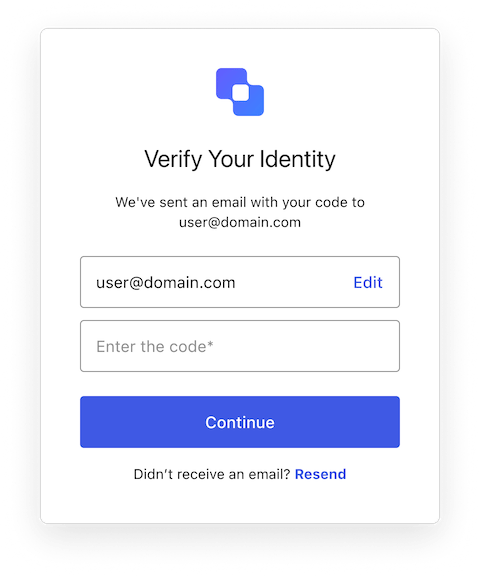
> Describes all the properties and methods available to customize the Universal Login `login-passwordless-email-code` screen.
The LoginPasswordlessEmailCode class implements the `login-passwordless-email-code` screen functionality. This screen collects the user's email and code.
 ## Constructors
Create an instance of LoginPasswordlessEmailCode screen manager:
```typescript Example theme={null}
import LoginPasswordlessEmailCode from '@auth0/auth0-acul-js/login-passwordless-email-code';
const loginPasswordlessEmailCodeManager = new LoginPasswordlessEmailCode();
loginPasswordlessEmailCodeManager.submitCode({
code: '123456',
});
```
## Properties
BrandingMembers}>
Provides branding-related configurations, such as branding theme and settings.
ClientMembers}>
Provides client-related configurations, such as `id`, `name`, and `logoUrl`, for the `login-passwordless-email-code` screen.
OrganizationMembers}>
Provides information about the user's Organization, such as `id` and `name`.
PromptMembers}>
Contains data about the current prompt in the authentication flow.
ScreenMembersOnLoginPasswordlessEmailCode}>
Contains details specific to the `login-passwordless-email-code` screen, including its configuration and context.
TenantMembers}>
Contains data related to the tenant, such as `id` and associated metadata.
TransactionMembersOnLoginPasswordlessEmailCode}>
Provides transaction-specific data for the `login-passwordless-email-code` screen, such as active identifiers and flow states.
UntrustedDataMembers}>
Handles untrusted data passed to the SDK, such as user input during login.
UserMembers}>
Details of the active user, including `username`, `email`, and `roles`.
## Methods
This method changes the display language of the Universal Login page.
```typescript Example theme={null}
import LoginPasswordlessEmailCode from '@auth0/auth0-acul-js/login-passwordless-email-code';
const loginPasswordlessEmailCodeManager = new LoginPasswordlessEmailCode();
loginPasswordlessEmailCodeManager.changeLanguage({
language: 'fr',
});
```
**Method Parameters**
[LanguageChangeOptions](/docs/libraries/acul/js-sdk/Screens/interfaces/LanguageChangeOptions).
The locale code for the desired language (for example, `'en'`, `'fr'`, `'es'`).
When set to `'session'`, the selected language persists for the duration of the session.
Additional custom fields prefixed with `ulp-` (for example, `'ulp-custom-field'`).
Error[]}>
This method retrieves the array of transaction errors from the context, or an empty array if none exist. An array of error objects from the transaction context.
This method resends the code to the user's email address.
```typescript Example theme={null}
import LoginPasswordlessEmailCode from '@auth0/auth0-acul-js/login-passwordless-email-code';
const loginPasswordlessEmailCodeManager = new LoginPasswordlessEmailCode();
loginPasswordlessEmailCodeManager.resendCode();
```
**Method Parameters**
[CustomOptions](/docs/libraries/acul/js-sdk/Screens/interfaces/CustomOptions).
Additional custom fields prefixed with `ulp-` (for example, `'ulp-custom-field'`).
ResendControl}>
This method provides resend functionality with timeout management. It returns a [`ResendControl`](/docs/libraries/acul/js-sdk/Screens/interfaces/ResendControl) object with a `startResend()` method that triggers the resend and enforces a cooldown period before the user can resend again.
```typescript Example theme={null}
import LoginPasswordlessEmailCode from '@auth0/auth0-acul-js/login-passwordless-email-code';
const loginPasswordlessEmailCodeManager = new LoginPasswordlessEmailCode();
const { startResend } = loginPasswordlessEmailCodeManager.resendManager({
timeoutSeconds: 15,
onStatusChange: (remainingSeconds, isDisabled) => {
console.log(`Resend available in ${remainingSeconds}s, disabled: ${isDisabled}`);
},
onTimeout: () => {
console.log('Resend is now available');
}
});
// Call startResend when user clicks resend button
startResend();
```
**Method Parameters**
[StartResendOptions](/docs/libraries/acul/js-sdk/Screens/interfaces/StartResendOptions).
The cooldown duration in seconds before the user can resend the code again.
OnStatusChangeCallback}>
Callback invoked whenever the resend status changes, it returns the remaining seconds and if the resend functionality is currently disabled.
Callback invoked when the cooldown expires and resend becomes available again.
This method continues the login process using the email code.
```typescript Example theme={null}
import LoginPasswordlessEmailCode from '@auth0/auth0-acul-js/login-passwordless-email-code';
const loginPasswordlessEmailCodeManager = new LoginPasswordlessEmailCode();
loginPasswordlessEmailCodeManager.submitCode({
code: '123456',
});
```
**Method Parameters**
[SubmitCodeOptions](/docs/libraries/acul/js-sdk/Screens/interfaces/SubmitCodeOptions).
The code entered by the user.
The captcha code or response from the captcha provider. This property is required if your Auth0 tenant has [Bot Detection](/docs/secure/attack-protection/bot-detection) enabled.
Additional custom fields prefixed with `ulp-` (for example, `'ulp-custom-field'`).
This method switches between a database connection (password) and a passwordless connection (Email/SMS OTP).
```typescript Example theme={null}
import LoginPasswordlessEmailCode from '@auth0/auth0-acul-js/login-passwordless-email-code';
const loginPasswordlessEmailCodeManager = new LoginPasswordlessEmailCode();
loginPasswordlessEmailCodeManager.switchConnection({
connection: 'email',
});
```
**Method Parameters**
[SwitchConnectionOptionsEmailCode](/docs/libraries/acul/js-sdk/Screens/interfaces/SwitchConnectionOptionsEmailCode).
The connection name to switch to. Use `'email'` or `'sms'` for passwordless, or a DB connection name for password-based authentication.
Additional custom fields prefixed with `ulp-` (for example, `'ulp-custom-field'`).
## Constructors
Create an instance of LoginPasswordlessEmailCode screen manager:
```typescript Example theme={null}
import LoginPasswordlessEmailCode from '@auth0/auth0-acul-js/login-passwordless-email-code';
const loginPasswordlessEmailCodeManager = new LoginPasswordlessEmailCode();
loginPasswordlessEmailCodeManager.submitCode({
code: '123456',
});
```
## Properties
BrandingMembers}>
Provides branding-related configurations, such as branding theme and settings.
ClientMembers}>
Provides client-related configurations, such as `id`, `name`, and `logoUrl`, for the `login-passwordless-email-code` screen.
OrganizationMembers}>
Provides information about the user's Organization, such as `id` and `name`.
PromptMembers}>
Contains data about the current prompt in the authentication flow.
ScreenMembersOnLoginPasswordlessEmailCode}>
Contains details specific to the `login-passwordless-email-code` screen, including its configuration and context.
TenantMembers}>
Contains data related to the tenant, such as `id` and associated metadata.
TransactionMembersOnLoginPasswordlessEmailCode}>
Provides transaction-specific data for the `login-passwordless-email-code` screen, such as active identifiers and flow states.
UntrustedDataMembers}>
Handles untrusted data passed to the SDK, such as user input during login.
UserMembers}>
Details of the active user, including `username`, `email`, and `roles`.
## Methods
This method changes the display language of the Universal Login page.
```typescript Example theme={null}
import LoginPasswordlessEmailCode from '@auth0/auth0-acul-js/login-passwordless-email-code';
const loginPasswordlessEmailCodeManager = new LoginPasswordlessEmailCode();
loginPasswordlessEmailCodeManager.changeLanguage({
language: 'fr',
});
```
**Method Parameters**
[LanguageChangeOptions](/docs/libraries/acul/js-sdk/Screens/interfaces/LanguageChangeOptions).
The locale code for the desired language (for example, `'en'`, `'fr'`, `'es'`).
When set to `'session'`, the selected language persists for the duration of the session.
Additional custom fields prefixed with `ulp-` (for example, `'ulp-custom-field'`).
Error[]}>
This method retrieves the array of transaction errors from the context, or an empty array if none exist. An array of error objects from the transaction context.
This method resends the code to the user's email address.
```typescript Example theme={null}
import LoginPasswordlessEmailCode from '@auth0/auth0-acul-js/login-passwordless-email-code';
const loginPasswordlessEmailCodeManager = new LoginPasswordlessEmailCode();
loginPasswordlessEmailCodeManager.resendCode();
```
**Method Parameters**
[CustomOptions](/docs/libraries/acul/js-sdk/Screens/interfaces/CustomOptions).
Additional custom fields prefixed with `ulp-` (for example, `'ulp-custom-field'`).
ResendControl}>
This method provides resend functionality with timeout management. It returns a [`ResendControl`](/docs/libraries/acul/js-sdk/Screens/interfaces/ResendControl) object with a `startResend()` method that triggers the resend and enforces a cooldown period before the user can resend again.
```typescript Example theme={null}
import LoginPasswordlessEmailCode from '@auth0/auth0-acul-js/login-passwordless-email-code';
const loginPasswordlessEmailCodeManager = new LoginPasswordlessEmailCode();
const { startResend } = loginPasswordlessEmailCodeManager.resendManager({
timeoutSeconds: 15,
onStatusChange: (remainingSeconds, isDisabled) => {
console.log(`Resend available in ${remainingSeconds}s, disabled: ${isDisabled}`);
},
onTimeout: () => {
console.log('Resend is now available');
}
});
// Call startResend when user clicks resend button
startResend();
```
**Method Parameters**
[StartResendOptions](/docs/libraries/acul/js-sdk/Screens/interfaces/StartResendOptions).
The cooldown duration in seconds before the user can resend the code again.
OnStatusChangeCallback}>
Callback invoked whenever the resend status changes, it returns the remaining seconds and if the resend functionality is currently disabled.
Callback invoked when the cooldown expires and resend becomes available again.
This method continues the login process using the email code.
```typescript Example theme={null}
import LoginPasswordlessEmailCode from '@auth0/auth0-acul-js/login-passwordless-email-code';
const loginPasswordlessEmailCodeManager = new LoginPasswordlessEmailCode();
loginPasswordlessEmailCodeManager.submitCode({
code: '123456',
});
```
**Method Parameters**
[SubmitCodeOptions](/docs/libraries/acul/js-sdk/Screens/interfaces/SubmitCodeOptions).
The code entered by the user.
The captcha code or response from the captcha provider. This property is required if your Auth0 tenant has [Bot Detection](/docs/secure/attack-protection/bot-detection) enabled.
Additional custom fields prefixed with `ulp-` (for example, `'ulp-custom-field'`).
This method switches between a database connection (password) and a passwordless connection (Email/SMS OTP).
```typescript Example theme={null}
import LoginPasswordlessEmailCode from '@auth0/auth0-acul-js/login-passwordless-email-code';
const loginPasswordlessEmailCodeManager = new LoginPasswordlessEmailCode();
loginPasswordlessEmailCodeManager.switchConnection({
connection: 'email',
});
```
**Method Parameters**
[SwitchConnectionOptionsEmailCode](/docs/libraries/acul/js-sdk/Screens/interfaces/SwitchConnectionOptionsEmailCode).
The connection name to switch to. Use `'email'` or `'sms'` for passwordless, or a DB connection name for password-based authentication.
Additional custom fields prefixed with `ulp-` (for example, `'ulp-custom-field'`).