> ## Documentation Index
> Fetch the complete documentation index at: https://docs-dev-actions-triggers-prototype.mintlify.site/llms.txt
> Use this file to discover all available pages before exploring further.
# mTLS Sender Constraining
> Learn how to sender constrain tokens using mTLS in Auth0.
ハイリーレギュレーテッドアイデンティティ機能を使用するには、エンタープライズプランとハイリーレギュレーテッドアイデンティティアドオンが必要です。詳細については、「[Auth0の価格設定](https://auth0.com/pricing/)」を参照してください。
[Sender constraining](/docs/ja-jp/secure/sender-constraining) is an OAuth 2.0 security mechanism that cryptographically binds access and refresh tokens to the client application that requested them. This ensures that only the legitimate client that obtained the access token can use it to access protected resources, providing a strong defense against token theft and replay attacks.
Mutual-TLS (mTLS) Client Certificate-Bound Access Tokens, or mTLS sender constraining, achieves this binding by leveraging the client's TLS certificate. With mTLS, the client's access token is bound to its unique client certificate, making the token unusable by any other party.
## Prerequisites
To implement mTLS sender constraining, you must:
* Have an Enterprise Plan with the Highly Regulated Identity add-on for your Auth0 tenant.
* [Configure sender constraining](/docs/ja-jp/secure/sender-constraining/configure-sender-constraining) for your client application and resource server within Auth0.
* Ensure your client application is a confidential client, as only confidential clients support mTLS sender constraining.
## How it works
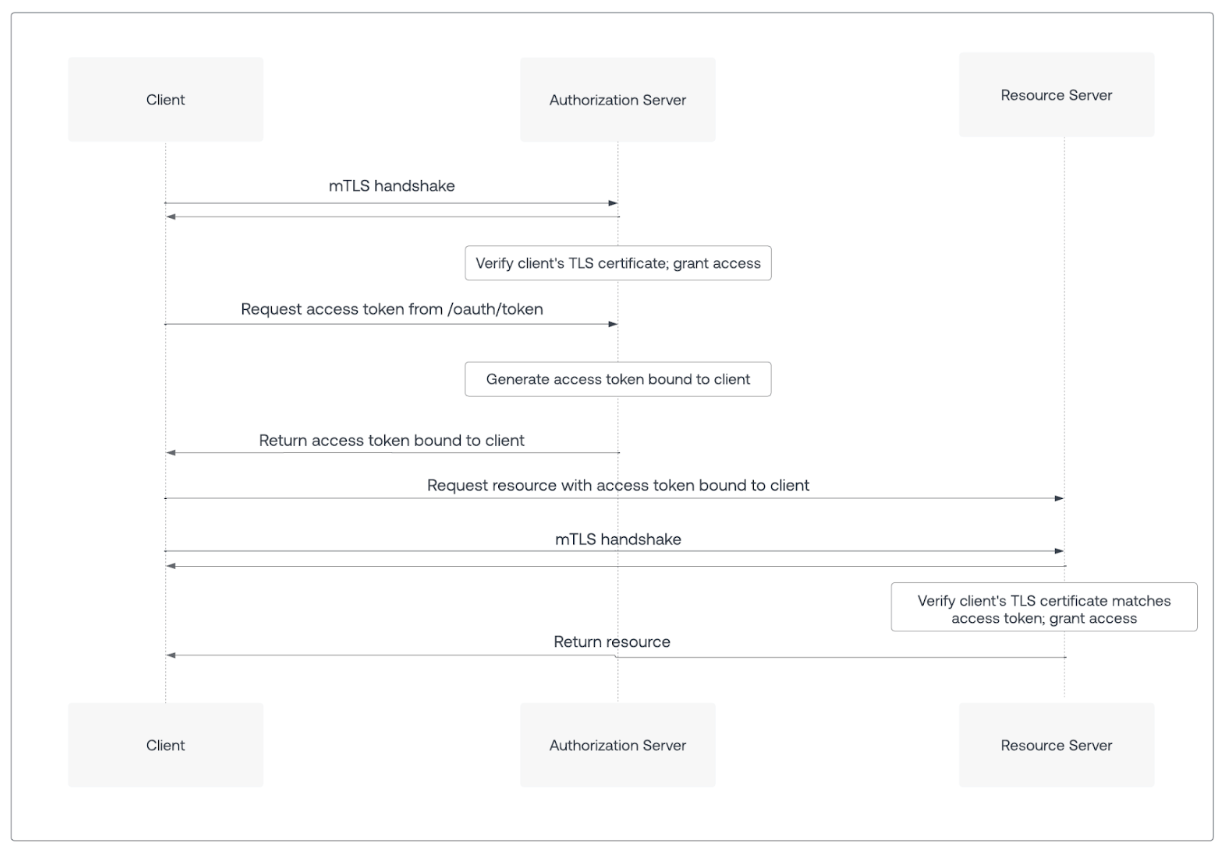
This section outlines the process of obtaining and using an mTLS-bound access token.
 ## Phase 1: Request an mTLS-bound access token
### Step 1: Client application establishes mTLS connection
* Before requesting an access token, your client application initiates a TLS handshake with the Auth0 Authorization Server's `/token` endpoint.
* During this handshake, the client application presents its client certificate to the Auth0 Authorization Server as part of the mutual TLS authentication process.
### Step 2: Client application requests access token
* The client application sends a standard OAuth 2.0 token request, such as using `grant_type=client_credentials` or `authorization_code`, to the Auth0 Authorization Server's `/token` endpoint.
* The token request does not include any special DPoP headers or additional proof JWTs for mTLS. The proof of possession is derived directly from the mTLS connection.
### Step 3: Auth0 Authorization Server processes request and binds token
When the Auth0 Authorization Server receives the token request over an mTLS connection and the client certificate is successfully validated:
1. **Extracts certificate:** The Auth0 Authorization Server extracts the client certificate used in the mTLS handshake.
2. **Calculates thumbprint:** The Auth0 Authorization Server calculates a unique hash (thumbprint) of the client certificate.
3. **Binds token:** The Auth0 Authorization Server binds this client certificate's thumbprint to the issued access token by including a confirmation claim (`cnf`) in the access token's payload.
* The `cnf` claim contains the `x5t#S256` parameter, which is the Base64url-encoded SHA-256 thumbprint of the client certificate.
4. **Sets** **`token_type`** **:** The Auth0 Authorization Server sets the `token_type` to DPoP. This differs from traditional Bearer tokens and signals that the token is bound to a specific key.
5. **Issues token:** The Auth0 Authorization Server issues the mTLS sender-constrained access token to your client application.
The following code sample is an example payload of an mTLS certificate-bound access token:
```json lines theme={null}
{
"iss": "https://server.example.com",
"sub": "ty.webb@example.com",
"exp": 1493726400,
"nbf": 1493722800,
"cnf": {
"x5t#S256": "bwcK0esc3ACC3DB2Y5_lESsXE8o9ltc05O89jdN-dg2"
}
}
```
In the mTLS certificate-bound access token example, `x5t#S256` indicates that the access token is bound to an mTLS client certificate with the SHA-256 thumbprint `bwcK0esc3ACC3DB2Y5_lESsXE8o9ltc05O89jdN-dg2`.
## Phase 2: Call an API with an mTLS-bound access token
### Step 4: Client application calls API
* When your client application needs to call an API that enforces mTLS sender constraining, it must establish a new mTLS connection with the resource server.
* During this mTLS handshake, the client application presents the same client certificate that was used to obtain the access token again.
* The client application then includes the mTLS-bound access token in the Authorization header of the API request using the DPoP authentication scheme:
```bash lines theme={null}
Authorization: DPoP {your_mtls_bound_access_token}
```
While RFC 8705 allows for a Bearer scheme with mTLS-bound tokens, Auth0 recommends using DPoP to enforce mTLS-bound access tokens. This explicitly signals to the resource server to expect a cryptographically bound token.
### Step 5: Resource server verifies token and certificate
When the resource server receives the API request over an mTLS connection:
1. **Requests client certificate:** The resource server retrieves the client certificate from the established mTLS connection.
2. **Extracts token and cnf claim:** The resource server extracts the access token from the `Authorization` header and decodes its payload to find the `cnf` (confirmation) claim, specifically the `x5t#S256` value (the bound certificate's thumbprint).
3. **Calculates current certificate thumbprint:** The resource server calculates the SHA-256 thumbprint of the client certificate received in the current mTLS connection.
4. **Compares thumbprints (Proof-of-Possession verification):** The resource server compares the newly calculated thumbprint with the `x5t#S256` thumbprint from the access token's `cnf` claim.
5. **Authorizes or rejects request:**
* If the thumbprints match and other token validations, such as the expiration, audience, and issuer, pass, the request is authorized.
* If the client certificate was not sent, or its thumbprint does not match the one in the `cnf` claim, the resource server rejects the request with an `HTTP 401 Unauthorized` status code and an `invalid_token` error code.
To understand how the thumbprint is calculated and the format of the `cnf` claim, refer to RFC 8705: Mutual-TLS Client Certificate-Bound Access Tokens.
## Important considerations
When implementing mTLS sender constraining, consider the following:
* **Confidential clients only:** mTLS sender constraining is designed for and supported only by confidential clients, such as backend services, that can securely manage client certificates and establish mTLS connections. Public clients like SPAs and mobile apps should use DPoP.
* **Certificate management:** The security of your mTLS implementation relies heavily on your certificate management practices, such as how you provision, manage, and rotate client certificates.
* **Infrastructure requirements:** Implementing mTLS requires specific infrastructure, including proxies, load balancers, and APIs capable of terminating mTLS connections and passing client certificate information to the application or resource server.
* **Resource server enforcement:** When you enable mTLS sender constraining for an API in Auth0, the resource server must perform the thumbprint verification as described in [Step 5](#step-5-resource-server-verifies-token-and-certificate).
* **Migration strategies:** If you are progressively migrating clients to use mTLS, consider exposing your API at two domains: one non-mTLS domain for existing clients and one mTLS-enabled domain for mTLS-capable clients. Alternatively, you could implement logic on a single domain to differentiate between mTLS and non-mTLS requests.
* **Error handling:** Implement robust error handling on the client and resource server to gracefully manage cases where certificates are missing, invalid, or do not match.
## もっと詳しく
* [送信者制約を構成する](/docs/ja-jp/secure/sender-constraining/configure-sender-constraining)
## Phase 1: Request an mTLS-bound access token
### Step 1: Client application establishes mTLS connection
* Before requesting an access token, your client application initiates a TLS handshake with the Auth0 Authorization Server's `/token` endpoint.
* During this handshake, the client application presents its client certificate to the Auth0 Authorization Server as part of the mutual TLS authentication process.
### Step 2: Client application requests access token
* The client application sends a standard OAuth 2.0 token request, such as using `grant_type=client_credentials` or `authorization_code`, to the Auth0 Authorization Server's `/token` endpoint.
* The token request does not include any special DPoP headers or additional proof JWTs for mTLS. The proof of possession is derived directly from the mTLS connection.
### Step 3: Auth0 Authorization Server processes request and binds token
When the Auth0 Authorization Server receives the token request over an mTLS connection and the client certificate is successfully validated:
1. **Extracts certificate:** The Auth0 Authorization Server extracts the client certificate used in the mTLS handshake.
2. **Calculates thumbprint:** The Auth0 Authorization Server calculates a unique hash (thumbprint) of the client certificate.
3. **Binds token:** The Auth0 Authorization Server binds this client certificate's thumbprint to the issued access token by including a confirmation claim (`cnf`) in the access token's payload.
* The `cnf` claim contains the `x5t#S256` parameter, which is the Base64url-encoded SHA-256 thumbprint of the client certificate.
4. **Sets** **`token_type`** **:** The Auth0 Authorization Server sets the `token_type` to DPoP. This differs from traditional Bearer tokens and signals that the token is bound to a specific key.
5. **Issues token:** The Auth0 Authorization Server issues the mTLS sender-constrained access token to your client application.
The following code sample is an example payload of an mTLS certificate-bound access token:
```json lines theme={null}
{
"iss": "https://server.example.com",
"sub": "ty.webb@example.com",
"exp": 1493726400,
"nbf": 1493722800,
"cnf": {
"x5t#S256": "bwcK0esc3ACC3DB2Y5_lESsXE8o9ltc05O89jdN-dg2"
}
}
```
In the mTLS certificate-bound access token example, `x5t#S256` indicates that the access token is bound to an mTLS client certificate with the SHA-256 thumbprint `bwcK0esc3ACC3DB2Y5_lESsXE8o9ltc05O89jdN-dg2`.
## Phase 2: Call an API with an mTLS-bound access token
### Step 4: Client application calls API
* When your client application needs to call an API that enforces mTLS sender constraining, it must establish a new mTLS connection with the resource server.
* During this mTLS handshake, the client application presents the same client certificate that was used to obtain the access token again.
* The client application then includes the mTLS-bound access token in the Authorization header of the API request using the DPoP authentication scheme:
```bash lines theme={null}
Authorization: DPoP {your_mtls_bound_access_token}
```
While RFC 8705 allows for a Bearer scheme with mTLS-bound tokens, Auth0 recommends using DPoP to enforce mTLS-bound access tokens. This explicitly signals to the resource server to expect a cryptographically bound token.
### Step 5: Resource server verifies token and certificate
When the resource server receives the API request over an mTLS connection:
1. **Requests client certificate:** The resource server retrieves the client certificate from the established mTLS connection.
2. **Extracts token and cnf claim:** The resource server extracts the access token from the `Authorization` header and decodes its payload to find the `cnf` (confirmation) claim, specifically the `x5t#S256` value (the bound certificate's thumbprint).
3. **Calculates current certificate thumbprint:** The resource server calculates the SHA-256 thumbprint of the client certificate received in the current mTLS connection.
4. **Compares thumbprints (Proof-of-Possession verification):** The resource server compares the newly calculated thumbprint with the `x5t#S256` thumbprint from the access token's `cnf` claim.
5. **Authorizes or rejects request:**
* If the thumbprints match and other token validations, such as the expiration, audience, and issuer, pass, the request is authorized.
* If the client certificate was not sent, or its thumbprint does not match the one in the `cnf` claim, the resource server rejects the request with an `HTTP 401 Unauthorized` status code and an `invalid_token` error code.
To understand how the thumbprint is calculated and the format of the `cnf` claim, refer to RFC 8705: Mutual-TLS Client Certificate-Bound Access Tokens.
## Important considerations
When implementing mTLS sender constraining, consider the following:
* **Confidential clients only:** mTLS sender constraining is designed for and supported only by confidential clients, such as backend services, that can securely manage client certificates and establish mTLS connections. Public clients like SPAs and mobile apps should use DPoP.
* **Certificate management:** The security of your mTLS implementation relies heavily on your certificate management practices, such as how you provision, manage, and rotate client certificates.
* **Infrastructure requirements:** Implementing mTLS requires specific infrastructure, including proxies, load balancers, and APIs capable of terminating mTLS connections and passing client certificate information to the application or resource server.
* **Resource server enforcement:** When you enable mTLS sender constraining for an API in Auth0, the resource server must perform the thumbprint verification as described in [Step 5](#step-5-resource-server-verifies-token-and-certificate).
* **Migration strategies:** If you are progressively migrating clients to use mTLS, consider exposing your API at two domains: one non-mTLS domain for existing clients and one mTLS-enabled domain for mTLS-capable clients. Alternatively, you could implement logic on a single domain to differentiate between mTLS and non-mTLS requests.
* **Error handling:** Implement robust error handling on the client and resource server to gracefully manage cases where certificates are missing, invalid, or do not match.
## もっと詳しく
* [送信者制約を構成する](/docs/ja-jp/secure/sender-constraining/configure-sender-constraining)