> ## Documentation Index
> Fetch the complete documentation index at: https://docs-dev-actions-triggers-prototype.mintlify.site/llms.txt
> Use this file to discover all available pages before exploring further.
# クライアントシークレットのローテーション
> アプリケーションのクライアントシークレットをAuth0 DashboardまたはManagement APIを使ってローテーションする方法を説明します。
export const AuthCodeGroup = ({children, dropdown}) => {
const [processedChildren, setProcessedChildren] = useState(children);
useEffect(() => {
let unsubscribe = null;
function init() {
unsubscribe = window.autorun(() => {
const processChildren = node => {
if (typeof node === "string") {
let processedNode = node;
for (const [key, value] of window.rootStore.variableStore.values.entries()) {
const escapedKey = key.replaceAll(/[.*+?^${}()|[\]\\]/g, (String.raw)`\$&`);
processedNode = processedNode.replaceAll(new RegExp(escapedKey, "g"), value);
}
return processedNode;
} else if (Array.isArray(node)) {
return node.map(processChildren);
} else if (node && node.props && node.props.children) {
return {
...node,
props: {
...node.props,
children: processChildren(node.props.children)
}
};
}
return node;
};
setProcessedChildren(processChildren(children));
});
}
if (window.rootStore) {
init();
} else {
window.addEventListener("adu:storeReady", init);
}
return () => {
window.removeEventListener("adu:storeReady", init);
unsubscribe?.();
};
}, [children]);
return {processedChildren};
};
export const AuthCodeBlock = ({filename, icon, language, highlight, children}) => {
const [displayText, setDisplayText] = useState(children);
const [copyText, setCopyText] = useState(children);
const wrapperRef = React.useRef(null);
useEffect(() => {
let unsubscribe = null;
function init() {
if (!window.autorun || !window.rootStore) {
return;
}
unsubscribe = window.autorun(() => {
let processedChildrenForDisplay = children;
let processedChildrenForCopy = children;
for (const [key, value] of window.rootStore.variableStore.values.entries()) {
const escapedKey = key.replaceAll(/[.*+?^${}()|[\]\\]/g, (String.raw)`\$&`);
let displayValue = value;
if (key === "{yourClientSecret}" && value !== "{yourClientSecret}") {
displayValue = value.substring(0, 3) + "*****MASKED*****";
}
processedChildrenForDisplay = processedChildrenForDisplay.replaceAll(new RegExp(escapedKey, "g"), displayValue);
processedChildrenForCopy = processedChildrenForCopy.replaceAll(new RegExp(escapedKey, "g"), value);
}
setDisplayText(processedChildrenForDisplay);
setCopyText(processedChildrenForCopy);
});
}
if (window.rootStore) {
init();
} else {
window.addEventListener("adu:storeReady", init);
}
return () => {
window.removeEventListener("adu:storeReady", init);
unsubscribe?.();
};
}, [children]);
useEffect(() => {
if (!wrapperRef.current) return;
const originalWriteText = navigator.clipboard.writeText.bind(navigator.clipboard);
let isOverriding = false;
const handleClick = e => {
const button = e.target.closest('[data-testid="copy-code-button"]');
if (!button || !wrapperRef.current.contains(button)) return;
isOverriding = true;
navigator.clipboard.writeText = text => {
if (isOverriding) {
isOverriding = false;
navigator.clipboard.writeText = originalWriteText;
return originalWriteText(copyText);
}
return originalWriteText(text);
};
setTimeout(() => {
if (isOverriding) {
isOverriding = false;
navigator.clipboard.writeText = originalWriteText;
}
}, 100);
};
const wrapper = wrapperRef.current;
wrapper.addEventListener('click', handleClick, true);
return () => {
wrapper.removeEventListener('click', handleClick, true);
if (navigator.clipboard.writeText !== originalWriteText) {
navigator.clipboard.writeText = originalWriteText;
}
};
}, [copyText]);
return
{displayText}
;
};
アプリケーションのクライアントシークレットは、Auth0 DashboardまたはManagement APIを使って変更できます。クライアントシークレットをローテーションするときは、新しい値で認可されたアプリケーションを更新する必要があります。
クライアントシークレットをパブリッククライアントアプリケーションに保管してはいけません。詳細については、「[機密アプリケーションとパブリックアプリケーション](/docs/ja-jp/get-started/applications/confidential-and-public-applications)
新しいシークレットは、ローテーション中に最大で30秒遅れます。ダウンタイムを最小限に抑えるために、新しいクライアントシークレットを以前のシークレットのフォールバックとしてアプリケーションのコードかシステム構成に保管することをお勧めします。そうすれば、クライアントアプリケーションの要求に古いシークレットで対処できなかった場合に、新しいシークレットを使用できます。
シークレットは、不要になるまでリスト(または類似の構造)に保管できます。古いシークレットが確実に不要になった時点で、アプリのコードからその値を削除します。
## Dashboardの使用
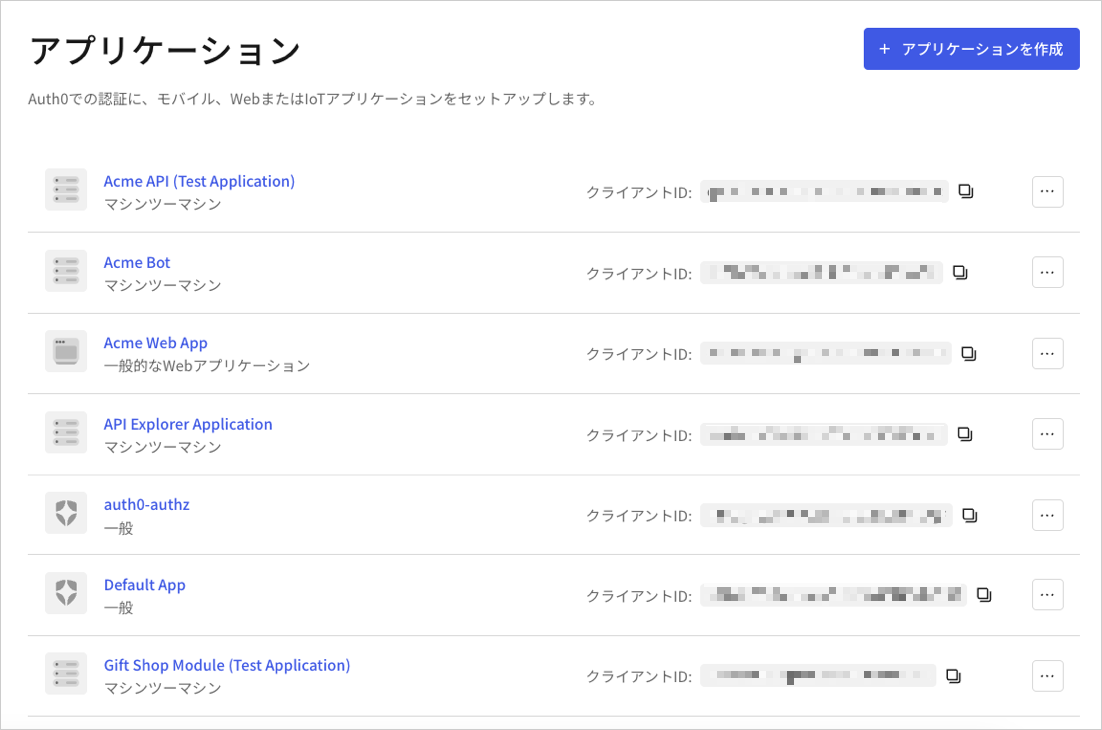
1. Auth0 Dashboardで、[[Applications(アプリケーション)]>[Applications(アプリケーション)]](https://manage.auth0.com/#/applications)に移動し、アプリケーションの名前を選択して表示します。
 2. **[Settings(設定)]** ページを下にスクロールして、**[Danger Zone(危険ゾーン)]** を見つけて、**[Rotate(ローテーション)]** を選択して確定します。
3. ページの上部までスクロールし、**[Credentials(資格情報)]** タブに切り替えます。
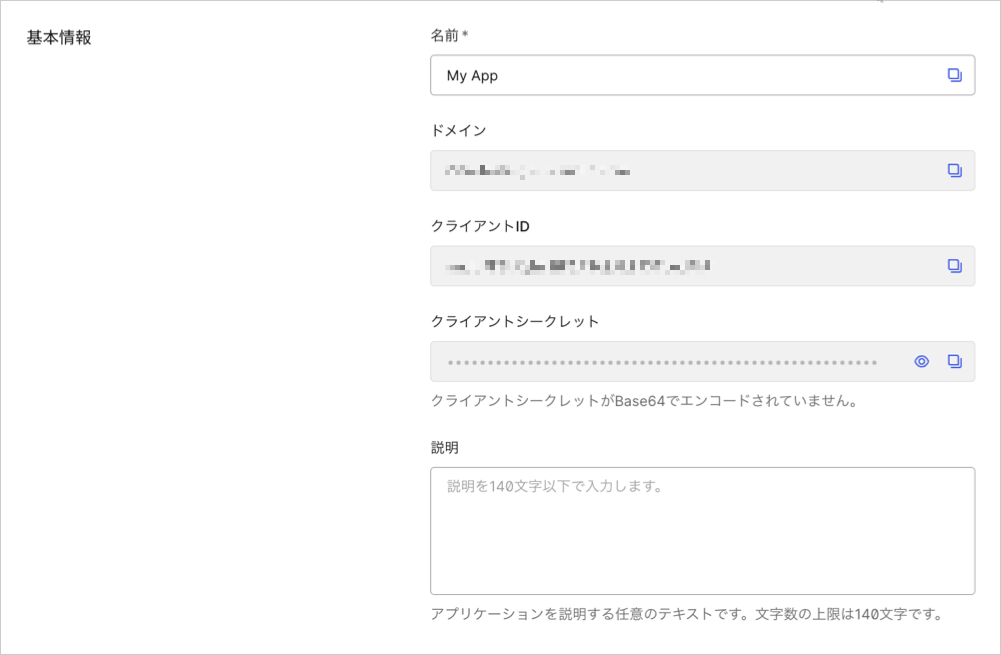
4. **[Client Secret(クライアントシークレット)]** の新しいシークレットを確認し、目のアイコンを選択します。
2. **[Settings(設定)]** ページを下にスクロールして、**[Danger Zone(危険ゾーン)]** を見つけて、**[Rotate(ローテーション)]** を選択して確定します。
3. ページの上部までスクロールし、**[Credentials(資格情報)]** タブに切り替えます。
4. **[Client Secret(クライアントシークレット)]** の新しいシークレットを確認し、目のアイコンを選択します。
 5. 新しい値で、認可されたアプリケーションを更新します。
## Management APIの使用
1. Management API[クライアントシークレットのローテーション](https://auth0.com/docs/api/management/v2#!/Clients/post_rotate_secret)エンドポイントを呼び出します。`{yourClientId}`と`MGMT_API_ACCESS_TOKEN`のプレースホルダーの値を、それぞれクライアントIDとManagement APIのアクセストークンに置き換えてください。
```bash cURL theme={null}
curl --request POST \
--url 'https://{yourDomain}/api/v2/clients/%7ByourClientId%7D/rotate-secret' \
--header 'authorization: Bearer {yourMgmtApiAccessToken}'
```
```csharp C# theme={null}
var client = new RestClient("https://{yourDomain}/api/v2/clients/%7ByourClientId%7D/rotate-secret");
var request = new RestRequest(Method.POST);
request.AddHeader("authorization", "Bearer {yourMgmtApiAccessToken}");
IRestResponse response = client.Execute(request);
```
```go Go theme={null}
package main
import (
"fmt"
"net/http"
"io/ioutil"
)
func main() {
url := "https://{yourDomain}/api/v2/clients/%7ByourClientId%7D/rotate-secret"
req, _ := http.NewRequest("POST", url, nil)
req.Header.Add("authorization", "Bearer {yourMgmtApiAccessToken}")
res, _ := http.DefaultClient.Do(req)
defer res.Body.Close()
body, _ := ioutil.ReadAll(res.Body)
fmt.Println(res)
fmt.Println(string(body))
}
```
```java Java theme={null}
HttpResponse response = Unirest.post("https://{yourDomain}/api/v2/clients/%7ByourClientId%7D/rotate-secret")
.header("authorization", "Bearer {yourMgmtApiAccessToken}")
.asString();
```
```javascript Node.JS theme={null}
var axios = require("axios").default;
var options = {
method: 'POST',
url: 'https://{yourDomain}/api/v2/clients/%7ByourClientId%7D/rotate-secret',
headers: {authorization: 'Bearer {yourMgmtApiAccessToken}'}
};
axios.request(options).then(function (response) {
console.log(response.data);
}).catch(function (error) {
console.error(error);
});
```
```objc Obj-C theme={null}
#import
NSDictionary *headers = @{ @"authorization": @"Bearer {yourMgmtApiAccessToken}" };
NSMutableURLRequest *request = [NSMutableURLRequest requestWithURL:[NSURL URLWithString:@"https://{yourDomain}/api/v2/clients/%7ByourClientId%7D/rotate-secret"]
cachePolicy:NSURLRequestUseProtocolCachePolicy
timeoutInterval:10.0];
[request setHTTPMethod:@"POST"];
[request setAllHTTPHeaderFields:headers];
NSURLSession *session = [NSURLSession sharedSession];
NSURLSessionDataTask *dataTask = [session dataTaskWithRequest:request
completionHandler:^(NSData *data, NSURLResponse *response, NSError *error) {
if (error) {
NSLog(@"%@", error);
} else {
NSHTTPURLResponse *httpResponse = (NSHTTPURLResponse *) response;
NSLog(@"%@", httpResponse);
}
}];
[dataTask resume];
```
```php PHP theme={null}
$curl = curl_init();
curl_setopt_array($curl, [
CURLOPT_URL => "https://{yourDomain}/api/v2/clients/%7ByourClientId%7D/rotate-secret",
CURLOPT_RETURNTRANSFER => true,
CURLOPT_ENCODING => "",
CURLOPT_MAXREDIRS => 10,
CURLOPT_TIMEOUT => 30,
CURLOPT_HTTP_VERSION => CURL_HTTP_VERSION_1_1,
CURLOPT_CUSTOMREQUEST => "POST",
CURLOPT_HTTPHEADER => [
"authorization: Bearer {yourMgmtApiAccessToken}"
],
]);
$response = curl_exec($curl);
$err = curl_error($curl);
curl_close($curl);
if ($err) {
echo "cURL Error #:" . $err;
} else {
echo $response;
}
```
```python Python theme={null}
import http.client
conn = http.client.HTTPSConnection("")
headers = { 'authorization': "Bearer {yourMgmtApiAccessToken}" }
conn.request("POST", "/{yourDomain}/api/v2/clients/%7ByourClientId%7D/rotate-secret", headers=headers)
res = conn.getresponse()
data = res.read()
print(data.decode("utf-8"))
```
```ruby Ruby theme={null}
require 'uri'
require 'net/http'
require 'openssl'
url = URI("https://{yourDomain}/api/v2/clients/%7ByourClientId%7D/rotate-secret")
http = Net::HTTP.new(url.host, url.port)
http.use_ssl = true
http.verify_mode = OpenSSL::SSL::VERIFY_NONE
request = Net::HTTP::Post.new(url)
request["authorization"] = 'Bearer {yourMgmtApiAccessToken}'
response = http.request(request)
puts response.read_body
```
```swift Swift theme={null}
import Foundation
let headers = ["authorization": "Bearer {yourMgmtApiAccessToken}"]
let request = NSMutableURLRequest(url: NSURL(string: "https://{yourDomain}/api/v2/clients/%7ByourClientId%7D/rotate-secret")! as URL,
cachePolicy: .useProtocolCachePolicy,
timeoutInterval: 10.0)
request.httpMethod = "POST"
request.allHTTPHeaderFields = headers
let session = URLSession.shared
let dataTask = session.dataTask(with: request as URLRequest, completionHandler: { (data, response, error) -> Void in
if (error != nil) {
print(error)
} else {
let httpResponse = response as? HTTPURLResponse
print(httpResponse)
}
})
dataTask.resume()
```
| 値 | 説明 |
| ----------------------- | ------------------------------------------------------------------------------------------- |
| `{yourClientId}` | 更新するアプリケーションのID。 |
| `MGMT_API_ACCESS_TOKEN` | スコープ`update:client_keys`を持つ[Management APIのアクセストークン](/docs/ja-jp/api/management/v2/tokens)。 |
2. 新しい値で、認可されたアプリケーションを更新します。
### カスタムのクライアントシークレットの設定
ローテーションを要求して自動的にシークレットを生成する代わりに、Management API[クライアント更新](https://auth0.com/docs/api/management/v2/#!/Clients/patch_clients_by_id)エンドポイントを使用して、手動でクライアントシークレットを設定できます。アプリケーションは、実際のローテーションより前にフォールバックとして将来のシークレットで構成されます。
```json lines theme={null}
{
curl --request PATCH \
--url https://{TenantDomain}/api/v2/clients/{ClientID} \
--header 'Authorization: Bearer {AccessToken}' \
--header 'Content-Type: application/json' \
--data '{
"client_secret": "{CustomClientSecret}"
}'
}
```
## もっと詳しく
* [署名証明書を確認する](/docs/ja-jp/get-started/tenant-settings/signing-keys/view-signing-certificates)
* [署名アルゴリズム](/docs/ja-jp/get-started/applications/signing-algorithms)
* [アプリケーションの署名アルゴリズムを変更する](/docs/ja-jp/get-started/applications/change-application-signing-algorithms)
5. 新しい値で、認可されたアプリケーションを更新します。
## Management APIの使用
1. Management API[クライアントシークレットのローテーション](https://auth0.com/docs/api/management/v2#!/Clients/post_rotate_secret)エンドポイントを呼び出します。`{yourClientId}`と`MGMT_API_ACCESS_TOKEN`のプレースホルダーの値を、それぞれクライアントIDとManagement APIのアクセストークンに置き換えてください。
```bash cURL theme={null}
curl --request POST \
--url 'https://{yourDomain}/api/v2/clients/%7ByourClientId%7D/rotate-secret' \
--header 'authorization: Bearer {yourMgmtApiAccessToken}'
```
```csharp C# theme={null}
var client = new RestClient("https://{yourDomain}/api/v2/clients/%7ByourClientId%7D/rotate-secret");
var request = new RestRequest(Method.POST);
request.AddHeader("authorization", "Bearer {yourMgmtApiAccessToken}");
IRestResponse response = client.Execute(request);
```
```go Go theme={null}
package main
import (
"fmt"
"net/http"
"io/ioutil"
)
func main() {
url := "https://{yourDomain}/api/v2/clients/%7ByourClientId%7D/rotate-secret"
req, _ := http.NewRequest("POST", url, nil)
req.Header.Add("authorization", "Bearer {yourMgmtApiAccessToken}")
res, _ := http.DefaultClient.Do(req)
defer res.Body.Close()
body, _ := ioutil.ReadAll(res.Body)
fmt.Println(res)
fmt.Println(string(body))
}
```
```java Java theme={null}
HttpResponse response = Unirest.post("https://{yourDomain}/api/v2/clients/%7ByourClientId%7D/rotate-secret")
.header("authorization", "Bearer {yourMgmtApiAccessToken}")
.asString();
```
```javascript Node.JS theme={null}
var axios = require("axios").default;
var options = {
method: 'POST',
url: 'https://{yourDomain}/api/v2/clients/%7ByourClientId%7D/rotate-secret',
headers: {authorization: 'Bearer {yourMgmtApiAccessToken}'}
};
axios.request(options).then(function (response) {
console.log(response.data);
}).catch(function (error) {
console.error(error);
});
```
```objc Obj-C theme={null}
#import
NSDictionary *headers = @{ @"authorization": @"Bearer {yourMgmtApiAccessToken}" };
NSMutableURLRequest *request = [NSMutableURLRequest requestWithURL:[NSURL URLWithString:@"https://{yourDomain}/api/v2/clients/%7ByourClientId%7D/rotate-secret"]
cachePolicy:NSURLRequestUseProtocolCachePolicy
timeoutInterval:10.0];
[request setHTTPMethod:@"POST"];
[request setAllHTTPHeaderFields:headers];
NSURLSession *session = [NSURLSession sharedSession];
NSURLSessionDataTask *dataTask = [session dataTaskWithRequest:request
completionHandler:^(NSData *data, NSURLResponse *response, NSError *error) {
if (error) {
NSLog(@"%@", error);
} else {
NSHTTPURLResponse *httpResponse = (NSHTTPURLResponse *) response;
NSLog(@"%@", httpResponse);
}
}];
[dataTask resume];
```
```php PHP theme={null}
$curl = curl_init();
curl_setopt_array($curl, [
CURLOPT_URL => "https://{yourDomain}/api/v2/clients/%7ByourClientId%7D/rotate-secret",
CURLOPT_RETURNTRANSFER => true,
CURLOPT_ENCODING => "",
CURLOPT_MAXREDIRS => 10,
CURLOPT_TIMEOUT => 30,
CURLOPT_HTTP_VERSION => CURL_HTTP_VERSION_1_1,
CURLOPT_CUSTOMREQUEST => "POST",
CURLOPT_HTTPHEADER => [
"authorization: Bearer {yourMgmtApiAccessToken}"
],
]);
$response = curl_exec($curl);
$err = curl_error($curl);
curl_close($curl);
if ($err) {
echo "cURL Error #:" . $err;
} else {
echo $response;
}
```
```python Python theme={null}
import http.client
conn = http.client.HTTPSConnection("")
headers = { 'authorization': "Bearer {yourMgmtApiAccessToken}" }
conn.request("POST", "/{yourDomain}/api/v2/clients/%7ByourClientId%7D/rotate-secret", headers=headers)
res = conn.getresponse()
data = res.read()
print(data.decode("utf-8"))
```
```ruby Ruby theme={null}
require 'uri'
require 'net/http'
require 'openssl'
url = URI("https://{yourDomain}/api/v2/clients/%7ByourClientId%7D/rotate-secret")
http = Net::HTTP.new(url.host, url.port)
http.use_ssl = true
http.verify_mode = OpenSSL::SSL::VERIFY_NONE
request = Net::HTTP::Post.new(url)
request["authorization"] = 'Bearer {yourMgmtApiAccessToken}'
response = http.request(request)
puts response.read_body
```
```swift Swift theme={null}
import Foundation
let headers = ["authorization": "Bearer {yourMgmtApiAccessToken}"]
let request = NSMutableURLRequest(url: NSURL(string: "https://{yourDomain}/api/v2/clients/%7ByourClientId%7D/rotate-secret")! as URL,
cachePolicy: .useProtocolCachePolicy,
timeoutInterval: 10.0)
request.httpMethod = "POST"
request.allHTTPHeaderFields = headers
let session = URLSession.shared
let dataTask = session.dataTask(with: request as URLRequest, completionHandler: { (data, response, error) -> Void in
if (error != nil) {
print(error)
} else {
let httpResponse = response as? HTTPURLResponse
print(httpResponse)
}
})
dataTask.resume()
```
| 値 | 説明 |
| ----------------------- | ------------------------------------------------------------------------------------------- |
| `{yourClientId}` | 更新するアプリケーションのID。 |
| `MGMT_API_ACCESS_TOKEN` | スコープ`update:client_keys`を持つ[Management APIのアクセストークン](/docs/ja-jp/api/management/v2/tokens)。 |
2. 新しい値で、認可されたアプリケーションを更新します。
### カスタムのクライアントシークレットの設定
ローテーションを要求して自動的にシークレットを生成する代わりに、Management API[クライアント更新](https://auth0.com/docs/api/management/v2/#!/Clients/patch_clients_by_id)エンドポイントを使用して、手動でクライアントシークレットを設定できます。アプリケーションは、実際のローテーションより前にフォールバックとして将来のシークレットで構成されます。
```json lines theme={null}
{
curl --request PATCH \
--url https://{TenantDomain}/api/v2/clients/{ClientID} \
--header 'Authorization: Bearer {AccessToken}' \
--header 'Content-Type: application/json' \
--data '{
"client_secret": "{CustomClientSecret}"
}'
}
```
## もっと詳しく
* [署名証明書を確認する](/docs/ja-jp/get-started/tenant-settings/signing-keys/view-signing-certificates)
* [署名アルゴリズム](/docs/ja-jp/get-started/applications/signing-algorithms)
* [アプリケーションの署名アルゴリズムを変更する](/docs/ja-jp/get-started/applications/change-application-signing-algorithms)