> ## Documentation Index
> Fetch the complete documentation index at: https://docs-dev-actions-triggers-prototype.mintlify.site/llms.txt
> Use this file to discover all available pages before exploring further.
# APIにロールベースのアクセス制御(RBAC)を有効にする
> Auth0 DashboardまたはManagement APIを使用して、APIにロールベースのアクセス制御(RBAC)を有効化する方法を学びます。
export const AuthCodeGroup = ({children, dropdown}) => {
const [processedChildren, setProcessedChildren] = useState(children);
useEffect(() => {
let unsubscribe = null;
function init() {
unsubscribe = window.autorun(() => {
const processChildren = node => {
if (typeof node === "string") {
let processedNode = node;
for (const [key, value] of window.rootStore.variableStore.values.entries()) {
const escapedKey = key.replaceAll(/[.*+?^${}()|[\]\\]/g, (String.raw)`\$&`);
processedNode = processedNode.replaceAll(new RegExp(escapedKey, "g"), value);
}
return processedNode;
} else if (Array.isArray(node)) {
return node.map(processChildren);
} else if (node && node.props && node.props.children) {
return {
...node,
props: {
...node.props,
children: processChildren(node.props.children)
}
};
}
return node;
};
setProcessedChildren(processChildren(children));
});
}
if (window.rootStore) {
init();
} else {
window.addEventListener("adu:storeReady", init);
}
return () => {
window.removeEventListener("adu:storeReady", init);
unsubscribe?.();
};
}, [children]);
return {processedChildren};
};
export const AuthCodeBlock = ({filename, icon, language, highlight, children}) => {
const [displayText, setDisplayText] = useState(children);
const [copyText, setCopyText] = useState(children);
const wrapperRef = React.useRef(null);
useEffect(() => {
let unsubscribe = null;
function init() {
if (!window.autorun || !window.rootStore) {
return;
}
unsubscribe = window.autorun(() => {
let processedChildrenForDisplay = children;
let processedChildrenForCopy = children;
for (const [key, value] of window.rootStore.variableStore.values.entries()) {
const escapedKey = key.replaceAll(/[.*+?^${}()|[\]\\]/g, (String.raw)`\$&`);
let displayValue = value;
if (key === "{yourClientSecret}" && value !== "{yourClientSecret}") {
displayValue = value.substring(0, 3) + "*****MASKED*****";
}
processedChildrenForDisplay = processedChildrenForDisplay.replaceAll(new RegExp(escapedKey, "g"), displayValue);
processedChildrenForCopy = processedChildrenForCopy.replaceAll(new RegExp(escapedKey, "g"), value);
}
setDisplayText(processedChildrenForDisplay);
setCopyText(processedChildrenForCopy);
});
}
if (window.rootStore) {
init();
} else {
window.addEventListener("adu:storeReady", init);
}
return () => {
window.removeEventListener("adu:storeReady", init);
unsubscribe?.();
};
}, [children]);
useEffect(() => {
if (!wrapperRef.current) return;
const originalWriteText = navigator.clipboard.writeText.bind(navigator.clipboard);
let isOverriding = false;
const handleClick = e => {
const button = e.target.closest('[data-testid="copy-code-button"]');
if (!button || !wrapperRef.current.contains(button)) return;
isOverriding = true;
navigator.clipboard.writeText = text => {
if (isOverriding) {
isOverriding = false;
navigator.clipboard.writeText = originalWriteText;
return originalWriteText(copyText);
}
return originalWriteText(text);
};
setTimeout(() => {
if (isOverriding) {
isOverriding = false;
navigator.clipboard.writeText = originalWriteText;
}
}, 100);
};
const wrapper = wrapperRef.current;
wrapper.addEventListener('click', handleClick, true);
return () => {
wrapper.removeEventListener('click', handleClick, true);
if (navigator.clipboard.writeText !== originalWriteText) {
navigator.clipboard.writeText = originalWriteText;
}
};
}, [copyText]);
return
{displayText}
;
};
Auth0 DashboardまたはManagement使用して、APIに[ロールベースのアクセス制御(RBAC)](/docs/ja-jp/manage-users/access-control/rbac)を有効化することができます。これにより、APIの認可コア機能セットが有効になります。
RBACを有効にすると、アクセストークンに権限が含まれているかにかかわらず、要求された権限とユーザーに割り当てられた権限の共通部分がアクセストークンの`scope`クレームに含まれます。RBACを無効にすると、アプリケーションがAPIに定義された任意の権限を要求できるようになり、`scope`クレームには要求されたすべての権限が含まれます。
アクセストークンのスコープを変更する[Actions](/docs/ja-jp/customize/actions)
## Dashboard
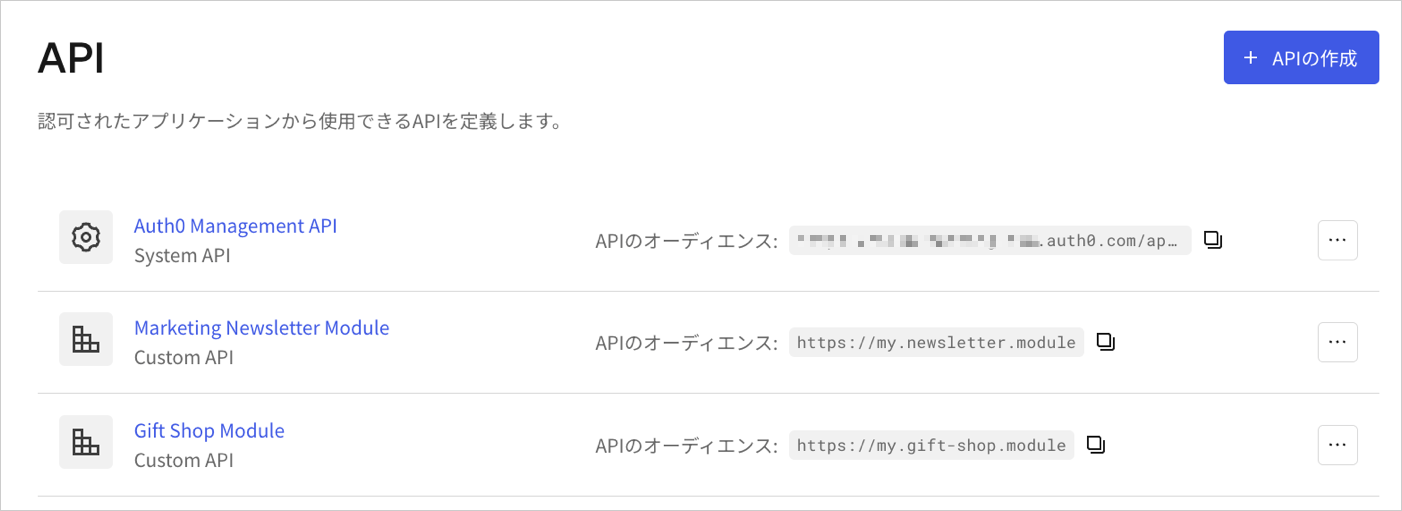
1. [[Dashboard]>[Applications (アプリケーション)]>[API]](https://manage.auth0.com/#/apis)に移動し、表示するAPI名をクリックします。
 2. **[RBAC Settings(RBACの設定)]** までスクロールして、**[Enable RBAC(RBACを有効にする)]** トグルを有効にします。
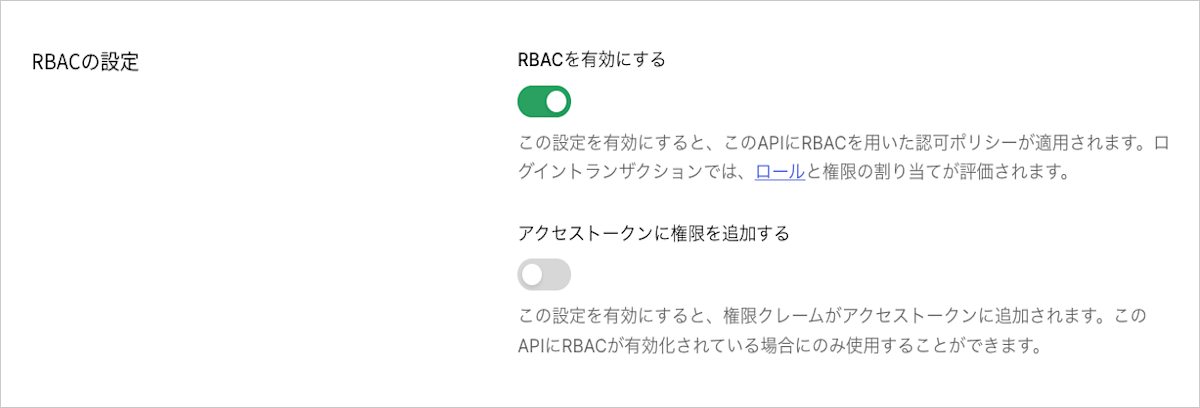 3. ユーザーに割り当てられたすべての権限をアクセストークンの`permissions`クレームに含めるには、**[Add Permissions in the Access Token(アクセストークンに権限を追加する)]** トグルを有効にして、**[Save(保存)]** をクリックします。アクセストークンに権限を含めると、最小限の呼び出しで権限を取得できますが、トークンのサイズは大きくなります。**[Add Permissions in the Access Token(アクセストークンに権限を追加する)]** sトグルを有効にすると、Auth0はAPIに設定された[アクセストークンプロファイル](/docs/ja-jp/secure/tokens/access-tokens/access-token-profiles)を基に、トークンのダイアレクトも更新します。
* トークンのダイアレクトが`access_token`の場合、Auth0はこれを`access_token_authz`に更新します。これは、`permissions`クレームを含む`access_token`プロファイルと同等です。
* トークンのダイアレクトが`rfc9068_profile`の場合、Auth0はこれを`rfc9068_profile_authz`に更新します。これは、`permissions`クレームを含む`rfc9068_profile`と同等です。
使用可能なトークンのダイアレクトについては、「[トークンのダイアレクトオプション](#token-dialect-options)」をお読みください。
## Mangement API
Management APIを使用してRBACを有効にするには、[リソースサーバー更新エンドポイント](https://auth0.com/docs/api/management/v2/resource-servers/patch-resource-servers-by-id)にPATCH要求を行います。PATCH要求で、`enforce_policies`を`true`に設定します。
```bash cURL theme={null}
curl --request PATCH \
--url 'https://{yourDomain}/api/v2/resource-servers/API_ID' \
--header 'authorization: Bearer MGMT_API_ACCESS_TOKEN' \
--header 'cache-control: no-cache' \
--header 'content-type: application/json' \
--data '{ "enforce_policies": "true", "token_dialect": "TOKEN_DIALECT" }'
```
```csharp C# theme={null}
var client = new RestClient("https://{yourDomain}/api/v2/resource-servers/API_ID");
var request = new RestRequest(Method.PATCH);
request.AddHeader("content-type", "application/json");
request.AddHeader("authorization", "Bearer MGMT_API_ACCESS_TOKEN");
request.AddHeader("cache-control", "no-cache");
request.AddParameter("application/json", "{ "enforce_policies": "true", "token_dialect": "TOKEN_DIALECT" }", ParameterType.RequestBody);
IRestResponse response = client.Execute(request);
```
```go Go theme={null}
package main
import (
"fmt"
"strings"
"net/http"
"io/ioutil"
)
func main() {
url := "https://{yourDomain}/api/v2/resource-servers/API_ID"
payload := strings.NewReader("{ "enforce_policies": "true", "token_dialect": "TOKEN_DIALECT" }")
req, _ := http.NewRequest("PATCH", url, payload)
req.Header.Add("content-type", "application/json")
req.Header.Add("authorization", "Bearer MGMT_API_ACCESS_TOKEN")
req.Header.Add("cache-control", "no-cache")
res, _ := http.DefaultClient.Do(req)
defer res.Body.Close()
body, _ := ioutil.ReadAll(res.Body)
fmt.Println(res)
fmt.Println(string(body))
}
```
```java Java theme={null}
HttpResponse response = Unirest.patch("https://{yourDomain}/api/v2/resource-servers/API_ID")
.header("content-type", "application/json")
.header("authorization", "Bearer MGMT_API_ACCESS_TOKEN")
.header("cache-control", "no-cache")
.body("{ "enforce_policies": "true", "token_dialect": "TOKEN_DIALECT" }")
.asString();
```
```javascript Node.JS theme={null}
var axios = require("axios").default;
var options = {
method: 'PATCH',
url: 'https://{yourDomain}/api/v2/resource-servers/API_ID',
headers: {
'content-type': 'application/json',
authorization: 'Bearer MGMT_API_ACCESS_TOKEN',
'cache-control': 'no-cache'
},
data: {enforce_policies: 'true', token_dialect: 'TOKEN_DIALECT'}
};
axios.request(options).then(function (response) {
console.log(response.data);
}).catch(function (error) {
console.error(error);
});
```
```objc Obj-C theme={null}
#import
NSDictionary *headers = @{ @"content-type": @"application/json",
@"authorization": @"Bearer MGMT_API_ACCESS_TOKEN",
@"cache-control": @"no-cache" };
NSDictionary *parameters = @{ @"enforce_policies": @"true",
@"token_dialect": @"TOKEN_DIALECT" };
NSData *postData = [NSJSONSerialization dataWithJSONObject:parameters options:0 error:nil];
NSMutableURLRequest *request = [NSMutableURLRequest requestWithURL:[NSURL URLWithString:@"https://{yourDomain}/api/v2/resource-servers/API_ID"]
cachePolicy:NSURLRequestUseProtocolCachePolicy
timeoutInterval:10.0];
[request setHTTPMethod:@"PATCH"];
[request setAllHTTPHeaderFields:headers];
[request setHTTPBody:postData];
NSURLSession *session = [NSURLSession sharedSession];
NSURLSessionDataTask *dataTask = [session dataTaskWithRequest:request
completionHandler:^(NSData *data, NSURLResponse *response, NSError *error) {
if (error) {
NSLog(@"%@", error);
} else {
NSHTTPURLResponse *httpResponse = (NSHTTPURLResponse *) response;
NSLog(@"%@", httpResponse);
}
}];
[dataTask resume];
```
```php PHP theme={null}
$curl = curl_init();
curl_setopt_array($curl, [
CURLOPT_URL => "https://{yourDomain}/api/v2/resource-servers/API_ID",
CURLOPT_RETURNTRANSFER => true,
CURLOPT_ENCODING => "",
CURLOPT_MAXREDIRS => 10,
CURLOPT_TIMEOUT => 30,
CURLOPT_HTTP_VERSION => CURL_HTTP_VERSION_1_1,
CURLOPT_CUSTOMREQUEST => "PATCH",
CURLOPT_POSTFIELDS => "{ "enforce_policies": "true", "token_dialect": "TOKEN_DIALECT" }",
CURLOPT_HTTPHEADER => [
"authorization: Bearer MGMT_API_ACCESS_TOKEN",
"cache-control: no-cache",
"content-type: application/json"
],
]);
$response = curl_exec($curl);
$err = curl_error($curl);
curl_close($curl);
if ($err) {
echo "cURL Error #:" . $err;
} else {
echo $response;
}
```
```python Python theme={null}
import http.client
conn = http.client.HTTPSConnection("")
payload = "{ "enforce_policies": "true", "token_dialect": "TOKEN_DIALECT" }"
headers = {
'content-type': "application/json",
'authorization': "Bearer MGMT_API_ACCESS_TOKEN",
'cache-control': "no-cache"
}
conn.request("PATCH", "/{yourDomain}/api/v2/resource-servers/API_ID", payload, headers)
res = conn.getresponse()
data = res.read()
print(data.decode("utf-8"))
```
```ruby Ruby theme={null}
require 'uri'
require 'net/http'
require 'openssl'
url = URI("https://{yourDomain}/api/v2/resource-servers/API_ID")
http = Net::HTTP.new(url.host, url.port)
http.use_ssl = true
http.verify_mode = OpenSSL::SSL::VERIFY_NONE
request = Net::HTTP::Patch.new(url)
request["content-type"] = 'application/json'
request["authorization"] = 'Bearer MGMT_API_ACCESS_TOKEN'
request["cache-control"] = 'no-cache'
request.body = "{ "enforce_policies": "true", "token_dialect": "TOKEN_DIALECT" }"
response = http.request(request)
puts response.read_body
```
```swift Swift theme={null}
import Foundation
let headers = [
"content-type": "application/json",
"authorization": "Bearer MGMT_API_ACCESS_TOKEN",
"cache-control": "no-cache"
]
let parameters = [
"enforce_policies": "true",
"token_dialect": "TOKEN_DIALECT"
] as [String : Any]
let postData = JSONSerialization.data(withJSONObject: parameters, options: [])
let request = NSMutableURLRequest(url: NSURL(string: "https://{yourDomain}/api/v2/resource-servers/API_ID")! as URL,
cachePolicy: .useProtocolCachePolicy,
timeoutInterval: 10.0)
request.httpMethod = "PATCH"
request.allHTTPHeaderFields = headers
request.httpBody = postData as Data
let session = URLSession.shared
let dataTask = session.dataTask(with: request as URLRequest, completionHandler: { (data, response, error) -> Void in
if (error != nil) {
print(error)
} else {
let httpResponse = response as? HTTPURLResponse
print(httpResponse)
}
})
dataTask.resume()
```
以下の表が示すように、`API_ID`、`MGMT_API_ACCESS_TOKEN`、`TOKEN_DIALECT`をそれぞれの値に置き換えます。
| パラメーター | 説明 |
| ----------------------- | ----------------------------------------------------------------------------------------------------------------- |
| `API_ID` | RBACを有効にしたいAPIのID。 |
| `MGMT_API_ACCESS_TOKEN` | スコープ`update:resource_servers`を持つ[Management APIのアクセストークン](https://auth0.com/docs/ja-jp/api/management/v2/tokens)。 |
| `TOKEN_DIALECT` | 指定されたAPIのアクセストークンのダイアレクト。詳しくは、「[トークンのダイアレクトオプション](#token-dialect-options)」をご覧ください。 |
### トークンのダイアレクトオプション
Auth0は以下のトークンダイアレクトに対応しています。
| 値 | 説明 |
| ----------------------- | ---------------------------------------------------------------------------------------------------------------------------------------------------------------------------------------------------------------------------------------------------------------------------------------------------------------------- |
| `access_token` | デフォルトのAuth0トークンプロファイルは[JSON Web Token(JWT)](/docs/ja-jp/secure/tokens/json-web-tokens)形式のアクセストークンを生成します。アクセストークンの`scope`クレームには、要求された権限とユーザーに割り当てられた権限の共通部分が含まれます。`permissions`クレームは渡されません。詳細については、「[アクセストークンのプロファイル](/docs/ja-jp/secure/tokens/access-tokens/access-token-profiles)」をお読みください。 |
| `access_token_authz` | `permissions`クレームのあるデフォルトのAuth0トークンプロファイル(`access_token`)です。アクセストークンの`scope`クレームには、要求された権限とユーザーに割り当てられた権限の共通部分が含まれます。アクセストークンの`permissions`クレームには、ユーザーに割り当てられたすべての許可が含まれます。アクセストークンに許可を含めると、最小限の呼び出しで許可を取得できますが、トークンサイズは大きくなります。 |
| `rfc9068_profile` | [IETF JWT Profile for OAuth 2.0 Access Tokens(RFC 9068)](https://datatracker.ietf.org/doc/html/rfc9068)に準拠したJWT形式のアクセストークンを生成します。アクセストークンの`scope`クレームには、要求された権限とユーザーに割り当てられた権限の共通部分が含まれます。`permissions`クレームは渡されません。詳細については、「[アクセストークンのプロファイル](/docs/ja-jp/secure/tokens/access-tokens/access-token-profiles)」をお読みください。 |
| `rfc9068_profile_authz` | `permissions`のあるRFC 9068トークンプロファイル(`rfc9068_profile`)。アクセストークンの`scope`クレームには、要求された権限とユーザーに割り当てられた権限の共通部分が含まれます。アクセストークンの`permissions`クレームには、ユーザーに割り当てられたすべての許可が含まれます。アクセストークンに許可を含めると、最小限の呼び出しで許可を取得できますが、トークンサイズは大きくなります。 |
## もっと詳しく
* [Role-based Access Controlユーザーの管理](/docs/ja-jp/manage-users/access-control/configure-core-rbac/rbac-users)
* [Role-based Access Controlアクセス許可の管理](/docs/ja-jp/manage-users/access-control/configure-core-rbac/manage-permissions)
* [ユースケースの例:ロールベースのアクセス制御(RBAC)](/docs/ja-jp/manage-users/access-control/sample-use-cases-role-based-access-control)
* [Role-Based Access Controlと認可のトラブルシューティング](/docs/ja-jp/troubleshoot/authentication-issues/troubleshoot-rbac-authorization)
3. ユーザーに割り当てられたすべての権限をアクセストークンの`permissions`クレームに含めるには、**[Add Permissions in the Access Token(アクセストークンに権限を追加する)]** トグルを有効にして、**[Save(保存)]** をクリックします。アクセストークンに権限を含めると、最小限の呼び出しで権限を取得できますが、トークンのサイズは大きくなります。**[Add Permissions in the Access Token(アクセストークンに権限を追加する)]** sトグルを有効にすると、Auth0はAPIに設定された[アクセストークンプロファイル](/docs/ja-jp/secure/tokens/access-tokens/access-token-profiles)を基に、トークンのダイアレクトも更新します。
* トークンのダイアレクトが`access_token`の場合、Auth0はこれを`access_token_authz`に更新します。これは、`permissions`クレームを含む`access_token`プロファイルと同等です。
* トークンのダイアレクトが`rfc9068_profile`の場合、Auth0はこれを`rfc9068_profile_authz`に更新します。これは、`permissions`クレームを含む`rfc9068_profile`と同等です。
使用可能なトークンのダイアレクトについては、「[トークンのダイアレクトオプション](#token-dialect-options)」をお読みください。
## Mangement API
Management APIを使用してRBACを有効にするには、[リソースサーバー更新エンドポイント](https://auth0.com/docs/api/management/v2/resource-servers/patch-resource-servers-by-id)にPATCH要求を行います。PATCH要求で、`enforce_policies`を`true`に設定します。
```bash cURL theme={null}
curl --request PATCH \
--url 'https://{yourDomain}/api/v2/resource-servers/API_ID' \
--header 'authorization: Bearer MGMT_API_ACCESS_TOKEN' \
--header 'cache-control: no-cache' \
--header 'content-type: application/json' \
--data '{ "enforce_policies": "true", "token_dialect": "TOKEN_DIALECT" }'
```
```csharp C# theme={null}
var client = new RestClient("https://{yourDomain}/api/v2/resource-servers/API_ID");
var request = new RestRequest(Method.PATCH);
request.AddHeader("content-type", "application/json");
request.AddHeader("authorization", "Bearer MGMT_API_ACCESS_TOKEN");
request.AddHeader("cache-control", "no-cache");
request.AddParameter("application/json", "{ "enforce_policies": "true", "token_dialect": "TOKEN_DIALECT" }", ParameterType.RequestBody);
IRestResponse response = client.Execute(request);
```
```go Go theme={null}
package main
import (
"fmt"
"strings"
"net/http"
"io/ioutil"
)
func main() {
url := "https://{yourDomain}/api/v2/resource-servers/API_ID"
payload := strings.NewReader("{ "enforce_policies": "true", "token_dialect": "TOKEN_DIALECT" }")
req, _ := http.NewRequest("PATCH", url, payload)
req.Header.Add("content-type", "application/json")
req.Header.Add("authorization", "Bearer MGMT_API_ACCESS_TOKEN")
req.Header.Add("cache-control", "no-cache")
res, _ := http.DefaultClient.Do(req)
defer res.Body.Close()
body, _ := ioutil.ReadAll(res.Body)
fmt.Println(res)
fmt.Println(string(body))
}
```
```java Java theme={null}
HttpResponse response = Unirest.patch("https://{yourDomain}/api/v2/resource-servers/API_ID")
.header("content-type", "application/json")
.header("authorization", "Bearer MGMT_API_ACCESS_TOKEN")
.header("cache-control", "no-cache")
.body("{ "enforce_policies": "true", "token_dialect": "TOKEN_DIALECT" }")
.asString();
```
```javascript Node.JS theme={null}
var axios = require("axios").default;
var options = {
method: 'PATCH',
url: 'https://{yourDomain}/api/v2/resource-servers/API_ID',
headers: {
'content-type': 'application/json',
authorization: 'Bearer MGMT_API_ACCESS_TOKEN',
'cache-control': 'no-cache'
},
data: {enforce_policies: 'true', token_dialect: 'TOKEN_DIALECT'}
};
axios.request(options).then(function (response) {
console.log(response.data);
}).catch(function (error) {
console.error(error);
});
```
```objc Obj-C theme={null}
#import
NSDictionary *headers = @{ @"content-type": @"application/json",
@"authorization": @"Bearer MGMT_API_ACCESS_TOKEN",
@"cache-control": @"no-cache" };
NSDictionary *parameters = @{ @"enforce_policies": @"true",
@"token_dialect": @"TOKEN_DIALECT" };
NSData *postData = [NSJSONSerialization dataWithJSONObject:parameters options:0 error:nil];
NSMutableURLRequest *request = [NSMutableURLRequest requestWithURL:[NSURL URLWithString:@"https://{yourDomain}/api/v2/resource-servers/API_ID"]
cachePolicy:NSURLRequestUseProtocolCachePolicy
timeoutInterval:10.0];
[request setHTTPMethod:@"PATCH"];
[request setAllHTTPHeaderFields:headers];
[request setHTTPBody:postData];
NSURLSession *session = [NSURLSession sharedSession];
NSURLSessionDataTask *dataTask = [session dataTaskWithRequest:request
completionHandler:^(NSData *data, NSURLResponse *response, NSError *error) {
if (error) {
NSLog(@"%@", error);
} else {
NSHTTPURLResponse *httpResponse = (NSHTTPURLResponse *) response;
NSLog(@"%@", httpResponse);
}
}];
[dataTask resume];
```
```php PHP theme={null}
$curl = curl_init();
curl_setopt_array($curl, [
CURLOPT_URL => "https://{yourDomain}/api/v2/resource-servers/API_ID",
CURLOPT_RETURNTRANSFER => true,
CURLOPT_ENCODING => "",
CURLOPT_MAXREDIRS => 10,
CURLOPT_TIMEOUT => 30,
CURLOPT_HTTP_VERSION => CURL_HTTP_VERSION_1_1,
CURLOPT_CUSTOMREQUEST => "PATCH",
CURLOPT_POSTFIELDS => "{ "enforce_policies": "true", "token_dialect": "TOKEN_DIALECT" }",
CURLOPT_HTTPHEADER => [
"authorization: Bearer MGMT_API_ACCESS_TOKEN",
"cache-control: no-cache",
"content-type: application/json"
],
]);
$response = curl_exec($curl);
$err = curl_error($curl);
curl_close($curl);
if ($err) {
echo "cURL Error #:" . $err;
} else {
echo $response;
}
```
```python Python theme={null}
import http.client
conn = http.client.HTTPSConnection("")
payload = "{ "enforce_policies": "true", "token_dialect": "TOKEN_DIALECT" }"
headers = {
'content-type': "application/json",
'authorization': "Bearer MGMT_API_ACCESS_TOKEN",
'cache-control': "no-cache"
}
conn.request("PATCH", "/{yourDomain}/api/v2/resource-servers/API_ID", payload, headers)
res = conn.getresponse()
data = res.read()
print(data.decode("utf-8"))
```
```ruby Ruby theme={null}
require 'uri'
require 'net/http'
require 'openssl'
url = URI("https://{yourDomain}/api/v2/resource-servers/API_ID")
http = Net::HTTP.new(url.host, url.port)
http.use_ssl = true
http.verify_mode = OpenSSL::SSL::VERIFY_NONE
request = Net::HTTP::Patch.new(url)
request["content-type"] = 'application/json'
request["authorization"] = 'Bearer MGMT_API_ACCESS_TOKEN'
request["cache-control"] = 'no-cache'
request.body = "{ "enforce_policies": "true", "token_dialect": "TOKEN_DIALECT" }"
response = http.request(request)
puts response.read_body
```
```swift Swift theme={null}
import Foundation
let headers = [
"content-type": "application/json",
"authorization": "Bearer MGMT_API_ACCESS_TOKEN",
"cache-control": "no-cache"
]
let parameters = [
"enforce_policies": "true",
"token_dialect": "TOKEN_DIALECT"
] as [String : Any]
let postData = JSONSerialization.data(withJSONObject: parameters, options: [])
let request = NSMutableURLRequest(url: NSURL(string: "https://{yourDomain}/api/v2/resource-servers/API_ID")! as URL,
cachePolicy: .useProtocolCachePolicy,
timeoutInterval: 10.0)
request.httpMethod = "PATCH"
request.allHTTPHeaderFields = headers
request.httpBody = postData as Data
let session = URLSession.shared
let dataTask = session.dataTask(with: request as URLRequest, completionHandler: { (data, response, error) -> Void in
if (error != nil) {
print(error)
} else {
let httpResponse = response as? HTTPURLResponse
print(httpResponse)
}
})
dataTask.resume()
```
以下の表が示すように、`API_ID`、`MGMT_API_ACCESS_TOKEN`、`TOKEN_DIALECT`をそれぞれの値に置き換えます。
| パラメーター | 説明 |
| ----------------------- | ----------------------------------------------------------------------------------------------------------------- |
| `API_ID` | RBACを有効にしたいAPIのID。 |
| `MGMT_API_ACCESS_TOKEN` | スコープ`update:resource_servers`を持つ[Management APIのアクセストークン](https://auth0.com/docs/ja-jp/api/management/v2/tokens)。 |
| `TOKEN_DIALECT` | 指定されたAPIのアクセストークンのダイアレクト。詳しくは、「[トークンのダイアレクトオプション](#token-dialect-options)」をご覧ください。 |
### トークンのダイアレクトオプション
Auth0は以下のトークンダイアレクトに対応しています。
| 値 | 説明 |
| ----------------------- | ---------------------------------------------------------------------------------------------------------------------------------------------------------------------------------------------------------------------------------------------------------------------------------------------------------------------- |
| `access_token` | デフォルトのAuth0トークンプロファイルは[JSON Web Token(JWT)](/docs/ja-jp/secure/tokens/json-web-tokens)形式のアクセストークンを生成します。アクセストークンの`scope`クレームには、要求された権限とユーザーに割り当てられた権限の共通部分が含まれます。`permissions`クレームは渡されません。詳細については、「[アクセストークンのプロファイル](/docs/ja-jp/secure/tokens/access-tokens/access-token-profiles)」をお読みください。 |
| `access_token_authz` | `permissions`クレームのあるデフォルトのAuth0トークンプロファイル(`access_token`)です。アクセストークンの`scope`クレームには、要求された権限とユーザーに割り当てられた権限の共通部分が含まれます。アクセストークンの`permissions`クレームには、ユーザーに割り当てられたすべての許可が含まれます。アクセストークンに許可を含めると、最小限の呼び出しで許可を取得できますが、トークンサイズは大きくなります。 |
| `rfc9068_profile` | [IETF JWT Profile for OAuth 2.0 Access Tokens(RFC 9068)](https://datatracker.ietf.org/doc/html/rfc9068)に準拠したJWT形式のアクセストークンを生成します。アクセストークンの`scope`クレームには、要求された権限とユーザーに割り当てられた権限の共通部分が含まれます。`permissions`クレームは渡されません。詳細については、「[アクセストークンのプロファイル](/docs/ja-jp/secure/tokens/access-tokens/access-token-profiles)」をお読みください。 |
| `rfc9068_profile_authz` | `permissions`のあるRFC 9068トークンプロファイル(`rfc9068_profile`)。アクセストークンの`scope`クレームには、要求された権限とユーザーに割り当てられた権限の共通部分が含まれます。アクセストークンの`permissions`クレームには、ユーザーに割り当てられたすべての許可が含まれます。アクセストークンに許可を含めると、最小限の呼び出しで許可を取得できますが、トークンサイズは大きくなります。 |
## もっと詳しく
* [Role-based Access Controlユーザーの管理](/docs/ja-jp/manage-users/access-control/configure-core-rbac/rbac-users)
* [Role-based Access Controlアクセス許可の管理](/docs/ja-jp/manage-users/access-control/configure-core-rbac/manage-permissions)
* [ユースケースの例:ロールベースのアクセス制御(RBAC)](/docs/ja-jp/manage-users/access-control/sample-use-cases-role-based-access-control)
* [Role-Based Access Controlと認可のトラブルシューティング](/docs/ja-jp/troubleshoot/authentication-issues/troubleshoot-rbac-authorization)