> ## Documentation Index
> Fetch the complete documentation index at: https://docs-dev-actions-triggers-prototype.mintlify.site/llms.txt
> Use this file to discover all available pages before exploring further.
# 認可拡張機能のデータをインポートまたはエクスポートする
> 認可拡張機能のデータをインポートまたはエクスポートする方法について説明します。
Auth0では、ロールベースのアクセス制御(RBAC)を2つの方法で実装できます。これは、API独自の内部アクセス制御システムの代わりに使用することもできれば、両方を組み合わせて使用することもできます。
* [認可コア](/docs/ja-jp/manage-users/access-control/rbac)
* [認可拡張機能](/docs/ja-jp/customize/extensions/authorization-extension)
認可コアの機能セットは、認可拡張機能と同じ機能性を備え、性能と拡張性を向上させると同時に、認可拡張機能より柔軟なRBACシステムを提供します。
現時点では、どちらもRBACの主要な機能を実装し、APIに対して定義されるカスタムスコープをユーザーに権限として割り当てられたスコープに制限することが可能です。
JSONファイルを使用して、新しいデータのインポートや既存の認可データのエクスポートを行うことができます。これは環境を移動する際に便利です。
ロールや権限は特定のアプリケーションと関連付けられています。JSONファイルをエクスポートし、別の環境にインポートするには、それらのレコードのクライアントIDを変更する必要があります。
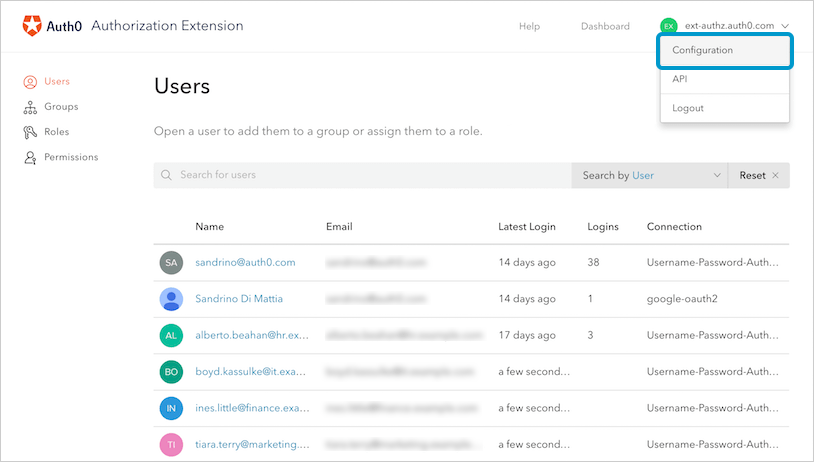
1. **[Import/Export(インポート/エクスポート)]** セクションに移動し、 **Authorization Dashboard** の右上にあるテナント名をクリックして、ドロップダウンメニューから **[Configuration(構成)]** を選択します。
 2. **[Import / Export(インポート/エクスポート)]** を選択します。
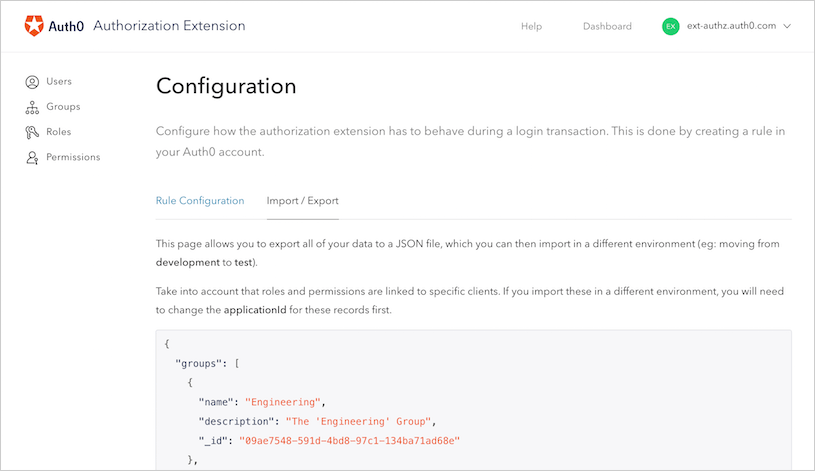 3. このフォームを使用して、JSONデータのコピー/貼り付けや編集を行います。終わったら、 **[Import(インポート)]** または **[Export(エクスポート)]** ボタンをクリックして、インポートまたはエクスポートの処理を開始します。以下はJSONの例です。
```json lines expandable theme={null}
{
"configuration": [
{
"_id": "v1",
"rolesInToken": true
}
],
"groups": [
{
"name": "Admin",
"description": "Administrators of the company",
"_id": "f185e4aa-0c28-4da7-8639-ae998512c838"
},
{
"_id": "5f5371c6-c8ff-4c7c-825e-c5ef8ac51cad",
"name": "HR",
"description": "Human Resources",
"members": [
"auth0|59c13f5ed6e34e41877c0810"
],
"roles": [
"6ab494d6-2592-4af0-a62f-2c13646143d0"
],
"nested": [
"59f2adac-9016-4051-ad02-dd5196b8f99e"
]
},
{
"name": "Trainers",
"description": "HR Trainers for New Employees",
"_id": "59f2adac-9016-4051-ad02-dd5196b8f99e"
}
],
"permissions": [
{
"applicationType": "client",
"applicationId": "fhginJh46igC6Rj630UeZBhUyDrgvJ08",
"description": "approve company expenditures",
"name": "Approve Expenses",
"_id": "e61f10f4-837e-4011-a52f-53618bd659e7"
},
{
"applicationType": "client",
"applicationId": "fhginJh46igC6Rj630UeZBhUyDrgvJ08",
"description": "approve hiring of employees",
"name": "Hire employees",
"_id": "03b94d9b-8893-413d-bdb3-451192264594"
}
],
"roles": [
{
"applicationType": "client",
"applicationId": "fhginJh46igC6Rj630UeZBhUyDrgvJ08",
"description": "Control over HR-related tasks",
"name": "HR Manager",
"permissions": [
"e61f10f4-837e-4011-a52f-53618bd659e7",
"03b94d9b-8893-413d-bdb3-451192264594"
],
"_id": "6ab494d6-2592-4af0-a62f-2c13646143d0"
}
]
}
```
## もっと詳しく
* [認可拡張機能へのAPIアクセスの有効化](/docs/ja-jp/customize/extensions/authorization-extension/enable-api-access-to-authorization-extension)
* [認可拡張でルールを使用する](/docs/ja-jp/customize/extensions/authorization-extension/use-rules-with-the-authorization-extension)
* [認可拡張機能のトラブルシューティング](/docs/ja-jp/troubleshoot/authentication-issues/troubleshoot-authorization-extension)
3. このフォームを使用して、JSONデータのコピー/貼り付けや編集を行います。終わったら、 **[Import(インポート)]** または **[Export(エクスポート)]** ボタンをクリックして、インポートまたはエクスポートの処理を開始します。以下はJSONの例です。
```json lines expandable theme={null}
{
"configuration": [
{
"_id": "v1",
"rolesInToken": true
}
],
"groups": [
{
"name": "Admin",
"description": "Administrators of the company",
"_id": "f185e4aa-0c28-4da7-8639-ae998512c838"
},
{
"_id": "5f5371c6-c8ff-4c7c-825e-c5ef8ac51cad",
"name": "HR",
"description": "Human Resources",
"members": [
"auth0|59c13f5ed6e34e41877c0810"
],
"roles": [
"6ab494d6-2592-4af0-a62f-2c13646143d0"
],
"nested": [
"59f2adac-9016-4051-ad02-dd5196b8f99e"
]
},
{
"name": "Trainers",
"description": "HR Trainers for New Employees",
"_id": "59f2adac-9016-4051-ad02-dd5196b8f99e"
}
],
"permissions": [
{
"applicationType": "client",
"applicationId": "fhginJh46igC6Rj630UeZBhUyDrgvJ08",
"description": "approve company expenditures",
"name": "Approve Expenses",
"_id": "e61f10f4-837e-4011-a52f-53618bd659e7"
},
{
"applicationType": "client",
"applicationId": "fhginJh46igC6Rj630UeZBhUyDrgvJ08",
"description": "approve hiring of employees",
"name": "Hire employees",
"_id": "03b94d9b-8893-413d-bdb3-451192264594"
}
],
"roles": [
{
"applicationType": "client",
"applicationId": "fhginJh46igC6Rj630UeZBhUyDrgvJ08",
"description": "Control over HR-related tasks",
"name": "HR Manager",
"permissions": [
"e61f10f4-837e-4011-a52f-53618bd659e7",
"03b94d9b-8893-413d-bdb3-451192264594"
],
"_id": "6ab494d6-2592-4af0-a62f-2c13646143d0"
}
]
}
```
## もっと詳しく
* [認可拡張機能へのAPIアクセスの有効化](/docs/ja-jp/customize/extensions/authorization-extension/enable-api-access-to-authorization-extension)
* [認可拡張でルールを使用する](/docs/ja-jp/customize/extensions/authorization-extension/use-rules-with-the-authorization-extension)
* [認可拡張機能のトラブルシューティング](/docs/ja-jp/troubleshoot/authentication-issues/troubleshoot-authorization-extension)