> ## Documentation Index
> Fetch the complete documentation index at: https://docs-dev-actions-triggers-prototype.mintlify.site/llms.txt
> Use this file to discover all available pages before exploring further.
# パスワードリセットのトリガー
> アクションのパスワードリセットフローについて説明します。このフローはユーザーが最初のチャレンジを完了した後、ユーザーがパスワードを設定する前に実行されます。
パスワードリセットのトリガーは、ユーザーが最初のチャレンジ(通常は[ユーザーのメール](/docs/ja-jp/secure/multi-factor-authentication/authenticate-using-ropg-flow-with-mfa/enroll-and-challenge-email-authenticators)へのリンク)を完了した後、新しいパスワードが設定される前に、パスワードのリセットプロセスで実行されます。これは、追加の多要素認証(MFA)要素でユーザーをチャレンジするか、ユーザーをサードパーティー検証などの外部サイトにリダイレクトするのに使うことができます。
検証したら、ユーザーはアカウントに新しいパスワードを設定することができます。
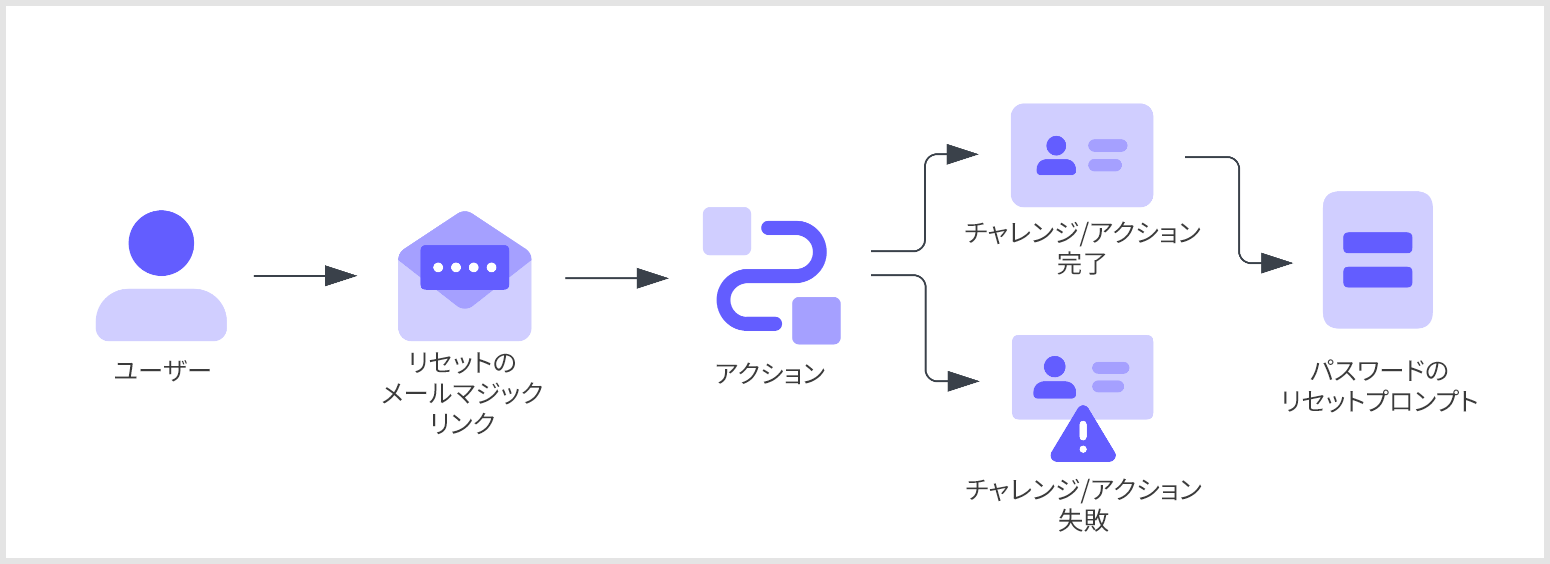 このフロー内のアクションはブロッキング(同期的)であり、トリガーのプロセスの一部として実行されます。そのため、アクションが完了するまでAuth0パイプラインの他の部分の実行が停止されます。
これらのアクションを正常に実行するには、New Universal Loginログインを有効にしなければなりません。これらのアクションは、クラシックログインではトリガーできません。
## トリガー
### PostChallenge
`post-challenge`トリガーは、ユーザーが最初のパスワードリセットチャレンジ(通常はメールのマジックリンク)を完了した後に実行される関数です。テナントには、`post-challenge`トリガーを利用するアクションを4つまで作成できます。
#### リファレンス
* [イベントオブジェクト](/docs/ja-jp/customize/actions/explore-triggers/password-reset-triggers/post-challenge-trigger/post-challenge-event-object):Auth0にログインする1人のユーザーについてのコンテキスト情報を提供します。
* [APIオブジェクト](/docs/ja-jp/customize/actions/explore-triggers/password-reset-triggers/post-challenge-trigger/post-challenge-api-object):フローの動作を変更するためのメソッドが提供されます。
## 制限事項
パスワードリセットフローは[Active Directory/LDAP接続](/docs/ja-jp/authenticate/identity-providers/enterprise-identity-providers/active-directory-ldap)には対応していません。
## 一般的なユースケース
### 追加のMFA要素でパスワードのリセットを保護する
`password-reset` / `post-challenge`(パスワードリセット/チャレンジ後)アクションはユーザーが最初のチャレンジを完了した後にMFAチャレンジを発行することができます。たとえば、テナントでWebAuthnが要素として有効化されている場合には、WebAuthnベースのチャレンジを第二要素として発行することができます。
```javascript lines theme={null}
/**@type {PasswordResetPostChallengeAction}** /
module.exports.onExecutePostChallenge = async (event, api) => {
const enrolledFactors = event.user.enrolledFactors.map((x) => ({
type: x.type
}));
api.authentication.challengeWith({ type: 'webauthn-roaming' }, { additionalFactors: enrolledFactors });
};
```
### ユーザーをサードパーティーのアプリケーションにリダイレクトする
MFAチャレンジの他にも、サードパーティー検証やリスク評価などへのリダイレクトをカスタムアクションに追加してみることができます。
```javascript lines theme={null}
/** @type {PasswordResetPostChallengeAction}
* This sample action redirects the user to an example app
* and then continues the action after the redirect to challenge
* the user with an MFA factor
*/
module.exports.onExecutePostChallenge = async (event, api) => {
// Send the user to https://my-app.example.com
api.redirect.sendUserTo('https://my-app.example.com');
};
module.exports.onContinuePostChallenge = async (event, api) => {
const enrolledFactors = event.user.enrolledFactors.map((x) => ({
type: x.type
}));
// Challenge the user with email otp OR another enrolled factor
api.authentication.challengeWith({ type: 'email' }, { additionalFactors: enrolledFactors });
// Example of how to challenge the user with multiple options
// in this case email otp OR sms otp
// api.authentication.challengeWithAny([{ type: 'email' }, { type: 'sms' }]);
};
```
Actionsパイプラインは、Auth0がユーザーをリダイレクトしている間はアクティブになりません。ユーザーがAuth0のログインプロセスを続行すると、Actionsパイプラインが再開されます。リダイレクトの前に実行されたアクションは再度実行されません。詳細については、「[アクションを使ったリダイレクト](/docs/ja-jp/customize/actions/explore-triggers/signup-and-login-triggers/login-trigger/redirect-with-actions)」を参照してください。
このフロー内のアクションはブロッキング(同期的)であり、トリガーのプロセスの一部として実行されます。そのため、アクションが完了するまでAuth0パイプラインの他の部分の実行が停止されます。
これらのアクションを正常に実行するには、New Universal Loginログインを有効にしなければなりません。これらのアクションは、クラシックログインではトリガーできません。
## トリガー
### PostChallenge
`post-challenge`トリガーは、ユーザーが最初のパスワードリセットチャレンジ(通常はメールのマジックリンク)を完了した後に実行される関数です。テナントには、`post-challenge`トリガーを利用するアクションを4つまで作成できます。
#### リファレンス
* [イベントオブジェクト](/docs/ja-jp/customize/actions/explore-triggers/password-reset-triggers/post-challenge-trigger/post-challenge-event-object):Auth0にログインする1人のユーザーについてのコンテキスト情報を提供します。
* [APIオブジェクト](/docs/ja-jp/customize/actions/explore-triggers/password-reset-triggers/post-challenge-trigger/post-challenge-api-object):フローの動作を変更するためのメソッドが提供されます。
## 制限事項
パスワードリセットフローは[Active Directory/LDAP接続](/docs/ja-jp/authenticate/identity-providers/enterprise-identity-providers/active-directory-ldap)には対応していません。
## 一般的なユースケース
### 追加のMFA要素でパスワードのリセットを保護する
`password-reset` / `post-challenge`(パスワードリセット/チャレンジ後)アクションはユーザーが最初のチャレンジを完了した後にMFAチャレンジを発行することができます。たとえば、テナントでWebAuthnが要素として有効化されている場合には、WebAuthnベースのチャレンジを第二要素として発行することができます。
```javascript lines theme={null}
/**@type {PasswordResetPostChallengeAction}** /
module.exports.onExecutePostChallenge = async (event, api) => {
const enrolledFactors = event.user.enrolledFactors.map((x) => ({
type: x.type
}));
api.authentication.challengeWith({ type: 'webauthn-roaming' }, { additionalFactors: enrolledFactors });
};
```
### ユーザーをサードパーティーのアプリケーションにリダイレクトする
MFAチャレンジの他にも、サードパーティー検証やリスク評価などへのリダイレクトをカスタムアクションに追加してみることができます。
```javascript lines theme={null}
/** @type {PasswordResetPostChallengeAction}
* This sample action redirects the user to an example app
* and then continues the action after the redirect to challenge
* the user with an MFA factor
*/
module.exports.onExecutePostChallenge = async (event, api) => {
// Send the user to https://my-app.example.com
api.redirect.sendUserTo('https://my-app.example.com');
};
module.exports.onContinuePostChallenge = async (event, api) => {
const enrolledFactors = event.user.enrolledFactors.map((x) => ({
type: x.type
}));
// Challenge the user with email otp OR another enrolled factor
api.authentication.challengeWith({ type: 'email' }, { additionalFactors: enrolledFactors });
// Example of how to challenge the user with multiple options
// in this case email otp OR sms otp
// api.authentication.challengeWithAny([{ type: 'email' }, { type: 'sms' }]);
};
```
Actionsパイプラインは、Auth0がユーザーをリダイレクトしている間はアクティブになりません。ユーザーがAuth0のログインプロセスを続行すると、Actionsパイプラインが再開されます。リダイレクトの前に実行されたアクションは再度実行されません。詳細については、「[アクションを使ったリダイレクト](/docs/ja-jp/customize/actions/explore-triggers/signup-and-login-triggers/login-trigger/redirect-with-actions)」を参照してください。