> ## Documentation Index
> Fetch the complete documentation index at: https://docs-dev-actions-triggers-prototype.mintlify.site/llms.txt
> Use this file to discover all available pages before exploring further.
# Native to Web SSO
> Learn how Auth0's Native to Web SSO works.
Native to Web SSO is currently available in Early Access. To use this feature, you must have an Enterprise plan. By using this feature, you agree to the applicable Free Trial terms in Okta’s [Master Subscription Agreement](https://www.okta.com/legal/?_gl=1*agihqh*_gcl_au*NjM2NjA1MDg4LjE3NTM5ODE4NjY.*_ga*MTgyNDA4MjM2Ny4xNzE1MTAyMjQy*_ga_QKMSDV5369*czE3NTQ0NzQ3NTAkbzM1MyRnMSR0MTc1NDQ3NjU5MCRqNiRsMCRoMA..). To learn more about Auth0's product release cycle, review Product Release Stages.
Auth0’s Native to Web Single Sign-On (SSO) feature provides a seamless user experience transitioning authenticated users from your [native application](/docs/ja-jp/authenticate/login/native-login) to your web application.
If your web application relies on embedded WebViews or external browsers to deliver extended or advanced functionality, your users can move between native and web environments in the same authenticated session.
By binding Session Transfer Tokens to the specific device through IP address or ASN, session continuity and security is maintained and ensures the authentication context remains secure throughout the transition.
## How it works
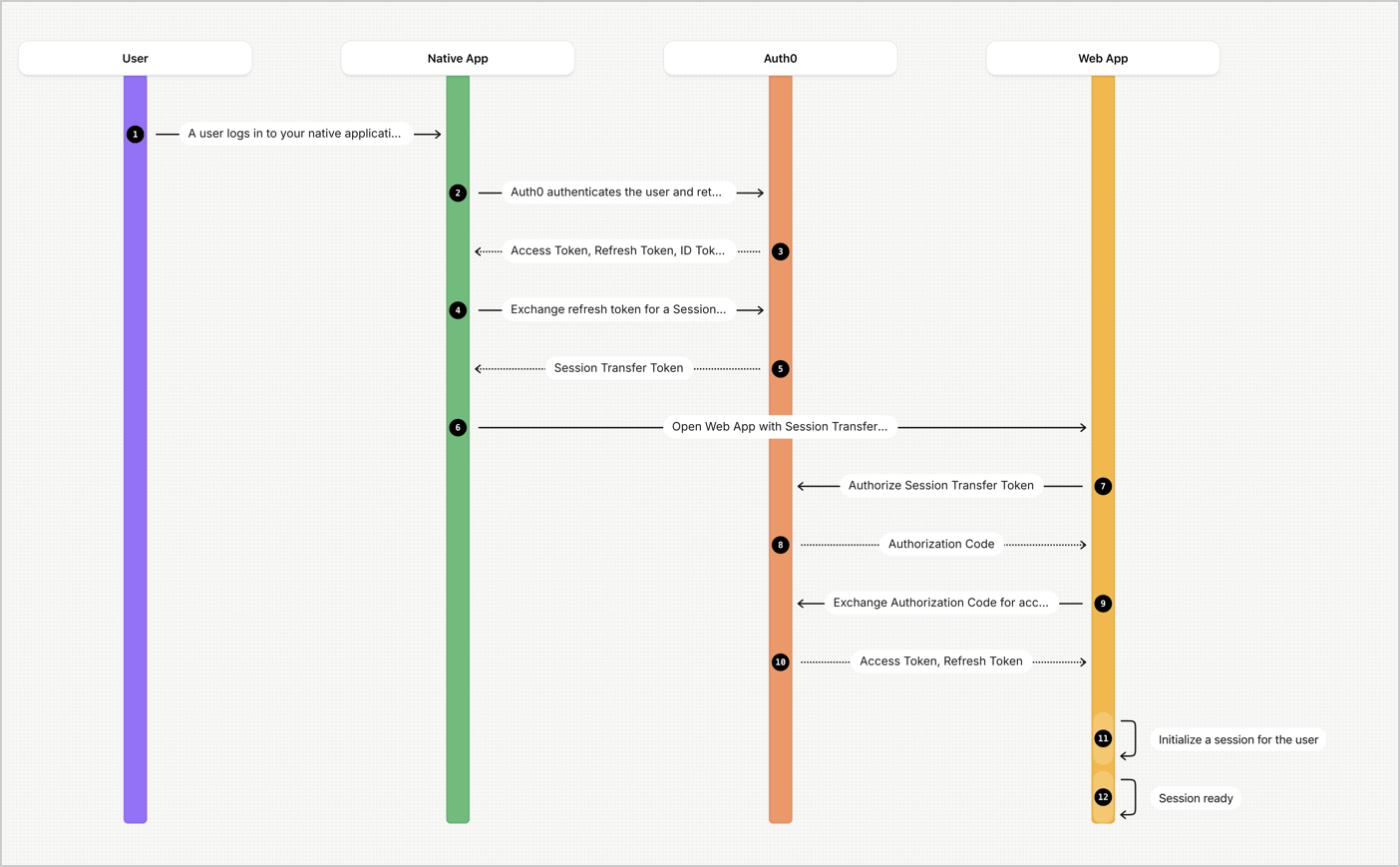 1. A user logs in to your native application.
2. Auth0 authenticates the user and returns an access token, refresh token, and ID token.
3. Your native application calls Auth0’s [`/token`](https://auth0.com/docs/api/authentication/authorization-code-flow-with-pkce/get-token-pkce) endpoint to exchange a refresh token for a Session Transfer Token. The Session Transfer Token is bound to a specific IP address or ASN.
4. Auth0 returns the Session Transfer Token for authentication with a web application.
5. Auth0 authorizes the Session Transfer Token as part of the cookie or as a URL parameter, and then returns an [authorization code](/docs/ja-jp/get-started/authentication-and-authorization-flow/authorization-code-flow).
6. The web application exchanges the authorization code for access or refresh tokens at the [`/token`](https://auth0.com/docs/api/authentication/authorization-code-flow/get-token) endpoint.
7. The web application initializes a session for the user.
Learn how to [Configure and Implement Native to Web SSO](/docs/ja-jp/authenticate/single-sign-on/native-to-web/configure-implement-native-to-web)
## Limitations
* Once Native to Web SSO is enabled in a client, the `session_transfer_token` parameter only works for Native to Web SSO
* Refresh Tokens originated from a previous Session Transfer Token transaction will not generate new Session Transfer Tokens.
1. A user logs in to your native application.
2. Auth0 authenticates the user and returns an access token, refresh token, and ID token.
3. Your native application calls Auth0’s [`/token`](https://auth0.com/docs/api/authentication/authorization-code-flow-with-pkce/get-token-pkce) endpoint to exchange a refresh token for a Session Transfer Token. The Session Transfer Token is bound to a specific IP address or ASN.
4. Auth0 returns the Session Transfer Token for authentication with a web application.
5. Auth0 authorizes the Session Transfer Token as part of the cookie or as a URL parameter, and then returns an [authorization code](/docs/ja-jp/get-started/authentication-and-authorization-flow/authorization-code-flow).
6. The web application exchanges the authorization code for access or refresh tokens at the [`/token`](https://auth0.com/docs/api/authentication/authorization-code-flow/get-token) endpoint.
7. The web application initializes a session for the user.
Learn how to [Configure and Implement Native to Web SSO](/docs/ja-jp/authenticate/single-sign-on/native-to-web/configure-implement-native-to-web)
## Limitations
* Once Native to Web SSO is enabled in a client, the `session_transfer_token` parameter only works for Native to Web SSO
* Refresh Tokens originated from a previous Session Transfer Token transaction will not generate new Session Transfer Tokens.