> ## Documentation Index
> Fetch the complete documentation index at: https://docs-dev-actions-triggers-prototype.mintlify.site/llms.txt
> Use this file to discover all available pages before exploring further.
# ユーザーのパスワードを変更する
> Auth0アプリケーションでユーザーパスワードをリセットする方法についてご説明します。
export const AuthCodeGroup = ({children, dropdown}) => {
const [processedChildren, setProcessedChildren] = useState(children);
useEffect(() => {
let unsubscribe = null;
function init() {
unsubscribe = window.autorun(() => {
const processChildren = node => {
if (typeof node === "string") {
let processedNode = node;
for (const [key, value] of window.rootStore.variableStore.values.entries()) {
const escapedKey = key.replaceAll(/[.*+?^${}()|[\]\\]/g, (String.raw)`\$&`);
processedNode = processedNode.replaceAll(new RegExp(escapedKey, "g"), value);
}
return processedNode;
} else if (Array.isArray(node)) {
return node.map(processChildren);
} else if (node && node.props && node.props.children) {
return {
...node,
props: {
...node.props,
children: processChildren(node.props.children)
}
};
}
return node;
};
setProcessedChildren(processChildren(children));
});
}
if (window.rootStore) {
init();
} else {
window.addEventListener("adu:storeReady", init);
}
return () => {
window.removeEventListener("adu:storeReady", init);
unsubscribe?.();
};
}, [children]);
return {processedChildren};
};
export const AuthCodeBlock = ({filename, icon, language, highlight, children}) => {
const [displayText, setDisplayText] = useState(children);
const [copyText, setCopyText] = useState(children);
const wrapperRef = React.useRef(null);
useEffect(() => {
let unsubscribe = null;
function init() {
if (!window.autorun || !window.rootStore) {
return;
}
unsubscribe = window.autorun(() => {
let processedChildrenForDisplay = children;
let processedChildrenForCopy = children;
for (const [key, value] of window.rootStore.variableStore.values.entries()) {
const escapedKey = key.replaceAll(/[.*+?^${}()|[\]\\]/g, (String.raw)`\$&`);
let displayValue = value;
if (key === "{yourClientSecret}" && value !== "{yourClientSecret}") {
displayValue = value.substring(0, 3) + "*****MASKED*****";
}
processedChildrenForDisplay = processedChildrenForDisplay.replaceAll(new RegExp(escapedKey, "g"), displayValue);
processedChildrenForCopy = processedChildrenForCopy.replaceAll(new RegExp(escapedKey, "g"), value);
}
setDisplayText(processedChildrenForDisplay);
setCopyText(processedChildrenForCopy);
});
}
if (window.rootStore) {
init();
} else {
window.addEventListener("adu:storeReady", init);
}
return () => {
window.removeEventListener("adu:storeReady", init);
unsubscribe?.();
};
}, [children]);
useEffect(() => {
if (!wrapperRef.current) return;
const originalWriteText = navigator.clipboard.writeText.bind(navigator.clipboard);
let isOverriding = false;
const handleClick = e => {
const button = e.target.closest('[data-testid="copy-code-button"]');
if (!button || !wrapperRef.current.contains(button)) return;
isOverriding = true;
navigator.clipboard.writeText = text => {
if (isOverriding) {
isOverriding = false;
navigator.clipboard.writeText = originalWriteText;
return originalWriteText(copyText);
}
return originalWriteText(text);
};
setTimeout(() => {
if (isOverriding) {
isOverriding = false;
navigator.clipboard.writeText = originalWriteText;
}
}, 100);
};
const wrapper = wrapperRef.current;
wrapper.addEventListener('click', handleClick, true);
return () => {
wrapper.removeEventListener('click', handleClick, true);
if (navigator.clipboard.writeText !== originalWriteText) {
navigator.clipboard.writeText = originalWriteText;
}
};
}, [copyText]);
return
{displayText}
;
};
重要なコンセプト
* Auth0 DashboardまたはManagement APIを使ってパスワードのリセットをトリガーする
このトピックでは、データベース内のユーザーのパスワードをリセットする各種方法をご紹介します。パスワードを変更できるのは、[データベース接続](/docs/ja-jp/authenticate/database-connections)のユーザーに限ります。[ソーシャル](/docs/ja-jp/authenticate/identity-providers/social-identity-providers)接続または[エンタープライズ](/docs/ja-jp/authenticate/identity-providers/enterprise-identity-providers)接続を使ってサインインしているユーザーは、IDプロバイダー(GoogleやFacebookなど)のパスワードをリセットする必要があります。以下の手順はユーザーのメールアドレスがわかっている場合のみ有効です。
ユーザーパスワードの変更には、2つの基本的な方法があります。
* [インタラクティブなパスワードリセットフローをトリガー](#trigger-an-interactive-password-reset-flow)してユーザーにリンクをメール送信する。ユーザーは、リンクからAuth0パスワードリセットページを開いて新しいパスワードを入力します。
* Auth0 Management APIまたはAuth0 Dashboardを使って[新しいパスワードを直接設定する](#directly-set-the-new-password)。
ユーザーのパスワードをリセットすると、そのユーザーのセッションが期限切れになります。
* カスタムのパスワードリセットページを設定する方法については、「[パスワードリセットページをカスタマイズする](/docs/ja-jp/customize/login-pages/classic-login/customize-password-reset-page)」をお読みください。
* パスワードの変更後にカスタムの動作を実装するには、「[アクションのトリガー:post-change-password](/docs/ja-jp/customize/actions/explore-triggers/password-reset-triggers/post-change-password-trigger)」をお読みください。
* ご自身のAuth0ユーザーアカウントのパスワードをリセットするには、「[アカウントパスワードをリセットする](/docs/ja-jp/troubleshoot/customer-support/reset-account-passwords)」をお読みください。
## インタラクティブなパスワードリセットフローをトリガーする
インタラクティブなパスワードリセットフローをトリガーする方法は、ユニバーサルログインページ経由とAuthentication API経由の2つがあり、どちらが適しているかはユースケースによって決まります。
### ユニバーサルログインページ
アプリケーションがユニバーサルログインを使用している場合、ユーザーは、ログイン画面のLockウィジェットを使ってパスワードリセットメールをトリガーします。ユニバーサルログインを使う場合、ユーザーは\*\*[Don't remember your password?(パスワードをお忘れの場合)]\*\* というリンクをクリックして、メールアドレスを入力します。すると、POST要求がAuth0に送られ、パスワードリセットのプロセスがトリガーされます。ユーザーは[パスワードリセットのメールを受信](#password-reset-email)します。
### Authentication API(認証API)
アプリケーションがAuthentication APIを通じたインタラクティブなパスワードリセットフローを採用している場合は、`POST`呼び出しを行います。`email`フィールドにパスワードを変更する必要があるユーザーのメールアドレスを入力します。呼び出しが成功すると、ユーザーは[パスワードリセットのメールを受信します](#password-reset-email)。
APIをブラウザーから呼び出す場合は、送信元URLが許可されていることを確認してください:
[[Auth0 Dashboard]>[Applications(アプリケーション)]>[Applications(アプリケーション)]](https://manage.auth0.com/#/applications/\{yourClientId}/settings)に移動して、URLを\*\*[Allowed Origins (CORS)(許可されているオリジン(CORS))]\*\* のリストに追加します。
カスタムデータベース接続の場合は、Authentication APIで`changePassword`を呼び出す前にデータベースにそのユーザーが存在しないかどうかをチェックします。
````bash cURL theme={null}
curl --request POST \
--url 'https://{yourDomain}/dbconnections/change_password' \
--header 'content-type: application/json' \
--data '{"client_id": "{yourClientId}","email": "","connection": "Username-Password-Authentication"}'
``` lines
```csharp C#
var client = new RestClient("https://{yourDomain}/dbconnections/change_password");
var request = new RestRequest(Method.POST);
request.AddHeader("content-type", "application/json");
request.AddParameter("application/json", "{"client_id": "{yourClientId}","email": "","connection": "Username-Password-Authentication"}", ParameterType.RequestBody);
IRestResponse response = client.Execute(request);
````
````go Go theme={null}
package main
import (
"fmt"
"strings"
"net/http"
"io/ioutil"
)
func main() {
url := "https://{yourDomain}/dbconnections/change_password"
payload := strings.NewReader("{"client_id": "{yourClientId}","email": "","connection": "Username-Password-Authentication"}")
req, _ := http.NewRequest("POST", url, payload)
req.Header.Add("content-type", "application/json")
res, _ := http.DefaultClient.Do(req)
defer res.Body.Close()
body, _ := ioutil.ReadAll(res.Body)
fmt.Println(res)
fmt.Println(string(body))
}
``` lines
```java Java
HttpResponse response = Unirest.post("https://{yourDomain}/dbconnections/change_password")
.header("content-type", "application/json")
.body("{"client_id": "{yourClientId}","email": "","connection": "Username-Password-Authentication"}")
.asString();
````
````javascript Node.JS theme={null}
var axios = require("axios").default;
var options = {
method: 'POST',
url: 'https://{yourDomain}/dbconnections/change_password',
headers: {'content-type': 'application/json'},
data: {
client_id: '{yourClientId}',
email: '',
connection: 'Username-Password-Authentication'
}
};
axios.request(options).then(function (response) {
console.log(response.data);
}).catch(function (error) {
console.error(error);
});
``` lines
```objc Obj-C
#import
NSDictionary \*headers = @{ @"content-type": @"application/json" };
NSDictionary \*parameters = @{ @"client_id": @"{yourClientId}",
@"email": @"",
@"connection": @"Username-Password-Authentication" };
NSData \*postData = [NSJSONSerialization dataWithJSONObject:parameters options:0 error:nil];
NSMutableURLRequest \*request = [NSMutableURLRequest requestWithURL:[NSURL URLWithString:@"https://{yourDomain}/dbconnections/change_password"]
cachePolicy:NSURLRequestUseProtocolCachePolicy
timeoutInterval:10.0];
[request setHTTPMethod:@"POST"];
[request setAllHTTPHeaderFields:headers];
[request setHTTPBody:postData];
NSURLSession \*session = [NSURLSession sharedSession];
NSURLSessionDataTask \*dataTask = [session dataTaskWithRequest:request
completionHandler:^(NSData \*data, NSURLResponse \*response, NSError \*error) {
if (error) {
NSLog(@"%@", error);
} else {
NSHTTPURLResponse \*httpResponse = (NSHTTPURLResponse \*) response;
NSLog(@"%@", httpResponse);
}
}];
[dataTask resume];
````
````php PHP theme={null}
$curl = curl_init();
curl_setopt_array($curl, [
CURLOPT_URL => "https://{yourDomain}/dbconnections/change_password",
CURLOPT_RETURNTRANSFER => true,
CURLOPT_ENCODING => "",
CURLOPT_MAXREDIRS => 10,
CURLOPT_TIMEOUT => 30,
CURLOPT_HTTP_VERSION => CURL_HTTP_VERSION_1_1,
CURLOPT_CUSTOMREQUEST => "POST",
CURLOPT_POSTFIELDS => "{"client_id": "{yourClientId}","email": "","connection": "Username-Password-Authentication"}",
CURLOPT_HTTPHEADER => [
"content-type: application/json"
],
]);
$response = curl_exec($curl);
$err = curl_error($curl);
curl_close($curl);
if ($err) {
echo "cURL Error #:" . $err;
} else {
echo $response;
}
``` lines
```python Python
import http.client
conn = http.client.HTTPSConnection("")
payload = "{"client_id": "{yourClientId}","email": "","connection": "Username-Password-Authentication"}"
headers = { 'content-type': "application/json" }
conn.request("POST", "/{yourDomain}/dbconnections/change_password", payload, headers)
res = conn.getresponse()
data = res.read()
print(data.decode("utf-8"))
````
````ruby Ruby theme={null}
require 'uri'
require 'net/http'
require 'openssl'
url = URI("https://{yourDomain}/dbconnections/change_password")
http = Net::HTTP.new(url.host, url.port)
http.use_ssl = true
http.verify_mode = OpenSSL::SSL::VERIFY_NONE
request = Net::HTTP::Post.new(url)
request["content-type"] = 'application/json'
request.body = "{"client_id": "{yourClientId}","email": "","connection": "Username-Password-Authentication"}"
response = http.request(request)
puts response.read_body
``` lines
```swift Swift
import Foundation
let headers = ["content-type": "application/json"]
let parameters = [
"client_id": "{yourClientId}",
"email": "",
"connection": "Username-Password-Authentication"
] as [String : Any]
let postData = JSONSerialization.data(withJSONObject: parameters, options: [])
let request = NSMutableURLRequest(url: NSURL(string: "https://{yourDomain}/dbconnections/change_password")! as URL,
cachePolicy: .useProtocolCachePolicy,
timeoutInterval: 10.0)
request.httpMethod = "POST"
request.allHTTPHeaderFields = headers
request.httpBody = postData as Data
let session = URLSession.shared
let dataTask = session.dataTask(with: request as URLRequest, completionHandler: { (data, response, error) -> Void in
if (error != nil) {
print(error)
} else {
let httpResponse = response as? HTTPURLResponse
print(httpResponse)
}
})
dataTask.resume()
````
### パスワードリセットメール
パスワードリセットのプロセスがどの方法でトリガーされた場合でも、ユーザーに、パスワードのリセット用リンクがメールで届きます。
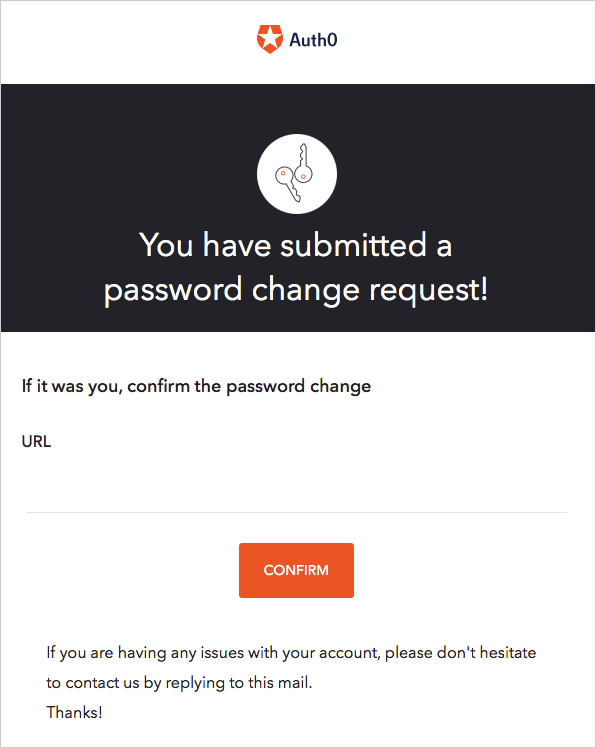 ユーザーがリンクをクリックすると、[パスワードリセットページ](/docs/ja-jp/customize/login-pages/classic-login/customize-password-reset-page)に移動します。
ユーザーが新しいパスワードを入力・送信すると、新しい資格情報でログインできるようになった旨が表示されます。
パスワードリセットについての注意事項:
* メール内のリセット用リンクは1回しか使用できません。
* ユーザーが複数のパスワードリセットメールを受信した場合は、直近のメール内のリンクのみが有効です。
* **[URL Lifetime(ライフタイム)]** フィールドは、リンクの有効期間を示します。Auth0 Dashboardから[パスワード変更メールをカスタマイズ](/docs/ja-jp/customize/email/email-templates)して[リンクのライフタイムを変更](/docs/ja-jp/api/authentication/reference#change-password)できます。
* Auth0 Actionsを使ってパスワードリセットフローに他の要素を含めることもできます。詳細については、「[パスワードリセットフロー](/docs/ja-jp/customize/actions/explore-triggers/password-reset-triggers)」をお読みください。
[クラシックログイン](/docs/ja-jp/authenticate/login/auth0-universal-login/universal-login-vs-classic-login/classic-experience)では、パスワードリセットの完了後にユーザーをリダイレクトするURLを構成できます。このURLが、成功したというサインとメッセージを受け取ります。詳細については、「[メールテンプレートをカスタマイズする](/docs/ja-jp/customize/email/email-templates)」の「リダイレクト先URLの構成」セクションをお読みください。
[ユニバーサルログイン](/docs/ja-jp/authenticate/login/auth0-universal-login/universal-login-vs-classic-login/universal-experience)では、成功するとユーザーを[デフォルトのログインルート](/docs/ja-jp/authenticate/login/auth0-universal-login/configure-default-login-routes)にリダイレクトし、ユニバーサルログインフローの一部としてエラーケースを処理します。このエクスペリエンスでは、メールテンプレートにあるリダイレクトURLが無視されます。
Management APIには[Create a Password Change Ticket](/docs/ja-jp/api/management/v2#!/Tickets/post_password_change)エンドポイントがあり、パスワードのリセットメールの場合と同じようにURLが生成されます。メール配信方式が適切でない場合は、生成されたURLを使用できます。デフォルトのフローでは、メールの配信がユーザーのIDを検証しますが(偽装者によるメール受信箱へのアクセスを防ぐため)、チケットのURLを使用する場合は、アプリケーションが何らかの手段でユーザーのIDを検証しなければなりません。
## 新しいパスワードを直接設定する
パスワードリセットメールを送らずに、ユーザーの新しいパスワードを直接設定するには、[Management API](#use-the-management-api)または[Auth0 Dashboard](#manually-set-users-passwords-using-the-auth0-dashboard)のいずれかを使います。
ユーザーのパスワードを変更しても、そのユーザー本人には通知されません。
### Management APIの使用
独自のパスワードリセットフローを実装したい場合は、Management APIへのサーバー要求からユーザーパスワードを直接変更できます。それには、[Update a Userエンドポイント](/docs/ja-jp/api/management/v2#!/Users/patch_users_by_id)に`PATCH`呼び出しを行います。
````bash cURL theme={null}
curl --request PATCH \
--url 'https://{yourDomain}/api/v2/users/%7BuserId%7D' \
--header 'authorization: Bearer {yourMgmtApiAccessToken}' \
--header 'content-type: application/json' \
--data '{"password": "newPassword","connection": "connectionName"}'
``` lines
```csharp C#
var client = new RestClient("https://{yourDomain}/api/v2/users/%7BuserId%7D");
var request = new RestRequest(Method.PATCH);
request.AddHeader("content-type", "application/json");
request.AddHeader("authorization", "Bearer {yourMgmtApiAccessToken}");
request.AddParameter("application/json", "{"password": "newPassword","connection": "connectionName"}", ParameterType.RequestBody);
IRestResponse response = client.Execute(request);
````
````go Go theme={null}
package main
import (
"fmt"
"strings"
"net/http"
"io/ioutil"
)
func main() {
url := "https://{yourDomain}/api/v2/users/%7BuserId%7D"
payload := strings.NewReader("{"password": "newPassword","connection": "connectionName"}")
req, _ := http.NewRequest("PATCH", url, payload)
req.Header.Add("content-type", "application/json")
req.Header.Add("authorization", "Bearer {yourMgmtApiAccessToken}")
res, _ := http.DefaultClient.Do(req)
defer res.Body.Close()
body, _ := ioutil.ReadAll(res.Body)
fmt.Println(res)
fmt.Println(string(body))
}
``` lines
```java Java
HttpResponse response = Unirest.patch("https://{yourDomain}/api/v2/users/%7BuserId%7D")
.header("content-type", "application/json")
.header("authorization", "Bearer {yourMgmtApiAccessToken}")
.body("{"password": "newPassword","connection": "connectionName"}")
.asString();
````
````javascript Node.JS theme={null}
var axios = require("axios").default;
var options = {
method: 'PATCH',
url: 'https://{yourDomain}/api/v2/users/%7BuserId%7D',
headers: {
'content-type': 'application/json',
authorization: 'Bearer {yourMgmtApiAccessToken}'
},
data: {password: 'newPassword', connection: 'connectionName'}
};
axios.request(options).then(function (response) {
console.log(response.data);
}).catch(function (error) {
console.error(error);
});
``` lines
```objc Obj-C
#import
NSDictionary \*headers = @{ @"content-type": @"application/json",
@"authorization": @"Bearer {yourMgmtApiAccessToken}" };
NSDictionary \*parameters = @{ @"password": @"newPassword",
@"connection": @"connectionName" };
NSData \*postData = [NSJSONSerialization dataWithJSONObject:parameters options:0 error:nil];
NSMutableURLRequest \*request = [NSMutableURLRequest requestWithURL:[NSURL URLWithString:@"https://{yourDomain}/api/v2/users/%7BuserId%7D"]
cachePolicy:NSURLRequestUseProtocolCachePolicy
timeoutInterval:10.0];
[request setHTTPMethod:@"PATCH"];
[request setAllHTTPHeaderFields:headers];
[request setHTTPBody:postData];
NSURLSession \*session = [NSURLSession sharedSession];
NSURLSessionDataTask \*dataTask = [session dataTaskWithRequest:request
completionHandler:^(NSData \*data, NSURLResponse \*response, NSError \*error) {
if (error) {
NSLog(@"%@", error);
} else {
NSHTTPURLResponse \*httpResponse = (NSHTTPURLResponse \*) response;
NSLog(@"%@", httpResponse);
}
}];
[dataTask resume];
````
````php PHP theme={null}
$curl = curl_init();
curl_setopt_array($curl, [
CURLOPT_URL => "https://{yourDomain}/api/v2/users/%7BuserId%7D",
CURLOPT_RETURNTRANSFER => true,
CURLOPT_ENCODING => "",
CURLOPT_MAXREDIRS => 10,
CURLOPT_TIMEOUT => 30,
CURLOPT_HTTP_VERSION => CURL_HTTP_VERSION_1_1,
CURLOPT_CUSTOMREQUEST => "PATCH",
CURLOPT_POSTFIELDS => "{"password": "newPassword","connection": "connectionName"}",
CURLOPT_HTTPHEADER => [
"authorization: Bearer {yourMgmtApiAccessToken}",
"content-type: application/json"
],
]);
$response = curl_exec($curl);
$err = curl_error($curl);
curl_close($curl);
if ($err) {
echo "cURL Error #:" . $err;
} else {
echo $response;
}
``` lines
```python Python
import http.client
conn = http.client.HTTPSConnection("")
payload = "{"password": "newPassword","connection": "connectionName"}"
headers = {
'content-type': "application/json",
'authorization': "Bearer {yourMgmtApiAccessToken}"
}
conn.request("PATCH", "/{yourDomain}/api/v2/users/%7BuserId%7D", payload, headers)
res = conn.getresponse()
data = res.read()
print(data.decode("utf-8"))
````
````ruby Ruby theme={null}
require 'uri'
require 'net/http'
require 'openssl'
url = URI("https://{yourDomain}/api/v2/users/%7BuserId%7D")
http = Net::HTTP.new(url.host, url.port)
http.use_ssl = true
http.verify_mode = OpenSSL::SSL::VERIFY_NONE
request = Net::HTTP::Patch.new(url)
request["content-type"] = 'application/json'
request["authorization"] = 'Bearer {yourMgmtApiAccessToken}'
request.body = "{"password": "newPassword","connection": "connectionName"}"
response = http.request(request)
puts response.read_body
``` lines
```swift Swift
import Foundation
let headers = [
"content-type": "application/json",
"authorization": "Bearer {yourMgmtApiAccessToken}"
]
let parameters = [
"password": "newPassword",
"connection": "connectionName"
] as [String : Any]
let postData = JSONSerialization.data(withJSONObject: parameters, options: [])
let request = NSMutableURLRequest(url: NSURL(string: "https://{yourDomain}/api/v2/users/%7BuserId%7D")! as URL,
cachePolicy: .useProtocolCachePolicy,
timeoutInterval: 10.0)
request.httpMethod = "PATCH"
request.allHTTPHeaderFields = headers
request.httpBody = postData as Data
let session = URLSession.shared
let dataTask = session.dataTask(with: request as URLRequest, completionHandler: { (data, response, error) -> Void in
if (error != nil) {
print(error)
} else {
let httpResponse = response as? HTTPURLResponse
print(httpResponse)
}
})
dataTask.resume()
````
### Auth0 Dashboardを使ってユーザーパスワードを手動で設定する
Auth0テナントの管理者権限を持っていれば誰でも、[[Auth0 Dashboard]>[User Management(ユーザー管理)]>[Users(ユーザー)]](https://manage.auth0.com/#/users)からユーザーのパスワードを手動で変更できます。
1. パスワードを変更したいユーザーの名前を選択します。
2. ページ下部の **[Danger Zone(危険ゾーン)]** に移動します。
3. 赤い **[Change Password(パスワード変更)]** ボックスで **[Change(変更)]** を選択します。
ユーザーがリンクをクリックすると、[パスワードリセットページ](/docs/ja-jp/customize/login-pages/classic-login/customize-password-reset-page)に移動します。
ユーザーが新しいパスワードを入力・送信すると、新しい資格情報でログインできるようになった旨が表示されます。
パスワードリセットについての注意事項:
* メール内のリセット用リンクは1回しか使用できません。
* ユーザーが複数のパスワードリセットメールを受信した場合は、直近のメール内のリンクのみが有効です。
* **[URL Lifetime(ライフタイム)]** フィールドは、リンクの有効期間を示します。Auth0 Dashboardから[パスワード変更メールをカスタマイズ](/docs/ja-jp/customize/email/email-templates)して[リンクのライフタイムを変更](/docs/ja-jp/api/authentication/reference#change-password)できます。
* Auth0 Actionsを使ってパスワードリセットフローに他の要素を含めることもできます。詳細については、「[パスワードリセットフロー](/docs/ja-jp/customize/actions/explore-triggers/password-reset-triggers)」をお読みください。
[クラシックログイン](/docs/ja-jp/authenticate/login/auth0-universal-login/universal-login-vs-classic-login/classic-experience)では、パスワードリセットの完了後にユーザーをリダイレクトするURLを構成できます。このURLが、成功したというサインとメッセージを受け取ります。詳細については、「[メールテンプレートをカスタマイズする](/docs/ja-jp/customize/email/email-templates)」の「リダイレクト先URLの構成」セクションをお読みください。
[ユニバーサルログイン](/docs/ja-jp/authenticate/login/auth0-universal-login/universal-login-vs-classic-login/universal-experience)では、成功するとユーザーを[デフォルトのログインルート](/docs/ja-jp/authenticate/login/auth0-universal-login/configure-default-login-routes)にリダイレクトし、ユニバーサルログインフローの一部としてエラーケースを処理します。このエクスペリエンスでは、メールテンプレートにあるリダイレクトURLが無視されます。
Management APIには[Create a Password Change Ticket](/docs/ja-jp/api/management/v2#!/Tickets/post_password_change)エンドポイントがあり、パスワードのリセットメールの場合と同じようにURLが生成されます。メール配信方式が適切でない場合は、生成されたURLを使用できます。デフォルトのフローでは、メールの配信がユーザーのIDを検証しますが(偽装者によるメール受信箱へのアクセスを防ぐため)、チケットのURLを使用する場合は、アプリケーションが何らかの手段でユーザーのIDを検証しなければなりません。
## 新しいパスワードを直接設定する
パスワードリセットメールを送らずに、ユーザーの新しいパスワードを直接設定するには、[Management API](#use-the-management-api)または[Auth0 Dashboard](#manually-set-users-passwords-using-the-auth0-dashboard)のいずれかを使います。
ユーザーのパスワードを変更しても、そのユーザー本人には通知されません。
### Management APIの使用
独自のパスワードリセットフローを実装したい場合は、Management APIへのサーバー要求からユーザーパスワードを直接変更できます。それには、[Update a Userエンドポイント](/docs/ja-jp/api/management/v2#!/Users/patch_users_by_id)に`PATCH`呼び出しを行います。
````bash cURL theme={null}
curl --request PATCH \
--url 'https://{yourDomain}/api/v2/users/%7BuserId%7D' \
--header 'authorization: Bearer {yourMgmtApiAccessToken}' \
--header 'content-type: application/json' \
--data '{"password": "newPassword","connection": "connectionName"}'
``` lines
```csharp C#
var client = new RestClient("https://{yourDomain}/api/v2/users/%7BuserId%7D");
var request = new RestRequest(Method.PATCH);
request.AddHeader("content-type", "application/json");
request.AddHeader("authorization", "Bearer {yourMgmtApiAccessToken}");
request.AddParameter("application/json", "{"password": "newPassword","connection": "connectionName"}", ParameterType.RequestBody);
IRestResponse response = client.Execute(request);
````
````go Go theme={null}
package main
import (
"fmt"
"strings"
"net/http"
"io/ioutil"
)
func main() {
url := "https://{yourDomain}/api/v2/users/%7BuserId%7D"
payload := strings.NewReader("{"password": "newPassword","connection": "connectionName"}")
req, _ := http.NewRequest("PATCH", url, payload)
req.Header.Add("content-type", "application/json")
req.Header.Add("authorization", "Bearer {yourMgmtApiAccessToken}")
res, _ := http.DefaultClient.Do(req)
defer res.Body.Close()
body, _ := ioutil.ReadAll(res.Body)
fmt.Println(res)
fmt.Println(string(body))
}
``` lines
```java Java
HttpResponse response = Unirest.patch("https://{yourDomain}/api/v2/users/%7BuserId%7D")
.header("content-type", "application/json")
.header("authorization", "Bearer {yourMgmtApiAccessToken}")
.body("{"password": "newPassword","connection": "connectionName"}")
.asString();
````
````javascript Node.JS theme={null}
var axios = require("axios").default;
var options = {
method: 'PATCH',
url: 'https://{yourDomain}/api/v2/users/%7BuserId%7D',
headers: {
'content-type': 'application/json',
authorization: 'Bearer {yourMgmtApiAccessToken}'
},
data: {password: 'newPassword', connection: 'connectionName'}
};
axios.request(options).then(function (response) {
console.log(response.data);
}).catch(function (error) {
console.error(error);
});
``` lines
```objc Obj-C
#import
NSDictionary \*headers = @{ @"content-type": @"application/json",
@"authorization": @"Bearer {yourMgmtApiAccessToken}" };
NSDictionary \*parameters = @{ @"password": @"newPassword",
@"connection": @"connectionName" };
NSData \*postData = [NSJSONSerialization dataWithJSONObject:parameters options:0 error:nil];
NSMutableURLRequest \*request = [NSMutableURLRequest requestWithURL:[NSURL URLWithString:@"https://{yourDomain}/api/v2/users/%7BuserId%7D"]
cachePolicy:NSURLRequestUseProtocolCachePolicy
timeoutInterval:10.0];
[request setHTTPMethod:@"PATCH"];
[request setAllHTTPHeaderFields:headers];
[request setHTTPBody:postData];
NSURLSession \*session = [NSURLSession sharedSession];
NSURLSessionDataTask \*dataTask = [session dataTaskWithRequest:request
completionHandler:^(NSData \*data, NSURLResponse \*response, NSError \*error) {
if (error) {
NSLog(@"%@", error);
} else {
NSHTTPURLResponse \*httpResponse = (NSHTTPURLResponse \*) response;
NSLog(@"%@", httpResponse);
}
}];
[dataTask resume];
````
````php PHP theme={null}
$curl = curl_init();
curl_setopt_array($curl, [
CURLOPT_URL => "https://{yourDomain}/api/v2/users/%7BuserId%7D",
CURLOPT_RETURNTRANSFER => true,
CURLOPT_ENCODING => "",
CURLOPT_MAXREDIRS => 10,
CURLOPT_TIMEOUT => 30,
CURLOPT_HTTP_VERSION => CURL_HTTP_VERSION_1_1,
CURLOPT_CUSTOMREQUEST => "PATCH",
CURLOPT_POSTFIELDS => "{"password": "newPassword","connection": "connectionName"}",
CURLOPT_HTTPHEADER => [
"authorization: Bearer {yourMgmtApiAccessToken}",
"content-type: application/json"
],
]);
$response = curl_exec($curl);
$err = curl_error($curl);
curl_close($curl);
if ($err) {
echo "cURL Error #:" . $err;
} else {
echo $response;
}
``` lines
```python Python
import http.client
conn = http.client.HTTPSConnection("")
payload = "{"password": "newPassword","connection": "connectionName"}"
headers = {
'content-type': "application/json",
'authorization': "Bearer {yourMgmtApiAccessToken}"
}
conn.request("PATCH", "/{yourDomain}/api/v2/users/%7BuserId%7D", payload, headers)
res = conn.getresponse()
data = res.read()
print(data.decode("utf-8"))
````
````ruby Ruby theme={null}
require 'uri'
require 'net/http'
require 'openssl'
url = URI("https://{yourDomain}/api/v2/users/%7BuserId%7D")
http = Net::HTTP.new(url.host, url.port)
http.use_ssl = true
http.verify_mode = OpenSSL::SSL::VERIFY_NONE
request = Net::HTTP::Patch.new(url)
request["content-type"] = 'application/json'
request["authorization"] = 'Bearer {yourMgmtApiAccessToken}'
request.body = "{"password": "newPassword","connection": "connectionName"}"
response = http.request(request)
puts response.read_body
``` lines
```swift Swift
import Foundation
let headers = [
"content-type": "application/json",
"authorization": "Bearer {yourMgmtApiAccessToken}"
]
let parameters = [
"password": "newPassword",
"connection": "connectionName"
] as [String : Any]
let postData = JSONSerialization.data(withJSONObject: parameters, options: [])
let request = NSMutableURLRequest(url: NSURL(string: "https://{yourDomain}/api/v2/users/%7BuserId%7D")! as URL,
cachePolicy: .useProtocolCachePolicy,
timeoutInterval: 10.0)
request.httpMethod = "PATCH"
request.allHTTPHeaderFields = headers
request.httpBody = postData as Data
let session = URLSession.shared
let dataTask = session.dataTask(with: request as URLRequest, completionHandler: { (data, response, error) -> Void in
if (error != nil) {
print(error)
} else {
let httpResponse = response as? HTTPURLResponse
print(httpResponse)
}
})
dataTask.resume()
````
### Auth0 Dashboardを使ってユーザーパスワードを手動で設定する
Auth0テナントの管理者権限を持っていれば誰でも、[[Auth0 Dashboard]>[User Management(ユーザー管理)]>[Users(ユーザー)]](https://manage.auth0.com/#/users)からユーザーのパスワードを手動で変更できます。
1. パスワードを変更したいユーザーの名前を選択します。
2. ページ下部の **[Danger Zone(危険ゾーン)]** に移動します。
3. 赤い **[Change Password(パスワード変更)]** ボックスで **[Change(変更)]** を選択します。
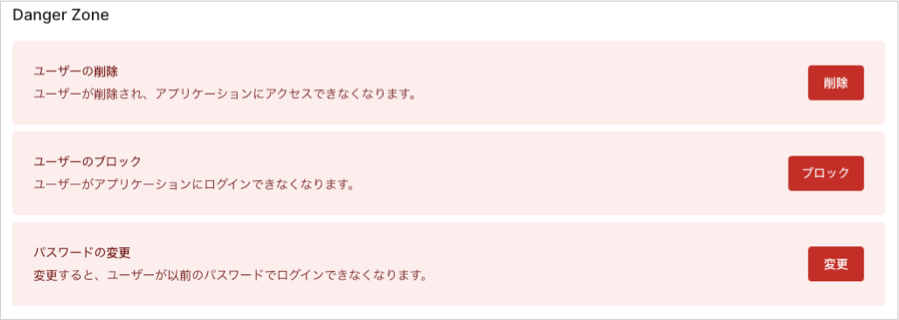 4. 新しいパスワードを入力して、**[Save(保存)]** を選択します。