> ## Documentation Index
> Fetch the complete documentation index at: https://docs-dev-actions-triggers-prototype.mintlify.site/llms.txt
> Use this file to discover all available pages before exploring further.
> Learn how to call your API from an input-constrained device using the Device Authorization flow.
# Call Your API Using the Device Authorization Flow
export const AuthCodeGroup = ({children, dropdown}) => {
const [processedChildren, setProcessedChildren] = useState(children);
useEffect(() => {
let unsubscribe = null;
function init() {
unsubscribe = window.autorun(() => {
const processChildren = node => {
if (typeof node === "string") {
let processedNode = node;
for (const [key, value] of window.rootStore.variableStore.values.entries()) {
const escapedKey = key.replaceAll(/[.*+?^${}()|[\]\\]/g, (String.raw)`\$&`);
processedNode = processedNode.replaceAll(new RegExp(escapedKey, "g"), value);
}
return processedNode;
} else if (Array.isArray(node)) {
return node.map(processChildren);
} else if (node && node.props && node.props.children) {
return {
...node,
props: {
...node.props,
children: processChildren(node.props.children)
}
};
}
return node;
};
setProcessedChildren(processChildren(children));
});
}
if (window.rootStore) {
init();
} else {
window.addEventListener("adu:storeReady", init);
}
return () => {
window.removeEventListener("adu:storeReady", init);
unsubscribe?.();
};
}, [children]);
return {processedChildren};
};
export const AuthCodeBlock = ({filename, icon, language, highlight, children}) => {
const [displayText, setDisplayText] = useState(children);
const [copyText, setCopyText] = useState(children);
const wrapperRef = React.useRef(null);
useEffect(() => {
let unsubscribe = null;
function init() {
if (!window.autorun || !window.rootStore) {
return;
}
unsubscribe = window.autorun(() => {
let processedChildrenForDisplay = children;
let processedChildrenForCopy = children;
for (const [key, value] of window.rootStore.variableStore.values.entries()) {
const escapedKey = key.replaceAll(/[.*+?^${}()|[\]\\]/g, (String.raw)`\$&`);
let displayValue = value;
if (key === "{yourClientSecret}" && value !== "{yourClientSecret}") {
displayValue = value.substring(0, 3) + "*****MASKED*****";
}
processedChildrenForDisplay = processedChildrenForDisplay.replaceAll(new RegExp(escapedKey, "g"), displayValue);
processedChildrenForCopy = processedChildrenForCopy.replaceAll(new RegExp(escapedKey, "g"), value);
}
setDisplayText(processedChildrenForDisplay);
setCopyText(processedChildrenForCopy);
});
}
if (window.rootStore) {
init();
} else {
window.addEventListener("adu:storeReady", init);
}
return () => {
window.removeEventListener("adu:storeReady", init);
unsubscribe?.();
};
}, [children]);
useEffect(() => {
if (!wrapperRef.current) return;
const originalWriteText = navigator.clipboard.writeText.bind(navigator.clipboard);
let isOverriding = false;
const handleClick = e => {
const button = e.target.closest('[data-testid="copy-code-button"]');
if (!button || !wrapperRef.current.contains(button)) return;
isOverriding = true;
navigator.clipboard.writeText = text => {
if (isOverriding) {
isOverriding = false;
navigator.clipboard.writeText = originalWriteText;
return originalWriteText(copyText);
}
return originalWriteText(text);
};
setTimeout(() => {
if (isOverriding) {
isOverriding = false;
navigator.clipboard.writeText = originalWriteText;
}
}, 100);
};
const wrapper = wrapperRef.current;
wrapper.addEventListener('click', handleClick, true);
return () => {
wrapper.removeEventListener('click', handleClick, true);
if (navigator.clipboard.writeText !== originalWriteText) {
navigator.clipboard.writeText = originalWriteText;
}
};
}, [copyText]);
return
{displayText}
;
};
This tutorial will help you call your own API from an input-constrained device using the Device Authorization Flow. If you want to learn how the flow works and why you should use it, see [Device Authorization Flow](/docs/get-started/authentication-and-authorization-flow/device-authorization-flow).
Auth0 makes it easy for your app to implement the Device Authorization flow using:
* [Authentication API](https://auth0.com/docs/api/authentication): Keep reading to learn how to call our API directly. For an interactive experience, read [Device Flow Playground](https://auth0.github.io/device-flow-playground/).
## Prerequisites
Before beginning this tutorial:
* Check limitations (below) to be sure the Device Authorization flow is suitable for your implementation.
* [Register the Application with Auth0](/docs/get-started/auth0-overview/create-applications/native-apps).
* Select an **Application Type** of **Native**.
* If necessary, set **Allowed Web Origins**. You can use this to allow localhost as an origin for local development, or to set an allowed origin for specific TV software with architecture subject to CORS (e.g., HTML5 + JS). Most applications will not use this setting.
* Ensure that the **OIDC Conformant** toggle is enabled. This setting is in the [Dashboard](https://manage.auth0.com/#) under **Applications > Application > Advanced Settings > OAuth**.
* Make sure the Application's **Grant Types** include **Device Code**. To learn how, read [Update Grant Types](/docs/get-started/applications/update-grant-types).
* If you want your Application to be able to use Refresh Tokens, make sure the Application's **Grant Types** include **Refresh Token**. To learn how, read [Update Grant Types](/docs/get-started/applications/update-grant-types). To learn more about Refresh Tokens, read [Refresh Tokens](/docs/secure/tokens/refresh-tokens).
* Set up and enable at least one connection for the Application: [Database connections](/docs/get-started/applications/set-up-database-connections), [Social connections](/docs/authenticate/identity-providers/social-identity-providers)
* [Register your API with Auth0](/docs/get-started/architecture-scenarios/mobile-api/part-2#create-the-api)
* If you want your API to receive Refresh Tokens to allow it to obtain new tokens when the previous ones expire, enable **Allow Offline Access**. To learn more about Refresh Tokens, read [Refresh Tokens](/docs/secure/tokens/refresh-tokens).
* [Configure Device User Code Settings](/docs/get-started/tenant-settings/configure-device-user-code-settings) to define the character set, format, and length of your randomly-generated user code.
## Steps
1. [Request device code](#request-device-code) (Device Flow): Request a device code that the user can use to authorize the device.
2. [Request device activation](#request-device-activation) (Device Flow): Request that the user authorize the device using their laptop or smartphone.
3. [Request tokens](#request-tokens) (Device Flow): Poll the token endpoint to request a token.
4. [Authorize user](#authorize-user) (Browser Flow): The user authorizes the device, so the device can receive tokens.
5. [Receive tokens](#receive-tokens) (Device Flow): After the user successfully authorizes the device, receive tokens.
6. [Call API](#call-your-api) (Device Flow): Use the retrieved Access Token to call your API.
7. [Refresh tokens](#refresh-tokens) (Device Flow): Use a Refresh Token to request new tokens when the existing ones expire.
Optional: [Explore sample use cases](#sample-use-cases).
Optional: [Troubleshoot](#troubleshoot).
### Request device code
Once the user has started their device app and wants to authorize the device, you'll need to get a device code. When the user begins their session in their browser-based device, this code will be bound to that session.
To get the device code, your app must request a code from the [device code URL](https://auth0.com/docs/api/authentication#get-device-code), including the Client ID.
#### Example POST to device code URL
```bash cURL theme={null}
curl --request POST \
--url 'https://{yourDomain}/oauth/device/code' \
--header 'content-type: application/x-www-form-urlencoded' \
--data 'client_id={yourClientId}' \
--data 'scope={scope}' \
--data 'audience={audience}'
```
```csharp C# theme={null}
var client = new RestClient("https://{yourDomain}/oauth/device/code");
var request = new RestRequest(Method.POST);
request.AddHeader("content-type", "application/x-www-form-urlencoded");
request.AddParameter("application/x-www-form-urlencoded", "client_id={yourClientId}&scope=%7Bscope%7D&audience=%7Baudience%7D", ParameterType.RequestBody);
IRestResponse response = client.Execute(request);
```
```go Go theme={null}
package main
import (
"fmt"
"strings"
"net/http"
"io/ioutil"
)
func main() {
url := "https://{yourDomain}/oauth/device/code"
payload := strings.NewReader("client_id={yourClientId}&scope=%7Bscope%7D&audience=%7Baudience%7D")
req, _ := http.NewRequest("POST", url, payload)
req.Header.Add("content-type", "application/x-www-form-urlencoded")
res, _ := http.DefaultClient.Do(req)
defer res.Body.Close()
body, _ := ioutil.ReadAll(res.Body)
fmt.Println(res)
fmt.Println(string(body))
}
```
```java Java theme={null}
HttpResponse response = Unirest.post("https://{yourDomain}/oauth/device/code")
.header("content-type", "application/x-www-form-urlencoded")
.body("client_id={yourClientId}&scope=%7Bscope%7D&audience=%7Baudience%7D")
.asString();
```
```javascript Node.JS theme={null}
var axios = require("axios").default;
var options = {
method: 'POST',
url: 'https://{yourDomain}/oauth/device/code',
headers: {'content-type': 'application/x-www-form-urlencoded'},
data: {client_id: '{yourClientId}', scope: '{scope}', audience: '{audience}'}
};
axios.request(options).then(function (response) {
console.log(response.data);
}).catch(function (error) {
console.error(error);
});
```
```php PHP theme={null}
$curl = curl_init();
curl_setopt_array($curl, [
CURLOPT_URL => "https://{yourDomain}/oauth/device/code",
CURLOPT_RETURNTRANSFER => true,
CURLOPT_ENCODING => "",
CURLOPT_MAXREDIRS => 10,
CURLOPT_TIMEOUT => 30,
CURLOPT_HTTP_VERSION => CURL_HTTP_VERSION_1_1,
CURLOPT_CUSTOMREQUEST => "POST",
CURLOPT_POSTFIELDS => "client_id={yourClientId}&scope=%7Bscope%7D&audience=%7Baudience%7D",
CURLOPT_HTTPHEADER => [
"content-type: application/x-www-form-urlencoded"
],
]);
$response = curl_exec($curl);
$err = curl_error($curl);
curl_close($curl);
if ($err) {
echo "cURL Error #:" . $err;
} else {
echo $response;
}
```
```python Python theme={null}
import http.client
conn = http.client.HTTPSConnection("")
payload = "client_id={yourClientId}&scope=%7Bscope%7D&audience=%7Baudience%7D"
headers = { 'content-type': "application/x-www-form-urlencoded" }
conn.request("POST", "/{yourDomain}/oauth/device/code", payload, headers)
res = conn.getresponse()
data = res.read()
print(data.decode("utf-8"))
```
```ruby Ruby theme={null}
require 'uri'
require 'net/http'
require 'openssl'
url = URI("https://{yourDomain}/oauth/device/code")
http = Net::HTTP.new(url.host, url.port)
http.use_ssl = true
http.verify_mode = OpenSSL::SSL::VERIFY_NONE
request = Net::HTTP::Post.new(url)
request["content-type"] = 'application/x-www-form-urlencoded'
request.body = "client_id={yourClientId}&scope=%7Bscope%7D&audience=%7Baudience%7D"
response = http.request(request)
puts response.read_body
```
##### Device code parameters
Note that when requesting a device code to call a custom API, you:
* must include an audience parameter
* can include additional scopes supported by the target API
If your app wants an Access Token only to retrieve info about the authenticated user, then no audience parameter is required.
| Parameter Name | Description |
| -------------- | ---------------------------------------------------------------------------------------------------------------------------------------------------------------------------------------------------------------------------------------------------------------------------------------------------------------------------------------------------------------------------------------------------------------------------------------------------------------------------------------------------------------------------------------------------------------------------------------------------------------------------------------------------------------------------------------------------------------------------------------------------------------------------------------------------------------------------------------------------------------------------------------------------------------------------------------------------------------------------------------------------------- |
| `client_id` | Your application's Client ID. You can find this value in your [Application Settings](https://manage.auth0.com/#/Applications/\{yourClientId}/settings). |
| `scope` | The [scopes](/docs/get-started/apis/scopes) for which you want to request authorization. These must be separated by a space. You can request any of the [standard OIDC scopes](https://openid.net/specs/openid-connect-core-1_0.html#StandardClaims) about users, such as `profile` and `email`, [custom claims](/docs/secure/tokens/json-web-tokens/json-web-token-claims#custom-claims) conforming to a [namespaced format](/docs/secure/tokens/json-web-tokens/create-custom-claims), or any [scopes supported by the target API](/docs/get-started/apis/scopes/api-scopes) (e.g., `read:contacts`). Include `openid` to get an ID Token or to be able to use the [/userinfo endpoint](https://auth0.com/docs/api/authentication#user-profile) to retrieve profile information for the user. Include `offline_access` to get a Refresh Token (make sure that the **Allow Offline Access** field is enabled in the [API Settings](https://manage.auth0.com/#/apis)). Note that this must be URL encoded. |
| `audience` | The unique identifier of the API your app wants to access. Use the **Identifier** value on the [Settings](https://manage.auth0.com/#/apis) tab for the API you created as part of the prerequisites for this tutorial. Note that this must be URL encoded. |
#### Device code response
If all goes well, you'll receive an `HTTP 200` response with a payload containing `device_code`, `user_code`, `verification_uri`, and `expires_in`, `interval`, and `verification_uri_complete` values:
```json lines theme={null}
{
"device_code": "Ag_EE...ko1p",
"user_code": "QTZL-MCBW",
"verification_uri": "https://accounts.acmetest.org/activate",
"verification_uri_complete": "https://accounts.acmetest.org/activate?user_code=QTZL-MCBW",
"expires_in": 900,
"interval": 5
}
```
* `device_code` is the unique code for the device. When the user goes to the `verification_uri` in their browser-based device, this code will be bound to their session.
* `user_code` contains the code that should be input at the `verification_uri` to authorize the device.
* `verification_uri` contains the URL the user should visit to authorize the device.
* `verification_uri_complete` contains the complete URL the user should visit to authorize the device. This allows your app to embed the `user_code` in the URL, if you so choose.
* `expires_in` indicates the lifetime (in seconds) of the `device_code` and `user_code`.
* `interval` indicates the interval (in seconds) at which the app should poll the token URL to request a token.
You can [configure the character set, format, and length of your randomly-generated user code](/docs/get-started/tenant-settings/configure-device-user-code-settings) in your tenant settings.
To prevent brute force attacks, we enforce the following limits on `user_code`:
**Minimum length**:
* BASE20 Letters: 8 characters
* Numbers: 9 characters
**Maximum length**:
* 20 characters (including hyphens and spaces, which may be added as separators for readability)
**Expiration time**:
* 15 minutes
### Request device activation
Once you have received a `device_code` and `user_code`, you must ask the user to go to the `verification_uri` on their laptop or smartphone and enter the `user_code`:
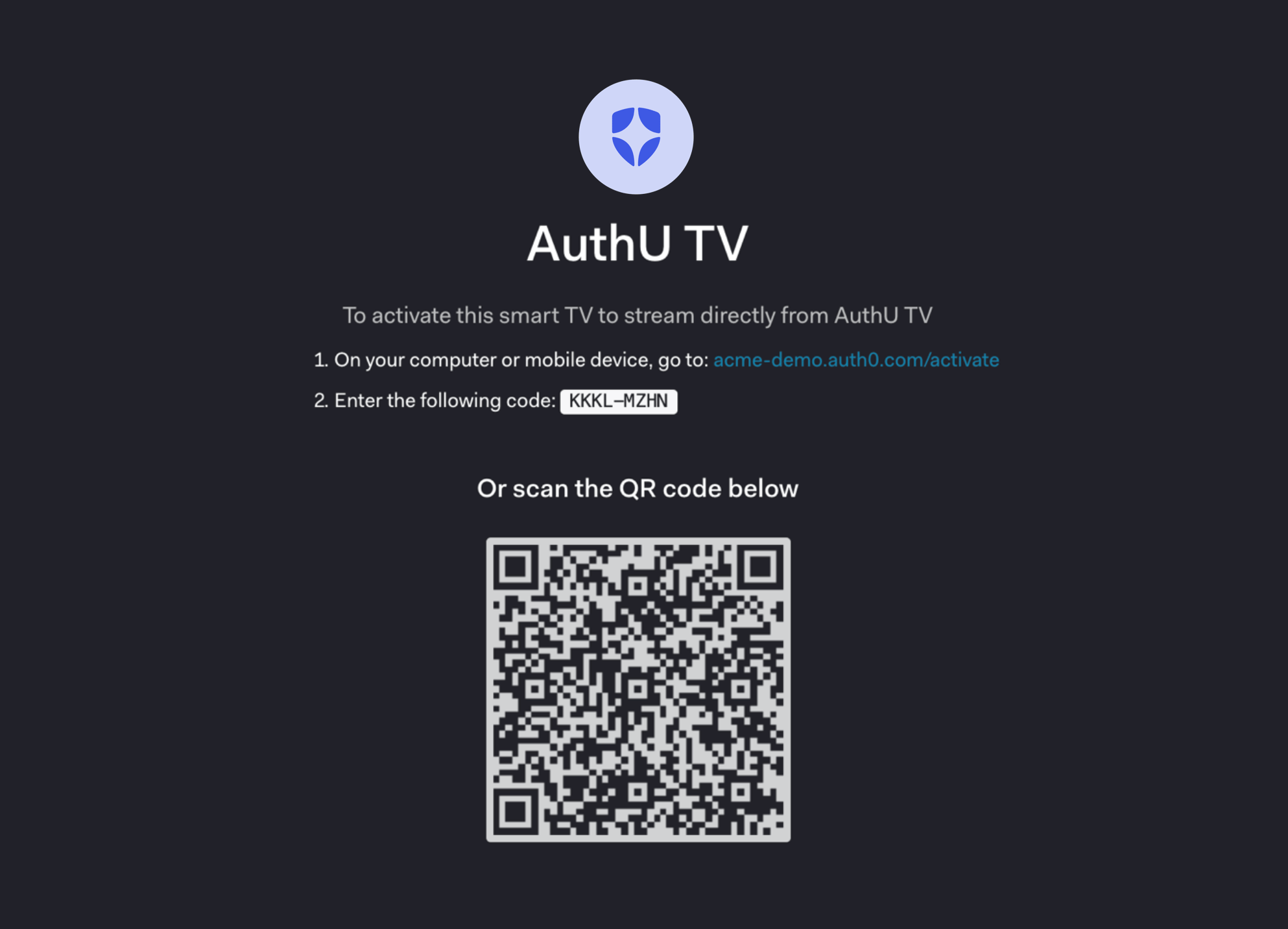 The `device_code` is not intended for the user directly and should not be displayed during the interaction to avoid confusing the user.
When building a CLI, you could skip this step and immediately open the browser with `verification_uri_complete`.
### Request tokens
While you are waiting for the user to activate the device, begin polling the token URL to request an Access Token. Using the extracted polling interval (`interval`) from the previous step, you will need to `POST` to the [token URL](https://auth0.com/docs/api/authentication#device-auth) sending along the `device_code`.
To avoid errors due to network latency, you should start counting each interval after receipt of the last polling request's response.
#### Example request token POST to token URL
```bash cURL theme={null}
curl --request POST \
--url 'https://{yourDomain}/oauth/token' \
--header 'content-type: application/x-www-form-urlencoded' \
--data grant_type=urn:ietf:params:oauth:grant-type:device_code \
--data 'device_code={yourDeviceCode}' \
--data 'client_id={yourClientId}'
```
```csharp C# theme={null}
var client = new RestClient("https://{yourDomain}/oauth/token");
var request = new RestRequest(Method.POST);
request.AddHeader("content-type", "application/x-www-form-urlencoded");
request.AddParameter("application/x-www-form-urlencoded", "grant_type=urn%3Aietf%3Aparams%3Aoauth%3Agrant-type%3Adevice_code&device_code=%7ByourDeviceCode%7D&client_id={yourClientId}", ParameterType.RequestBody);
IRestResponse response = client.Execute(request);
```
```go Go theme={null}
package main
import (
"fmt"
"strings"
"net/http"
"io/ioutil"
)
func main() {
url := "https://{yourDomain}/oauth/token"
payload := strings.NewReader("grant_type=urn%3Aietf%3Aparams%3Aoauth%3Agrant-type%3Adevice_code&device_code=%7ByourDeviceCode%7D&client_id={yourClientId}")
req, _ := http.NewRequest("POST", url, payload)
req.Header.Add("content-type", "application/x-www-form-urlencoded")
res, _ := http.DefaultClient.Do(req)
defer res.Body.Close()
body, _ := ioutil.ReadAll(res.Body)
fmt.Println(res)
fmt.Println(string(body))
}
```
```java Java theme={null}
HttpResponse response = Unirest.post("https://{yourDomain}/oauth/token")
.header("content-type", "application/x-www-form-urlencoded")
.body("grant_type=urn%3Aietf%3Aparams%3Aoauth%3Agrant-type%3Adevice_code&device_code=%7ByourDeviceCode%7D&client_id={yourClientId}")
.asString();
```
```javascript Node.JS theme={null}
var axios = require("axios").default;
var options = {
method: 'POST',
url: 'https://{yourDomain}/oauth/token',
headers: {'content-type': 'application/x-www-form-urlencoded'},
data: new URLSearchParams({
grant_type: 'urn:ietf:params:oauth:grant-type:device_code',
device_code: '{yourDeviceCode}',
client_id: '{yourClientId}'
})
};
axios.request(options).then(function (response) {
console.log(response.data);
}).catch(function (error) {
console.error(error);
});
```
```php PHP theme={null}
$curl = curl_init();
curl_setopt_array($curl, [
CURLOPT_URL => "https://{yourDomain}/oauth/token",
CURLOPT_RETURNTRANSFER => true,
CURLOPT_ENCODING => "",
CURLOPT_MAXREDIRS => 10,
CURLOPT_TIMEOUT => 30,
CURLOPT_HTTP_VERSION => CURL_HTTP_VERSION_1_1,
CURLOPT_CUSTOMREQUEST => "POST",
CURLOPT_POSTFIELDS => "grant_type=urn%3Aietf%3Aparams%3Aoauth%3Agrant-type%3Adevice_code&device_code=%7ByourDeviceCode%7D&client_id={yourClientId}",
CURLOPT_HTTPHEADER => [
"content-type: application/x-www-form-urlencoded"
],
]);
$response = curl_exec($curl);
$err = curl_error($curl);
curl_close($curl);
if ($err) {
echo "cURL Error #:" . $err;
} else {
echo $response;
}
```
```python Python theme={null}
import http.client
conn = http.client.HTTPSConnection("")
payload = "grant_type=urn%3Aietf%3Aparams%3Aoauth%3Agrant-type%3Adevice_code&device_code=%7ByourDeviceCode%7D&client_id={yourClientId}"
headers = { 'content-type': "application/x-www-form-urlencoded" }
conn.request("POST", "/{yourDomain}/oauth/token", payload, headers)
res = conn.getresponse()
data = res.read()
print(data.decode("utf-8"))
```
```ruby Ruby theme={null}
require 'uri'
require 'net/http'
require 'openssl'
url = URI("https://{yourDomain}/oauth/token")
http = Net::HTTP.new(url.host, url.port)
http.use_ssl = true
http.verify_mode = OpenSSL::SSL::VERIFY_NONE
request = Net::HTTP::Post.new(url)
request["content-type"] = 'application/x-www-form-urlencoded'
request.body = "grant_type=urn%3Aietf%3Aparams%3Aoauth%3Agrant-type%3Adevice_code&device_code=%7ByourDeviceCode%7D&client_id={yourClientId}"
response = http.request(request)
puts response.read_body
```
##### Token request parameters
| Parameter Name | Description |
| -------------- | --------------------------------------------------------------------------------------------------------------------------------------------------------------------------------------------------------------------------- |
| `grant_type` | Set this to "urn:ietf:params:oauth:grant-type:device\_code". This is an extension grant type (as defined by Section 4.5 of [RFC6749](https://tools.ietf.org/html/rfc6749#section-4.5)). Note that this must be URL encoded. |
| `device_code` | The `device_code` retrieved in the previous step of this tutorial. |
| `client_id` | Your application's Client ID. You can find this value in your [Application Settings](https://manage.auth0.com/#/Applications/\{yourClientId}/settings). |
#### Token responses
While you wait for the user to authorize the device, you may receive a few different `HTTP 4xx` responses:
##### Authorization pending
You will see this error while waiting for the user to take action. Continue polling using the suggested interval retrieved in the previous step of this tutorial.
```json lines theme={null}
HTTP/1.1 403 Forbidden
{
"error": "authorization_pending",
"error_description": "..."
}
```
##### Slow down
You are polling too fast. Slow down and use the suggested interval retrieved in the previous step of this tutorial. To avoid receiving this error due to network latency, you should start counting each interval after receipt of the last polling request's response.
```json lines theme={null}
HTTP/1.1 429 Too Many Requests
{
"error": "slow_down",
"error_description": "..."
}
```
##### Expired token
The user has not authorized the device quickly enough, so the `device_code` has expired. Your application should notify the user that the flow has expired and prompt them to reinitiate the flow.
The `expired_token` error will be returned exactly once; after that, `invalid_grant` is returned. Your device **must** stop polling.
```json lines theme={null}
HTTP/1.1 403 Bad Request
{
"error": "expired_token",
"error_description": "..."
}
```
##### Access denied
Finally, if access is denied, you will receive:
```json lines theme={null}
HTTP/1.1 403 Forbidden
{
"error": "access_denied",
"error_description": "..."
}
```
This can occur for a variety of reasons, including:
* the user refused to authorize the device
* the authorization server denied the transaction
* a configured rule denied access (To learn more, read [Auth0 Rules](/docs/customize/rules).)
### Authorize user
The user will either scan the QR code, or else will open the activation page and enter the user code:
The `device_code` is not intended for the user directly and should not be displayed during the interaction to avoid confusing the user.
When building a CLI, you could skip this step and immediately open the browser with `verification_uri_complete`.
### Request tokens
While you are waiting for the user to activate the device, begin polling the token URL to request an Access Token. Using the extracted polling interval (`interval`) from the previous step, you will need to `POST` to the [token URL](https://auth0.com/docs/api/authentication#device-auth) sending along the `device_code`.
To avoid errors due to network latency, you should start counting each interval after receipt of the last polling request's response.
#### Example request token POST to token URL
```bash cURL theme={null}
curl --request POST \
--url 'https://{yourDomain}/oauth/token' \
--header 'content-type: application/x-www-form-urlencoded' \
--data grant_type=urn:ietf:params:oauth:grant-type:device_code \
--data 'device_code={yourDeviceCode}' \
--data 'client_id={yourClientId}'
```
```csharp C# theme={null}
var client = new RestClient("https://{yourDomain}/oauth/token");
var request = new RestRequest(Method.POST);
request.AddHeader("content-type", "application/x-www-form-urlencoded");
request.AddParameter("application/x-www-form-urlencoded", "grant_type=urn%3Aietf%3Aparams%3Aoauth%3Agrant-type%3Adevice_code&device_code=%7ByourDeviceCode%7D&client_id={yourClientId}", ParameterType.RequestBody);
IRestResponse response = client.Execute(request);
```
```go Go theme={null}
package main
import (
"fmt"
"strings"
"net/http"
"io/ioutil"
)
func main() {
url := "https://{yourDomain}/oauth/token"
payload := strings.NewReader("grant_type=urn%3Aietf%3Aparams%3Aoauth%3Agrant-type%3Adevice_code&device_code=%7ByourDeviceCode%7D&client_id={yourClientId}")
req, _ := http.NewRequest("POST", url, payload)
req.Header.Add("content-type", "application/x-www-form-urlencoded")
res, _ := http.DefaultClient.Do(req)
defer res.Body.Close()
body, _ := ioutil.ReadAll(res.Body)
fmt.Println(res)
fmt.Println(string(body))
}
```
```java Java theme={null}
HttpResponse response = Unirest.post("https://{yourDomain}/oauth/token")
.header("content-type", "application/x-www-form-urlencoded")
.body("grant_type=urn%3Aietf%3Aparams%3Aoauth%3Agrant-type%3Adevice_code&device_code=%7ByourDeviceCode%7D&client_id={yourClientId}")
.asString();
```
```javascript Node.JS theme={null}
var axios = require("axios").default;
var options = {
method: 'POST',
url: 'https://{yourDomain}/oauth/token',
headers: {'content-type': 'application/x-www-form-urlencoded'},
data: new URLSearchParams({
grant_type: 'urn:ietf:params:oauth:grant-type:device_code',
device_code: '{yourDeviceCode}',
client_id: '{yourClientId}'
})
};
axios.request(options).then(function (response) {
console.log(response.data);
}).catch(function (error) {
console.error(error);
});
```
```php PHP theme={null}
$curl = curl_init();
curl_setopt_array($curl, [
CURLOPT_URL => "https://{yourDomain}/oauth/token",
CURLOPT_RETURNTRANSFER => true,
CURLOPT_ENCODING => "",
CURLOPT_MAXREDIRS => 10,
CURLOPT_TIMEOUT => 30,
CURLOPT_HTTP_VERSION => CURL_HTTP_VERSION_1_1,
CURLOPT_CUSTOMREQUEST => "POST",
CURLOPT_POSTFIELDS => "grant_type=urn%3Aietf%3Aparams%3Aoauth%3Agrant-type%3Adevice_code&device_code=%7ByourDeviceCode%7D&client_id={yourClientId}",
CURLOPT_HTTPHEADER => [
"content-type: application/x-www-form-urlencoded"
],
]);
$response = curl_exec($curl);
$err = curl_error($curl);
curl_close($curl);
if ($err) {
echo "cURL Error #:" . $err;
} else {
echo $response;
}
```
```python Python theme={null}
import http.client
conn = http.client.HTTPSConnection("")
payload = "grant_type=urn%3Aietf%3Aparams%3Aoauth%3Agrant-type%3Adevice_code&device_code=%7ByourDeviceCode%7D&client_id={yourClientId}"
headers = { 'content-type': "application/x-www-form-urlencoded" }
conn.request("POST", "/{yourDomain}/oauth/token", payload, headers)
res = conn.getresponse()
data = res.read()
print(data.decode("utf-8"))
```
```ruby Ruby theme={null}
require 'uri'
require 'net/http'
require 'openssl'
url = URI("https://{yourDomain}/oauth/token")
http = Net::HTTP.new(url.host, url.port)
http.use_ssl = true
http.verify_mode = OpenSSL::SSL::VERIFY_NONE
request = Net::HTTP::Post.new(url)
request["content-type"] = 'application/x-www-form-urlencoded'
request.body = "grant_type=urn%3Aietf%3Aparams%3Aoauth%3Agrant-type%3Adevice_code&device_code=%7ByourDeviceCode%7D&client_id={yourClientId}"
response = http.request(request)
puts response.read_body
```
##### Token request parameters
| Parameter Name | Description |
| -------------- | --------------------------------------------------------------------------------------------------------------------------------------------------------------------------------------------------------------------------- |
| `grant_type` | Set this to "urn:ietf:params:oauth:grant-type:device\_code". This is an extension grant type (as defined by Section 4.5 of [RFC6749](https://tools.ietf.org/html/rfc6749#section-4.5)). Note that this must be URL encoded. |
| `device_code` | The `device_code` retrieved in the previous step of this tutorial. |
| `client_id` | Your application's Client ID. You can find this value in your [Application Settings](https://manage.auth0.com/#/Applications/\{yourClientId}/settings). |
#### Token responses
While you wait for the user to authorize the device, you may receive a few different `HTTP 4xx` responses:
##### Authorization pending
You will see this error while waiting for the user to take action. Continue polling using the suggested interval retrieved in the previous step of this tutorial.
```json lines theme={null}
HTTP/1.1 403 Forbidden
{
"error": "authorization_pending",
"error_description": "..."
}
```
##### Slow down
You are polling too fast. Slow down and use the suggested interval retrieved in the previous step of this tutorial. To avoid receiving this error due to network latency, you should start counting each interval after receipt of the last polling request's response.
```json lines theme={null}
HTTP/1.1 429 Too Many Requests
{
"error": "slow_down",
"error_description": "..."
}
```
##### Expired token
The user has not authorized the device quickly enough, so the `device_code` has expired. Your application should notify the user that the flow has expired and prompt them to reinitiate the flow.
The `expired_token` error will be returned exactly once; after that, `invalid_grant` is returned. Your device **must** stop polling.
```json lines theme={null}
HTTP/1.1 403 Bad Request
{
"error": "expired_token",
"error_description": "..."
}
```
##### Access denied
Finally, if access is denied, you will receive:
```json lines theme={null}
HTTP/1.1 403 Forbidden
{
"error": "access_denied",
"error_description": "..."
}
```
This can occur for a variety of reasons, including:
* the user refused to authorize the device
* the authorization server denied the transaction
* a configured rule denied access (To learn more, read [Auth0 Rules](/docs/customize/rules).)
### Authorize user
The user will either scan the QR code, or else will open the activation page and enter the user code:
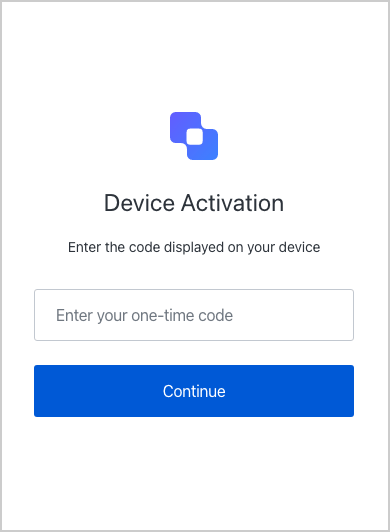 A confirmation page will be shown to have the user confirm that this is the right device:
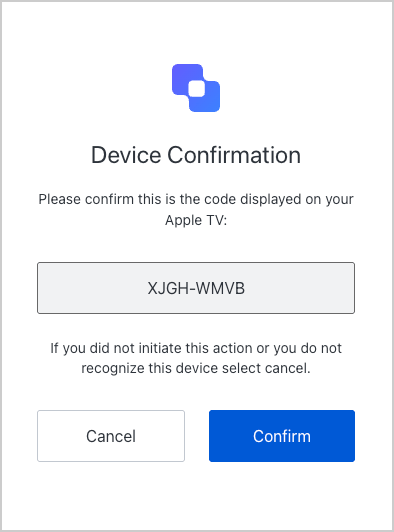 The user will complete the transaction by signing in. This step may include one or more of the following processes:
* Authenticating the user;
* Redirecting the user to an Identity Provider to handle authentication;
* Checking for active SSO sessions;
* Obtaining user consent for the device, unless consent has been previously given.
The user will complete the transaction by signing in. This step may include one or more of the following processes:
* Authenticating the user;
* Redirecting the user to an Identity Provider to handle authentication;
* Checking for active SSO sessions;
* Obtaining user consent for the device, unless consent has been previously given.
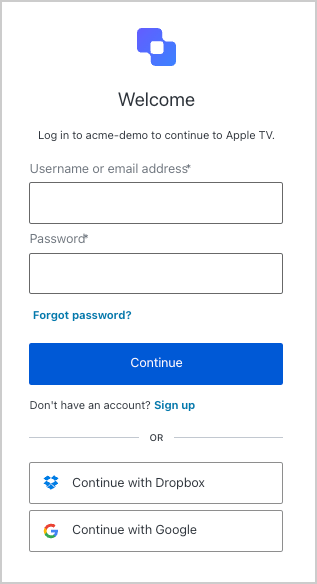 Upon successful authentication and consent, the confirmation prompt will be shown:
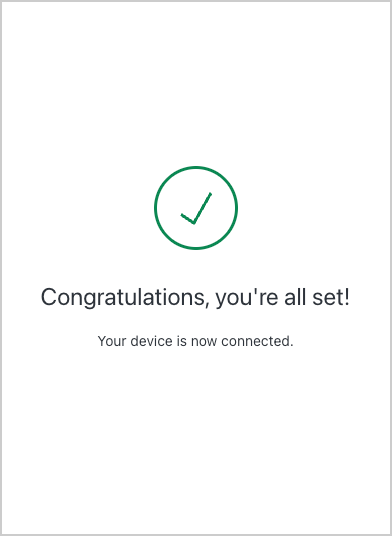 At this point, the user has authenticated, and the device has been authorized.
### Receive tokens
While the user has been authenticating and authorizing the device, the device app has continued to poll the token URL to request an Access Token.
Once the user has successfully authorized the device, you'll receive an `HTTP 200` response with a payload containing `access_token`, `refresh_token` (optionally), `id_token` (optionally), `token_type`, and `expires_in` values:
```json lines theme={null}
{
"access_token":"eyJz93a...k4laUWw",
"refresh_token":"GEbRxBN...edjnXbL",
"id_token": "eyJ0XAi...4faeEoQ",
"token_type":"Bearer",
"expires_in":86400
}
```
Validate your tokens before saving them. To learn how, read [Validate ID Tokens](/docs/secure/tokens/id-tokens/validate-id-tokens) and [Validate Access Tokens](/docs/secure/tokens/access-tokens/validate-access-tokens).
Access Tokens are used to call the Auth0 Authentication API's [`/userinfo` endpoint](https://auth0.com/docs/api/authentication#get-user-info) or another API. (To learn more about Access Tokens, read [Access Tokens](/docs/secure/tokens/access-tokens).) You will be able to use the Access Token to call `/userinfo` only if you included the `openid` scope. If you are calling your own API, the first thing your API will need to do is [verify the Access Token](/docs/secure/tokens/access-tokens/validate-access-tokens).
ID Tokens contain user information that must be decoded and extracted. (To learn more about ID Tokens, read [ID Tokens](/docs/secure/tokens/id-tokens).) The `id_token` will only be present in the response if you included the `openid` scope.
Refresh Tokens are used to obtain a new Access Token or ID Token after the previous one has expired. (To learn more about Refresh Tokens, read [Refresh Tokens](/docs/secure/tokens/refresh-tokens).) The `refresh_token` will only be present in the response if you included the `offline_access` scope and enabled **Allow Offline Access** for your API in the Dashboard.
Refresh tokens must be stored securely since they allow a user to remain authenticated essentially forever.
### Call your API
To call your API, the application must pass the retrieved Access Token as a Bearer token in the Authorization header of your HTTP request.
```bash cURL lines theme={null}
curl --request GET \
--url https://myapi.com/api \
--header 'authorization: Bearer ACCESS_TOKEN' \
--header 'content-type: application/json'
```
```csharp C# lines theme={null}
var client = new RestClient("https://myapi.com/api");
var request = new RestRequest(Method.GET);
request.AddHeader("content-type", "application/json");
request.AddHeader("authorization", "Bearer ACCESS_TOKEN");
IRestResponse response = client.Execute(request);
```
```go Go lines expandable theme={null}
package main
import (
"fmt"
"net/http"
"io/ioutil"
)
func main() {
url := "https://myapi.com/api"
req, _ := http.NewRequest("GET", url, nil)
req.Header.Add("content-type", "application/json")
req.Header.Add("authorization", "Bearer ACCESS_TOKEN")
res, _ := http.DefaultClient.Do(req)
defer res.Body.Close()
body, _ := ioutil.ReadAll(res.Body)
fmt.Println(res)
fmt.Println(string(body))
}
```
```java Java lines theme={null}
HttpResponse response = Unirest.get("https://myapi.com/api")
.header("content-type", "application/json")
.header("authorization", "Bearer ACCESS_TOKEN")
.asString();
```
```javascript Node.JS lines theme={null}
var axios = require("axios").default;
var options = {
method: 'GET',
url: 'https://myapi.com/api',
headers: {'content-type': 'application/json', authorization: 'Bearer ACCESS_TOKEN'}
};
axios.request(options).then(function (response) {
console.log(response.data);
}).catch(function (error) {
console.error(error);
});
```
```php PHP lines expandable theme={null}
$curl = curl_init();
curl_setopt_array($curl, [
CURLOPT_URL => "https://myapi.com/api",
CURLOPT_RETURNTRANSFER => true,
CURLOPT_ENCODING => "",
CURLOPT_MAXREDIRS => 10,
CURLOPT_TIMEOUT => 30,
CURLOPT_HTTP_VERSION => CURL_HTTP_VERSION_1_1,
CURLOPT_CUSTOMREQUEST => "GET",
CURLOPT_HTTPHEADER => [
"authorization: Bearer ACCESS_TOKEN",
"content-type: application/json"
],
]);
$response = curl_exec($curl);
$err = curl_error($curl);
curl_close($curl);
if ($err) {
echo "cURL Error #:" . $err;
} else {
echo $response;
}
```
```python Python lines theme={null}
import http.client
conn = http.client.HTTPSConnection("myapi.com")
headers = {
'content-type': "application/json",
'authorization': "Bearer ACCESS_TOKEN"
}
conn.request("GET", "/api", headers=headers)
res = conn.getresponse()
data = res.read()
print(data.decode("utf-8"))
```
```ruby Ruby lines theme={null}
require 'uri'
require 'net/http'
require 'openssl'
url = URI("https://myapi.com/api")
http = Net::HTTP.new(url.host, url.port)
http.use_ssl = true
http.verify_mode = OpenSSL::SSL::VERIFY_NONE
request = Net::HTTP::Get.new(url)
request["content-type"] = 'application/json'
request["authorization"] = 'Bearer ACCESS_TOKEN'
response = http.request(request)
puts response.read_body
```
### Refresh tokens
You have already received a Refresh Token if you've been following this tutorial and completed the following:
* configured your API to allow offline access
* included the `offline_access` scope when you initiated the authentication request through the [authorize endpoint](https://auth0.com/docs/api/authentication/reference#authorize-application)
You can use the Refresh Token to get a new Access Token. Usually, a user will need a new Access Token only after the previous one expires or when gaining access to a new resource for the first time. It's bad practice to call the endpoint to get a new Access Token every time you call an API, and Auth0 maintains rate limits that will throttle the amount of requests to the endpoint that can be executed using the same token from the same IP.
To refresh your token, make a `POST` request to the `/oauth/token` endpoint in the Authentication API, using `grant_type=refresh_token`.
#### Example refresh token POST to token URL
```bash cURL theme={null}
curl --request POST \
--url 'https://{yourDomain}/oauth/token' \
--header 'content-type: application/x-www-form-urlencoded' \
--data grant_type=refresh_token \
--data 'client_id={yourClientId}' \
--data 'client_secret={yourClientSecret}' \
--data 'refresh_token={yourRefreshToken}'
```
```csharp C# theme={null}
var client = new RestClient("https://{yourDomain}/oauth/token");
var request = new RestRequest(Method.POST);
request.AddHeader("content-type", "application/x-www-form-urlencoded");
request.AddParameter("application/x-www-form-urlencoded", "grant_type=refresh_token&client_id={yourClientId}&client_secret={yourClientSecret}&refresh_token=%7ByourRefreshToken%7D", ParameterType.RequestBody);
IRestResponse response = client.Execute(request);
```
```go Go theme={null}
package main
import (
"fmt"
"strings"
"net/http"
"io/ioutil"
)
func main() {
url := "https://{yourDomain}/oauth/token"
payload := strings.NewReader("grant_type=refresh_token&client_id={yourClientId}&client_secret={yourClientSecret}&refresh_token=%7ByourRefreshToken%7D")
req, _ := http.NewRequest("POST", url, payload)
req.Header.Add("content-type", "application/x-www-form-urlencoded")
res, _ := http.DefaultClient.Do(req)
defer res.Body.Close()
body, _ := ioutil.ReadAll(res.Body)
fmt.Println(res)
fmt.Println(string(body))
}
```
```java Java theme={null}
HttpResponse response = Unirest.post("https://{yourDomain}/oauth/token")
.header("content-type", "application/x-www-form-urlencoded")
.body("grant_type=refresh_token&client_id={yourClientId}&client_secret={yourClientSecret}&refresh_token=%7ByourRefreshToken%7D")
.asString();
```
```javascript Node.JS theme={null}
var axios = require("axios").default;
var options = {
method: 'POST',
url: 'https://{yourDomain}/oauth/token',
headers: {'content-type': 'application/x-www-form-urlencoded'},
data: new URLSearchParams({
grant_type: 'refresh_token',
client_id: '{yourClientId}',
client_secret: '{yourClientSecret}',
refresh_token: '{yourRefreshToken}'
})
};
axios.request(options).then(function (response) {
console.log(response.data);
}).catch(function (error) {
console.error(error);
});
```
```php PHP theme={null}
$curl = curl_init();
curl_setopt_array($curl, [
CURLOPT_URL => "https://{yourDomain}/oauth/token",
CURLOPT_RETURNTRANSFER => true,
CURLOPT_ENCODING => "",
CURLOPT_MAXREDIRS => 10,
CURLOPT_TIMEOUT => 30,
CURLOPT_HTTP_VERSION => CURL_HTTP_VERSION_1_1,
CURLOPT_CUSTOMREQUEST => "POST",
CURLOPT_POSTFIELDS => "grant_type=refresh_token&client_id={yourClientId}&client_secret={yourClientSecret}&refresh_token=%7ByourRefreshToken%7D",
CURLOPT_HTTPHEADER => [
"content-type: application/x-www-form-urlencoded"
],
]);
$response = curl_exec($curl);
$err = curl_error($curl);
curl_close($curl);
if ($err) {
echo "cURL Error #:" . $err;
} else {
echo $response;
}
```
```python Python theme={null}
import http.client
conn = http.client.HTTPSConnection("")
payload = "grant_type=refresh_token&client_id={yourClientId}&client_secret={yourClientSecret}&refresh_token=%7ByourRefreshToken%7D"
headers = { 'content-type': "application/x-www-form-urlencoded" }
conn.request("POST", "/{yourDomain}/oauth/token", payload, headers)
res = conn.getresponse()
data = res.read()
print(data.decode("utf-8"))
```
```ruby Ruby theme={null}
require 'uri'
require 'net/http'
require 'openssl'
url = URI("https://{yourDomain}/oauth/token")
http = Net::HTTP.new(url.host, url.port)
http.use_ssl = true
http.verify_mode = OpenSSL::SSL::VERIFY_NONE
request = Net::HTTP::Post.new(url)
request["content-type"] = 'application/x-www-form-urlencoded'
request.body = "grant_type=refresh_token&client_id={yourClientId}&client_secret={yourClientSecret}&refresh_token=%7ByourRefreshToken%7D"
response = http.request(request)
puts response.read_body
```
##### Refresh token request parameters
| Parameter Name | Description |
| --------------- | ------------------------------------------------------------------------------------------------------------------------------------------------------------------------------------------------------- |
| `grant_type` | Set this to "refresh\_token". |
| `client_id` | Your application's Client ID. You can find this value in your [Application Settings](https://manage.auth0.com/#/Applications/\{yourClientId}/settings). |
| `client_secret` | Your application's Client Secret. You can find this value in your [Application Settings](https://manage.auth0.com/#/Applications/\{yourClientSecret}/settings). |
| `refresh_token` | The Refresh Token to use. |
| `scope` | (Optional) A space-delimited list of requested scope permissions. If not sent, the original scopes will be used; otherwise you can request a reduced set of scopes. Note that this must be URL encoded. |
#### Refresh token response
If all goes well, you'll receive an `HTTP 200` response with a payload containing a new `access_token`, `id_token` (optionally), token lifetime in seconds (`expires_in`), granted `scope` values, and `token_type`:
```json lines theme={null}
{
"access_token": "eyJ...MoQ",
"expires_in": 86400,
"scope": "openid offline_access",
"id_token": "eyJ...0NE",
"token_type": "Bearer"
}
```
Validate your tokens before saving them. To learn how, read [Validate ID Tokens](/docs/secure/tokens/id-tokens/validate-id-tokens) and [Validate Access Tokens](/docs/secure/tokens/access-tokens/validate-access-tokens).
## Sample use cases
### Detect device authorization flow use
You can use Rules to detect whether the current transaction is using the Device Authorization Flow. (To learn more about rules, read [Auth0 Rules](/docs/customize/rules).) To do so, check the `context` object's `protocol` property:
```javascript lines theme={null}
function (user, context, callback) {
if (context.protocol === 'oauth2-device-code') {
...
}
callback(null, user, context);
}
```
### Sample implementations
* [Device Authorization Playground](https://auth0.github.io/device-flow-playground/)
* [AppleTV (Swift)](https://github.com/pushpabrol/auth0-device-flow-appletv): Simple application that shows how Auth0 can be used with the Device Authorization Flow from an AppleTV.
* [CLI (Node.js)](https://gist.github.com/panva/ebaacfe433a8677bdbf458f6e1132045): Sample implementation of a CLI that uses the Device Authorization Flow instead of the Authorization Code Flow. The major difference is that your CLI does not need to host a web server and listen on a port.
## Troubleshoot
Tenant logs are created for any interaction that takes place and can be used to troubleshoot issues. To learn more, read [Logs](/docs/deploy-monitor/logs).
### Error codes
| Code | Name | Description |
| ------- | ------------------------------------- | ---------------------------- |
| `fdeaz` | Failed device authorization request | |
| `fdeac` | Failed device activation | |
| `fdecc` | User canceled the device confirmation | |
| `fede` | Failed Exchange | Device Code for Access Token |
| `sede` | Success Exchange | Device Code for Access Token |
### Limitations
To use the Device Authorization Flow, devices must:
* Support Server Name Indication (SNI) when [Custom Domains](/docs/customize/custom-domains) are used
* Have an [Auth0 application type](/docs/get-started/applications) of **Native**
* Have the [Token Endpoint Authentication Method](/docs/get-started/applications/application-settings) set to **None**
* Be [OIDC-conformant](/docs/get-started/applications/application-settings)
* Not be created through [Dynamic Client Registration](/docs/get-started/applications/dynamic-client-registration)
In addition, the Device Authorization Flow does not allow:
* [Social Connections](/docs/authenticate/identity-providers/social-identity-providers) using [Auth0 developer keys](/docs/authenticate/identity-providers/social-identity-providers/devkeys) unless you are using the [Universal Login experience](/docs/authenticate/login/auth0-universal-login/universal-login-vs-classic-login/universal-experience)
* Query string parameters to be accessed from hosted login page or Rules or Actions
* [User account linking](/docs/manage-users/user-accounts/user-account-linking)
We support the full Draft 15, except for confidential Clients. To learn more, read [OAuth 2.0 Device Authorization Grant Draft 15 on ietf.org](https://tools.ietf.org/html/draft-ietf-oauth-device-flow-15).
## Learn more
* [OAuth 2.0 Authorization Framework](/docs/authenticate/protocols/oauth)
* [OpenID Connect Protocol](/docs/authenticate/protocols/openid-connect-protocol)
* [Tokens](/docs/secure/tokens)
* [Logs](/docs/deploy-monitor/logs)
At this point, the user has authenticated, and the device has been authorized.
### Receive tokens
While the user has been authenticating and authorizing the device, the device app has continued to poll the token URL to request an Access Token.
Once the user has successfully authorized the device, you'll receive an `HTTP 200` response with a payload containing `access_token`, `refresh_token` (optionally), `id_token` (optionally), `token_type`, and `expires_in` values:
```json lines theme={null}
{
"access_token":"eyJz93a...k4laUWw",
"refresh_token":"GEbRxBN...edjnXbL",
"id_token": "eyJ0XAi...4faeEoQ",
"token_type":"Bearer",
"expires_in":86400
}
```
Validate your tokens before saving them. To learn how, read [Validate ID Tokens](/docs/secure/tokens/id-tokens/validate-id-tokens) and [Validate Access Tokens](/docs/secure/tokens/access-tokens/validate-access-tokens).
Access Tokens are used to call the Auth0 Authentication API's [`/userinfo` endpoint](https://auth0.com/docs/api/authentication#get-user-info) or another API. (To learn more about Access Tokens, read [Access Tokens](/docs/secure/tokens/access-tokens).) You will be able to use the Access Token to call `/userinfo` only if you included the `openid` scope. If you are calling your own API, the first thing your API will need to do is [verify the Access Token](/docs/secure/tokens/access-tokens/validate-access-tokens).
ID Tokens contain user information that must be decoded and extracted. (To learn more about ID Tokens, read [ID Tokens](/docs/secure/tokens/id-tokens).) The `id_token` will only be present in the response if you included the `openid` scope.
Refresh Tokens are used to obtain a new Access Token or ID Token after the previous one has expired. (To learn more about Refresh Tokens, read [Refresh Tokens](/docs/secure/tokens/refresh-tokens).) The `refresh_token` will only be present in the response if you included the `offline_access` scope and enabled **Allow Offline Access** for your API in the Dashboard.
Refresh tokens must be stored securely since they allow a user to remain authenticated essentially forever.
### Call your API
To call your API, the application must pass the retrieved Access Token as a Bearer token in the Authorization header of your HTTP request.
```bash cURL lines theme={null}
curl --request GET \
--url https://myapi.com/api \
--header 'authorization: Bearer ACCESS_TOKEN' \
--header 'content-type: application/json'
```
```csharp C# lines theme={null}
var client = new RestClient("https://myapi.com/api");
var request = new RestRequest(Method.GET);
request.AddHeader("content-type", "application/json");
request.AddHeader("authorization", "Bearer ACCESS_TOKEN");
IRestResponse response = client.Execute(request);
```
```go Go lines expandable theme={null}
package main
import (
"fmt"
"net/http"
"io/ioutil"
)
func main() {
url := "https://myapi.com/api"
req, _ := http.NewRequest("GET", url, nil)
req.Header.Add("content-type", "application/json")
req.Header.Add("authorization", "Bearer ACCESS_TOKEN")
res, _ := http.DefaultClient.Do(req)
defer res.Body.Close()
body, _ := ioutil.ReadAll(res.Body)
fmt.Println(res)
fmt.Println(string(body))
}
```
```java Java lines theme={null}
HttpResponse response = Unirest.get("https://myapi.com/api")
.header("content-type", "application/json")
.header("authorization", "Bearer ACCESS_TOKEN")
.asString();
```
```javascript Node.JS lines theme={null}
var axios = require("axios").default;
var options = {
method: 'GET',
url: 'https://myapi.com/api',
headers: {'content-type': 'application/json', authorization: 'Bearer ACCESS_TOKEN'}
};
axios.request(options).then(function (response) {
console.log(response.data);
}).catch(function (error) {
console.error(error);
});
```
```php PHP lines expandable theme={null}
$curl = curl_init();
curl_setopt_array($curl, [
CURLOPT_URL => "https://myapi.com/api",
CURLOPT_RETURNTRANSFER => true,
CURLOPT_ENCODING => "",
CURLOPT_MAXREDIRS => 10,
CURLOPT_TIMEOUT => 30,
CURLOPT_HTTP_VERSION => CURL_HTTP_VERSION_1_1,
CURLOPT_CUSTOMREQUEST => "GET",
CURLOPT_HTTPHEADER => [
"authorization: Bearer ACCESS_TOKEN",
"content-type: application/json"
],
]);
$response = curl_exec($curl);
$err = curl_error($curl);
curl_close($curl);
if ($err) {
echo "cURL Error #:" . $err;
} else {
echo $response;
}
```
```python Python lines theme={null}
import http.client
conn = http.client.HTTPSConnection("myapi.com")
headers = {
'content-type': "application/json",
'authorization': "Bearer ACCESS_TOKEN"
}
conn.request("GET", "/api", headers=headers)
res = conn.getresponse()
data = res.read()
print(data.decode("utf-8"))
```
```ruby Ruby lines theme={null}
require 'uri'
require 'net/http'
require 'openssl'
url = URI("https://myapi.com/api")
http = Net::HTTP.new(url.host, url.port)
http.use_ssl = true
http.verify_mode = OpenSSL::SSL::VERIFY_NONE
request = Net::HTTP::Get.new(url)
request["content-type"] = 'application/json'
request["authorization"] = 'Bearer ACCESS_TOKEN'
response = http.request(request)
puts response.read_body
```
### Refresh tokens
You have already received a Refresh Token if you've been following this tutorial and completed the following:
* configured your API to allow offline access
* included the `offline_access` scope when you initiated the authentication request through the [authorize endpoint](https://auth0.com/docs/api/authentication/reference#authorize-application)
You can use the Refresh Token to get a new Access Token. Usually, a user will need a new Access Token only after the previous one expires or when gaining access to a new resource for the first time. It's bad practice to call the endpoint to get a new Access Token every time you call an API, and Auth0 maintains rate limits that will throttle the amount of requests to the endpoint that can be executed using the same token from the same IP.
To refresh your token, make a `POST` request to the `/oauth/token` endpoint in the Authentication API, using `grant_type=refresh_token`.
#### Example refresh token POST to token URL
```bash cURL theme={null}
curl --request POST \
--url 'https://{yourDomain}/oauth/token' \
--header 'content-type: application/x-www-form-urlencoded' \
--data grant_type=refresh_token \
--data 'client_id={yourClientId}' \
--data 'client_secret={yourClientSecret}' \
--data 'refresh_token={yourRefreshToken}'
```
```csharp C# theme={null}
var client = new RestClient("https://{yourDomain}/oauth/token");
var request = new RestRequest(Method.POST);
request.AddHeader("content-type", "application/x-www-form-urlencoded");
request.AddParameter("application/x-www-form-urlencoded", "grant_type=refresh_token&client_id={yourClientId}&client_secret={yourClientSecret}&refresh_token=%7ByourRefreshToken%7D", ParameterType.RequestBody);
IRestResponse response = client.Execute(request);
```
```go Go theme={null}
package main
import (
"fmt"
"strings"
"net/http"
"io/ioutil"
)
func main() {
url := "https://{yourDomain}/oauth/token"
payload := strings.NewReader("grant_type=refresh_token&client_id={yourClientId}&client_secret={yourClientSecret}&refresh_token=%7ByourRefreshToken%7D")
req, _ := http.NewRequest("POST", url, payload)
req.Header.Add("content-type", "application/x-www-form-urlencoded")
res, _ := http.DefaultClient.Do(req)
defer res.Body.Close()
body, _ := ioutil.ReadAll(res.Body)
fmt.Println(res)
fmt.Println(string(body))
}
```
```java Java theme={null}
HttpResponse response = Unirest.post("https://{yourDomain}/oauth/token")
.header("content-type", "application/x-www-form-urlencoded")
.body("grant_type=refresh_token&client_id={yourClientId}&client_secret={yourClientSecret}&refresh_token=%7ByourRefreshToken%7D")
.asString();
```
```javascript Node.JS theme={null}
var axios = require("axios").default;
var options = {
method: 'POST',
url: 'https://{yourDomain}/oauth/token',
headers: {'content-type': 'application/x-www-form-urlencoded'},
data: new URLSearchParams({
grant_type: 'refresh_token',
client_id: '{yourClientId}',
client_secret: '{yourClientSecret}',
refresh_token: '{yourRefreshToken}'
})
};
axios.request(options).then(function (response) {
console.log(response.data);
}).catch(function (error) {
console.error(error);
});
```
```php PHP theme={null}
$curl = curl_init();
curl_setopt_array($curl, [
CURLOPT_URL => "https://{yourDomain}/oauth/token",
CURLOPT_RETURNTRANSFER => true,
CURLOPT_ENCODING => "",
CURLOPT_MAXREDIRS => 10,
CURLOPT_TIMEOUT => 30,
CURLOPT_HTTP_VERSION => CURL_HTTP_VERSION_1_1,
CURLOPT_CUSTOMREQUEST => "POST",
CURLOPT_POSTFIELDS => "grant_type=refresh_token&client_id={yourClientId}&client_secret={yourClientSecret}&refresh_token=%7ByourRefreshToken%7D",
CURLOPT_HTTPHEADER => [
"content-type: application/x-www-form-urlencoded"
],
]);
$response = curl_exec($curl);
$err = curl_error($curl);
curl_close($curl);
if ($err) {
echo "cURL Error #:" . $err;
} else {
echo $response;
}
```
```python Python theme={null}
import http.client
conn = http.client.HTTPSConnection("")
payload = "grant_type=refresh_token&client_id={yourClientId}&client_secret={yourClientSecret}&refresh_token=%7ByourRefreshToken%7D"
headers = { 'content-type': "application/x-www-form-urlencoded" }
conn.request("POST", "/{yourDomain}/oauth/token", payload, headers)
res = conn.getresponse()
data = res.read()
print(data.decode("utf-8"))
```
```ruby Ruby theme={null}
require 'uri'
require 'net/http'
require 'openssl'
url = URI("https://{yourDomain}/oauth/token")
http = Net::HTTP.new(url.host, url.port)
http.use_ssl = true
http.verify_mode = OpenSSL::SSL::VERIFY_NONE
request = Net::HTTP::Post.new(url)
request["content-type"] = 'application/x-www-form-urlencoded'
request.body = "grant_type=refresh_token&client_id={yourClientId}&client_secret={yourClientSecret}&refresh_token=%7ByourRefreshToken%7D"
response = http.request(request)
puts response.read_body
```
##### Refresh token request parameters
| Parameter Name | Description |
| --------------- | ------------------------------------------------------------------------------------------------------------------------------------------------------------------------------------------------------- |
| `grant_type` | Set this to "refresh\_token". |
| `client_id` | Your application's Client ID. You can find this value in your [Application Settings](https://manage.auth0.com/#/Applications/\{yourClientId}/settings). |
| `client_secret` | Your application's Client Secret. You can find this value in your [Application Settings](https://manage.auth0.com/#/Applications/\{yourClientSecret}/settings). |
| `refresh_token` | The Refresh Token to use. |
| `scope` | (Optional) A space-delimited list of requested scope permissions. If not sent, the original scopes will be used; otherwise you can request a reduced set of scopes. Note that this must be URL encoded. |
#### Refresh token response
If all goes well, you'll receive an `HTTP 200` response with a payload containing a new `access_token`, `id_token` (optionally), token lifetime in seconds (`expires_in`), granted `scope` values, and `token_type`:
```json lines theme={null}
{
"access_token": "eyJ...MoQ",
"expires_in": 86400,
"scope": "openid offline_access",
"id_token": "eyJ...0NE",
"token_type": "Bearer"
}
```
Validate your tokens before saving them. To learn how, read [Validate ID Tokens](/docs/secure/tokens/id-tokens/validate-id-tokens) and [Validate Access Tokens](/docs/secure/tokens/access-tokens/validate-access-tokens).
## Sample use cases
### Detect device authorization flow use
You can use Rules to detect whether the current transaction is using the Device Authorization Flow. (To learn more about rules, read [Auth0 Rules](/docs/customize/rules).) To do so, check the `context` object's `protocol` property:
```javascript lines theme={null}
function (user, context, callback) {
if (context.protocol === 'oauth2-device-code') {
...
}
callback(null, user, context);
}
```
### Sample implementations
* [Device Authorization Playground](https://auth0.github.io/device-flow-playground/)
* [AppleTV (Swift)](https://github.com/pushpabrol/auth0-device-flow-appletv): Simple application that shows how Auth0 can be used with the Device Authorization Flow from an AppleTV.
* [CLI (Node.js)](https://gist.github.com/panva/ebaacfe433a8677bdbf458f6e1132045): Sample implementation of a CLI that uses the Device Authorization Flow instead of the Authorization Code Flow. The major difference is that your CLI does not need to host a web server and listen on a port.
## Troubleshoot
Tenant logs are created for any interaction that takes place and can be used to troubleshoot issues. To learn more, read [Logs](/docs/deploy-monitor/logs).
### Error codes
| Code | Name | Description |
| ------- | ------------------------------------- | ---------------------------- |
| `fdeaz` | Failed device authorization request | |
| `fdeac` | Failed device activation | |
| `fdecc` | User canceled the device confirmation | |
| `fede` | Failed Exchange | Device Code for Access Token |
| `sede` | Success Exchange | Device Code for Access Token |
### Limitations
To use the Device Authorization Flow, devices must:
* Support Server Name Indication (SNI) when [Custom Domains](/docs/customize/custom-domains) are used
* Have an [Auth0 application type](/docs/get-started/applications) of **Native**
* Have the [Token Endpoint Authentication Method](/docs/get-started/applications/application-settings) set to **None**
* Be [OIDC-conformant](/docs/get-started/applications/application-settings)
* Not be created through [Dynamic Client Registration](/docs/get-started/applications/dynamic-client-registration)
In addition, the Device Authorization Flow does not allow:
* [Social Connections](/docs/authenticate/identity-providers/social-identity-providers) using [Auth0 developer keys](/docs/authenticate/identity-providers/social-identity-providers/devkeys) unless you are using the [Universal Login experience](/docs/authenticate/login/auth0-universal-login/universal-login-vs-classic-login/universal-experience)
* Query string parameters to be accessed from hosted login page or Rules or Actions
* [User account linking](/docs/manage-users/user-accounts/user-account-linking)
We support the full Draft 15, except for confidential Clients. To learn more, read [OAuth 2.0 Device Authorization Grant Draft 15 on ietf.org](https://tools.ietf.org/html/draft-ietf-oauth-device-flow-15).
## Learn more
* [OAuth 2.0 Authorization Framework](/docs/authenticate/protocols/oauth)
* [OpenID Connect Protocol](/docs/authenticate/protocols/openid-connect-protocol)
* [Tokens](/docs/secure/tokens)
* [Logs](/docs/deploy-monitor/logs)