> ## Documentation Index
> Fetch the complete documentation index at: https://docs-dev-actions-triggers-prototype.mintlify.site/llms.txt
> Use this file to discover all available pages before exploring further.
> Learn how to authenticate a client using mTLS.
# Authenticate with mTLS
## mTLS in OAuth/OIDC
Default OAuth/OIDC flows are not always secure because of the following issues:
* The use of a shared Client Secret as a form of client authentication.
* The ability for an access token to be used by unintended parties.
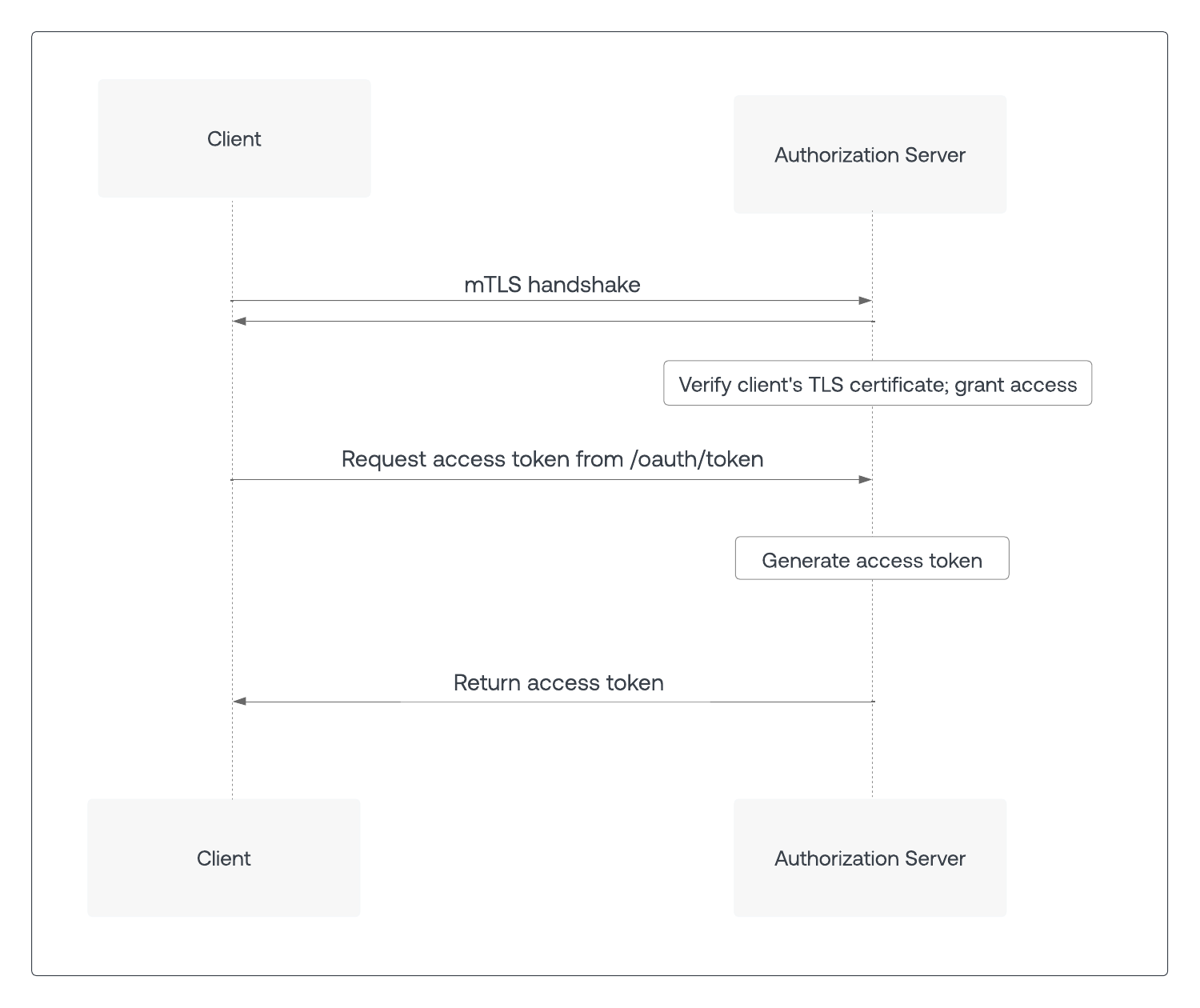
In 2020, the Internet Engineering Task Force (IETF) released [RFC 8705](https://www.rfc-editor.org/rfc/rfc8705) Mutual-TLS (mTLS) client authentication to address these issues. With mTLS authentication, the client certificate with a private key functions like a Client Secret in an OAuth/OIDC flow to verify the client’s identity. If a client is already authenticated at the network layer, there’s no need for a Client Secret at the application layer. Additionally, client certificates can be used with multiple servers to prove a client’s identity to a resource server. Note there are other approaches to solve the above issues, namely [Private Key JWT](/docs/get-started/authentication-and-authorization-flow/authenticate-with-private-key-jwt) and [DPoP](https://datatracker.ietf.org/doc/html/rfc9449) respectively.
To secure an OAuth flow with mTLS, clients send a mTLS certificate to the TLS termination point on the customer edge network when the TLS connection is being established. Before the authorization server processes the request, it must first verify the client’s mTLS certificate.
 Optionally, mTLS can also be used to ensure an access token is used only by the intended party, known as Sender Constraining or Token Binding. When the client calls the `/oauth/token` endpoint on the authorization server using an mTLS connection, the resulting access token contains information that the resource server uses to verify that the client’s TLS certificate matches that of the access token.
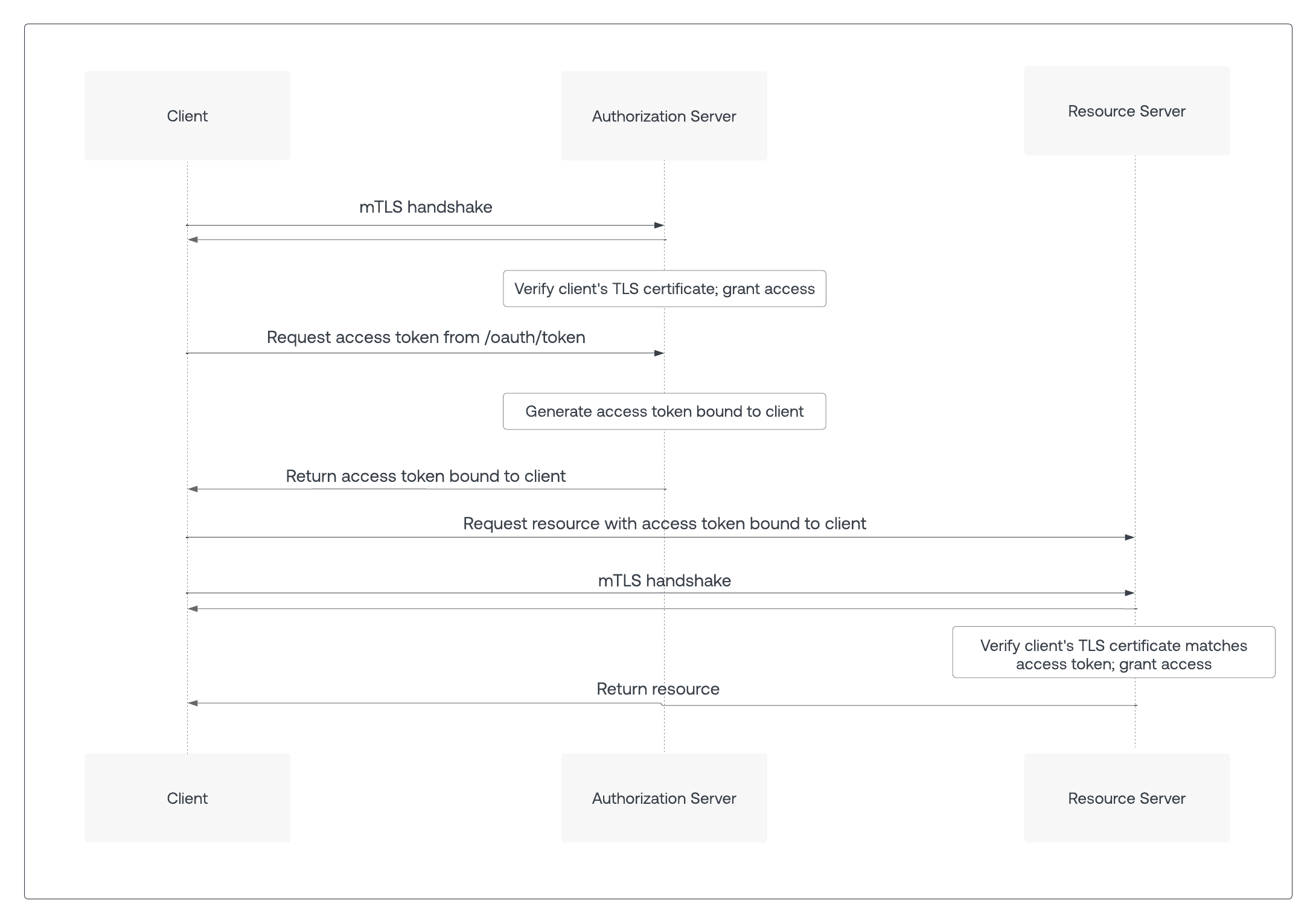 **Note**: mTLS client authentication and mTLS Token Binding can be used independently of each other. mTLS client authentication can be used without mTLS Token Binding, and mTLS Token Binding can be used with other forms of client authentication such as Client Secret or Private Key JWT. Even if other forms of client authentication are used, the client still sends the client certificate to the authorization server for mTLS Token Binding.
## mTLS at Auth0
mTLS for Auth0 builds on [custom domains](/docs/customize/custom-domains) and leverages the customer’s existing mTLS infrastructure to perform certificate provisioning and verification.
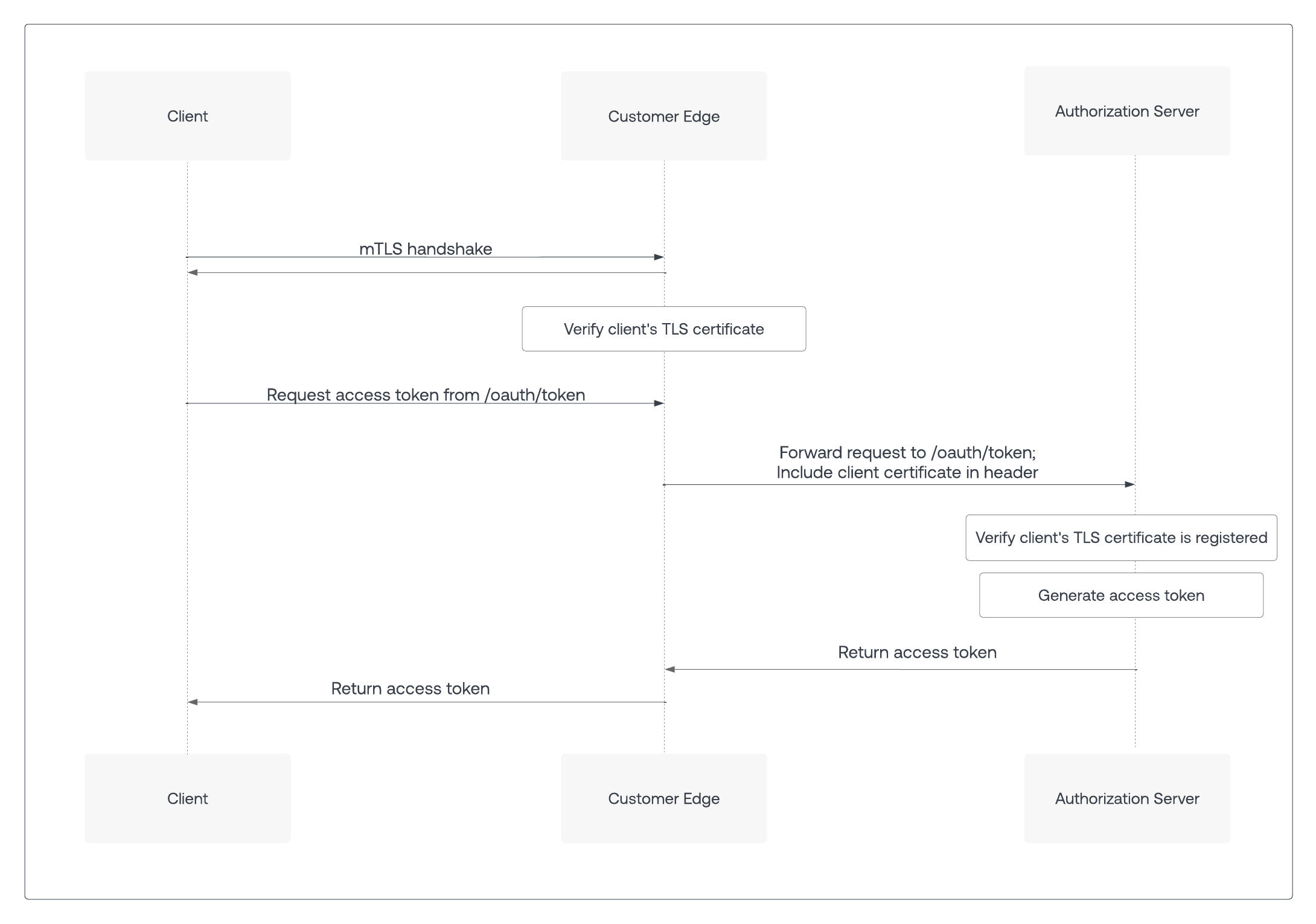
Authenticated client calls to Auth0 that normally require a Client Secret are first sent to the customer edge. This already happens for custom domains that use customer-managed certificates. The customer edge performs the mTLS handshake with the client and validates the client certificate. Once the client certificate is verified, the request is then forwarded to the tenant’s edge domain at Auth0, including the validated client certificate in an HTTP header along with the correct `cname-api-key` as per the custom domains functionality.
**Note**: mTLS client authentication and mTLS Token Binding can be used independently of each other. mTLS client authentication can be used without mTLS Token Binding, and mTLS Token Binding can be used with other forms of client authentication such as Client Secret or Private Key JWT. Even if other forms of client authentication are used, the client still sends the client certificate to the authorization server for mTLS Token Binding.
## mTLS at Auth0
mTLS for Auth0 builds on [custom domains](/docs/customize/custom-domains) and leverages the customer’s existing mTLS infrastructure to perform certificate provisioning and verification.
Authenticated client calls to Auth0 that normally require a Client Secret are first sent to the customer edge. This already happens for custom domains that use customer-managed certificates. The customer edge performs the mTLS handshake with the client and validates the client certificate. Once the client certificate is verified, the request is then forwarded to the tenant’s edge domain at Auth0, including the validated client certificate in an HTTP header along with the correct `cname-api-key` as per the custom domains functionality.
 ## Call the authorization server
Since mTLS serves both client authentication and access token binding, the client must know whether these features are enabled on the authorization server. In addition, an authorization server’s mTLS endpoints and non-mTLS endpoints may be exposed on different domains.
To get configuration details about the authorization server, the client sends a GET request to the [OpenID Connect Discovery](https://openid.net/specs/openid-connect-discovery-1_0.html) endpoint: `https:///.well-known/openid-configuration`
A successful response returns the OIDC discovery document, or a JSON object listing the authorization server’s properties and endpoints, including those related to mTLS.
If mTLS client authentication is enabled, the OIDC discovery document includes the `token_endpoint_auth_methods_supported` property, which contains either `tls_client_auth` or `self_signed_tls_client_auth`:
```json lines theme={null}
{
...
"token_endpoint_auth_methods_supported": ["tls_client_auth"]
...
}
```
If mTLS Token Binding is enabled, the OIDC discovery document sets the `tls_client_certificate_bound_access_tokens` property to `true:`
```json lines theme={null}
{
...
"tls_client_certificate_bound_access_tokens": true
...
}
```
Environments that support mTLS endpoint aliases expose a new property, `mtls_endpoint_aliases`, that contains a list of endpoints that support mTLS. For clients that support mTLS, the endpoints listed under `mtls_endpoint_aliases` take precedence over the same endpoints exposed outside of `mtls_endpoint_aliases`.
In the following code sample, the `token_endpoint` property is exposed twice. The endpoint to use for mTLS calls is listed under `mtls_endpoint_aliases`, or `https://mtls.auth.bank.com/oauth/token`:
```json lines theme={null}
{
...
"mtls_endpoint_aliases": {
"token_endpoint": "https://mtls.auth.bank.com/oauth/token"
},
"token_endpoint": "https://auth.bank.com/oauth/token",
"pushed_authorization_request_endpoint": "https://auth.bank.com/oauth/par",
...
}
```
If an endpoint is not listed under `mtls_endpoint_aliases`, use the same endpoint listed outside of `mtls_endpoint_aliases`. In the example above, `pushed_authorization_request_endpoint` is not listed under `mtls_endpoint_aliases`. As a result, use the `pushed_authorization_request_endpoint` exposed outside of `mtls_endpoint_aliases`, or `https://auth.bank.com/oauth/par`.
For more information, see RFC 8705’s [section on endpoint aliases](https://www.rfc-editor.org/rfc/rfc8705#name-metadata-for-mutual-tls-end).
## Call the resource server
Once a client receives an access token, it can access protected resources on a resource server. If mTLS Token Binding is enabled, the authorization server returns the OIDC discovery document that contains the `tls_client_certificate_bound_access_tokens` property.
When the client calls the resource server with a mTLS-bound access token, the resource server requests a mTLS certificate from the client during the TLS handshake. The resource server should reject requests with an access token that does not match that client certificate with a 401 HTTP status code and an `invalid_token` error code. To learn more, read [Configure Resource Server for Sender Constraining](/docs/secure/sender-constraining/configure-sender-constraining/configure-resource-server-for-sender-constraining).
## Learn more
* [Configure mTLS Authentication](/docs/get-started/applications/configure-mtls)
## Call the authorization server
Since mTLS serves both client authentication and access token binding, the client must know whether these features are enabled on the authorization server. In addition, an authorization server’s mTLS endpoints and non-mTLS endpoints may be exposed on different domains.
To get configuration details about the authorization server, the client sends a GET request to the [OpenID Connect Discovery](https://openid.net/specs/openid-connect-discovery-1_0.html) endpoint: `https:///.well-known/openid-configuration`
A successful response returns the OIDC discovery document, or a JSON object listing the authorization server’s properties and endpoints, including those related to mTLS.
If mTLS client authentication is enabled, the OIDC discovery document includes the `token_endpoint_auth_methods_supported` property, which contains either `tls_client_auth` or `self_signed_tls_client_auth`:
```json lines theme={null}
{
...
"token_endpoint_auth_methods_supported": ["tls_client_auth"]
...
}
```
If mTLS Token Binding is enabled, the OIDC discovery document sets the `tls_client_certificate_bound_access_tokens` property to `true:`
```json lines theme={null}
{
...
"tls_client_certificate_bound_access_tokens": true
...
}
```
Environments that support mTLS endpoint aliases expose a new property, `mtls_endpoint_aliases`, that contains a list of endpoints that support mTLS. For clients that support mTLS, the endpoints listed under `mtls_endpoint_aliases` take precedence over the same endpoints exposed outside of `mtls_endpoint_aliases`.
In the following code sample, the `token_endpoint` property is exposed twice. The endpoint to use for mTLS calls is listed under `mtls_endpoint_aliases`, or `https://mtls.auth.bank.com/oauth/token`:
```json lines theme={null}
{
...
"mtls_endpoint_aliases": {
"token_endpoint": "https://mtls.auth.bank.com/oauth/token"
},
"token_endpoint": "https://auth.bank.com/oauth/token",
"pushed_authorization_request_endpoint": "https://auth.bank.com/oauth/par",
...
}
```
If an endpoint is not listed under `mtls_endpoint_aliases`, use the same endpoint listed outside of `mtls_endpoint_aliases`. In the example above, `pushed_authorization_request_endpoint` is not listed under `mtls_endpoint_aliases`. As a result, use the `pushed_authorization_request_endpoint` exposed outside of `mtls_endpoint_aliases`, or `https://auth.bank.com/oauth/par`.
For more information, see RFC 8705’s [section on endpoint aliases](https://www.rfc-editor.org/rfc/rfc8705#name-metadata-for-mutual-tls-end).
## Call the resource server
Once a client receives an access token, it can access protected resources on a resource server. If mTLS Token Binding is enabled, the authorization server returns the OIDC discovery document that contains the `tls_client_certificate_bound_access_tokens` property.
When the client calls the resource server with a mTLS-bound access token, the resource server requests a mTLS certificate from the client during the TLS handshake. The resource server should reject requests with an access token that does not match that client certificate with a 401 HTTP status code and an `invalid_token` error code. To learn more, read [Configure Resource Server for Sender Constraining](/docs/secure/sender-constraining/configure-sender-constraining/configure-resource-server-for-sender-constraining).
## Learn more
* [Configure mTLS Authentication](/docs/get-started/applications/configure-mtls)