> ## Documentation Index
> Fetch the complete documentation index at: https://docs-dev-actions-triggers-prototype.mintlify.site/llms.txt
> Use this file to discover all available pages before exploring further.
> Describes how to create an additional tenant using the Auth0 Dashboard.
# Create Multiple Tenants
You can configure multiple tenants to create [different environments](/docs/get-started/auth0-overview/create-tenants/set-up-multiple-environments) in the Auth0 Dashboard to allow for complex configurations. For example, you could have two separate domains (one internal and one public-facing), or you may want users to log in differently for different applications. The way to accomplish this is to create more than one Auth0 tenant to allow you to have separate sets of applications, connections, and users for the applications and groups of users that you need to support.
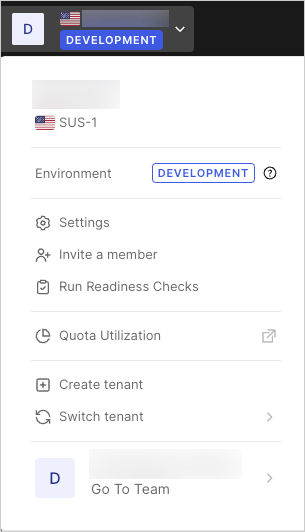
1. Go to the [Auth0 Dashboard](https://manage.auth0.com/#/), select your tenant name, and select **Create Tenant**.
 2. Enter your desired **Tenant Domain**, select a **Region**, and select **Create**.
## Learn more
* [Multiple Organization Architecture](/docs/get-started/architecture-scenarios/multiple-organization-architecture)
* [Set Up Multiple Environments](/docs/get-started/auth0-overview/create-tenants/set-up-multiple-environments)
* [Delete or Reset Tenants](/docs/troubleshoot/customer-support/manage-subscriptions/delete-or-reset-tenant)
* [Multi-Tenant Applications Best Practices](/docs/get-started/auth0-overview/create-tenants/multi-tenant-apps-best-practices)
* [Tenant Settings](/docs/get-started/tenant-settings)
2. Enter your desired **Tenant Domain**, select a **Region**, and select **Create**.
## Learn more
* [Multiple Organization Architecture](/docs/get-started/architecture-scenarios/multiple-organization-architecture)
* [Set Up Multiple Environments](/docs/get-started/auth0-overview/create-tenants/set-up-multiple-environments)
* [Delete or Reset Tenants](/docs/troubleshoot/customer-support/manage-subscriptions/delete-or-reset-tenant)
* [Multi-Tenant Applications Best Practices](/docs/get-started/auth0-overview/create-tenants/multi-tenant-apps-best-practices)
* [Tenant Settings](/docs/get-started/tenant-settings)