> ## Documentation Index
> Fetch the complete documentation index at: https://docs-dev-actions-triggers-prototype.mintlify.site/llms.txt
> Use this file to discover all available pages before exploring further.
> Describes how to configure new and existing applications to use Private Key JWT Authentication.
# Configure Private Key JWT Authentication
Private Key JWT is available for customers on the Enterprise plan. To upgrade, contact [Auth0 pricing](https://auth0.com/pricing/).
Private Key JWT Authentication supports [OIDC Connect Core Client Authentication 1.0](https://openid.net/specs/openid-connect-core-1_0.html#ClientAuthentication) client authentication using JWT assertions signed with asymmetric key pairs. You can create a new application to use `private_key_jwt` or enable existing applications to use private key pairs for authentication.
## Prerequisites
Before configuring an application that authenticates using Private Key JWT, you must [generate an RSA key pair](/docs/secure/application-credentials/generate-rsa-key-pair).
## Configure Private Key JWT
You can use the Auth0 Dashboard to create a new application and configure the credentials or update an existing application.
We recommend you securely store the current `client_secret` parameter before you set your application credential method to Private Key JWT. The `client_secret` parameter will be hidden once the Private Key JWT configuration is complete.
#### Configure a new application for `private_key_jwt`
1. Navigate to [**Auth0 Dashboard > Applications > Application**](https://manage.auth0.com/#/applications).
2. Select **Create Application**.
3. Choose your application type.
4. Under the application settings, select the **Credentials** tab.
5. Under **Authentication Methods**, select **Private Key JWT**.
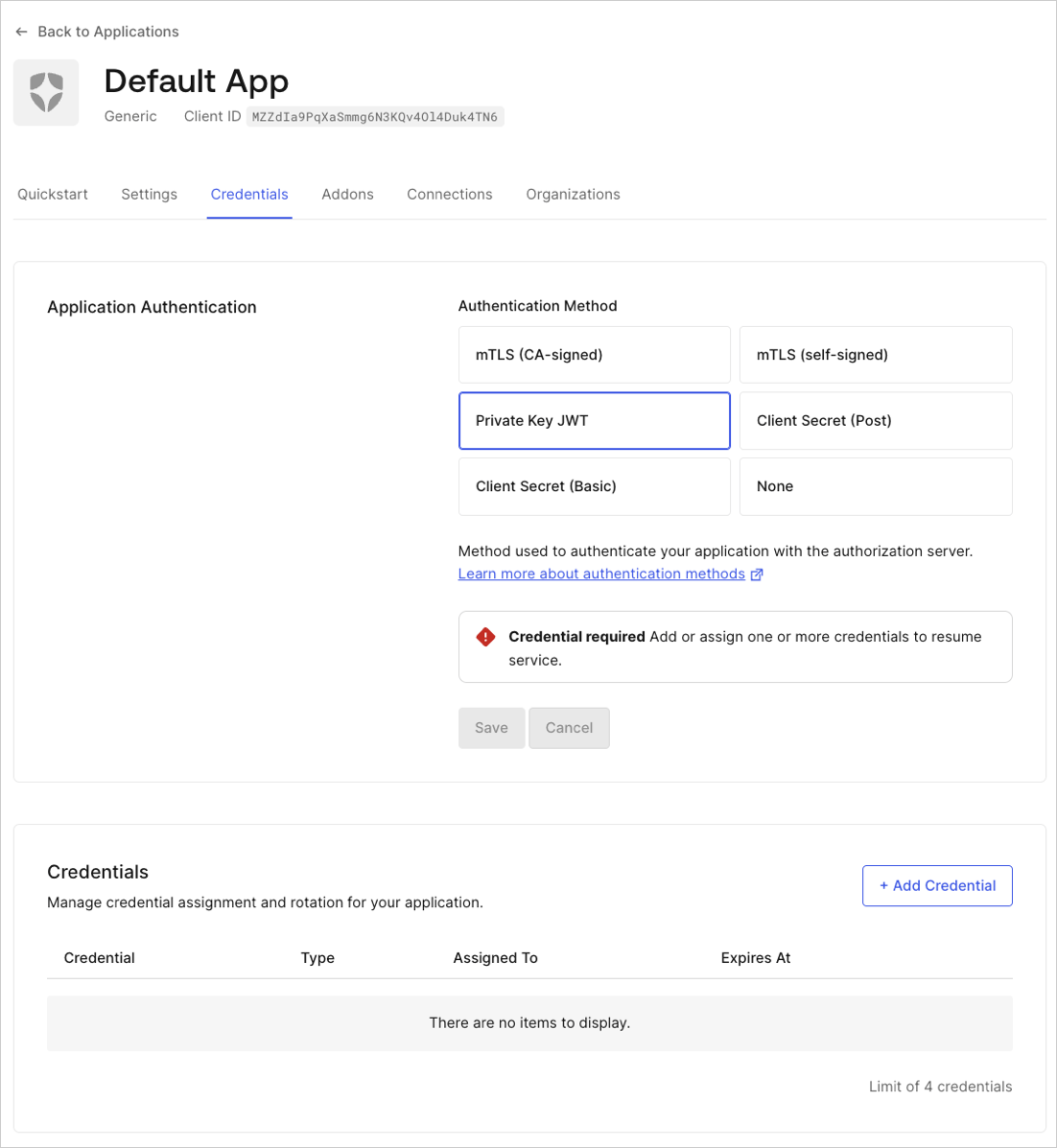 6. Configure credential details:
1. Enter a name for the credential.
2. Upload your PEM format or X.509 certificate.
3. Select the algorithm to sign the assertions.
4. Optional: Enable custom expiration. Select **Set an explicit expiry date for this Credential** and set a future date.
You may receive an invalid certificate error if you are submitting an malformed key material, to avoid any issues it’s best to upload the file directly created by openssl.
7. Select **Add Credential**.
#### Configure an existing application
1. Navigate to [Auth0 Dashboard > Applications](http://manage.auth0.com/#/applications).
2. Select the application you want to update.
3. Select the **Credentials** tab.
4. Choose **Private Key JWT**.
5. Configure credential details:
1. Enter a name for the credential.
2. Upload your PEM format or X.509 certificate.
3. Select the algorithm to sign the assertions.
4. Optional: Enable custom expiration. Select **Set an explicit expiry date for this Credential** and set a future date.
6. Select **Add Credential**.
#### Configure an application to use Client Secret authentication
1. Navigate to [Auth0 Dashboard > Applications > Applications](https://manage.auth0.com/dashboard/#/applications/) and select the application you want to update.
2. Select the **Credentials** tab.
3. Choose **Client Secret (Post)** or **Client Secret (Basic)**.
4. Select **Save**.
#### Update credential expiration
You can update an existing credential with an expiration date with Auth0 Dashboard.
1. Navigate to [Auth0 Dashboard > Applications > Applications](https://manage.auth0.com/dashboard/#/applications/) and select the application you want to update.
2. Select the **Credentials** tab.
3. Choose the credential you want to update and select **Edit Credential**.
6. Configure credential details:
1. Enter a name for the credential.
2. Upload your PEM format or X.509 certificate.
3. Select the algorithm to sign the assertions.
4. Optional: Enable custom expiration. Select **Set an explicit expiry date for this Credential** and set a future date.
You may receive an invalid certificate error if you are submitting an malformed key material, to avoid any issues it’s best to upload the file directly created by openssl.
7. Select **Add Credential**.
#### Configure an existing application
1. Navigate to [Auth0 Dashboard > Applications](http://manage.auth0.com/#/applications).
2. Select the application you want to update.
3. Select the **Credentials** tab.
4. Choose **Private Key JWT**.
5. Configure credential details:
1. Enter a name for the credential.
2. Upload your PEM format or X.509 certificate.
3. Select the algorithm to sign the assertions.
4. Optional: Enable custom expiration. Select **Set an explicit expiry date for this Credential** and set a future date.
6. Select **Add Credential**.
#### Configure an application to use Client Secret authentication
1. Navigate to [Auth0 Dashboard > Applications > Applications](https://manage.auth0.com/dashboard/#/applications/) and select the application you want to update.
2. Select the **Credentials** tab.
3. Choose **Client Secret (Post)** or **Client Secret (Basic)**.
4. Select **Save**.
#### Update credential expiration
You can update an existing credential with an expiration date with Auth0 Dashboard.
1. Navigate to [Auth0 Dashboard > Applications > Applications](https://manage.auth0.com/dashboard/#/applications/) and select the application you want to update.
2. Select the **Credentials** tab.
3. Choose the credential you want to update and select **Edit Credential**.
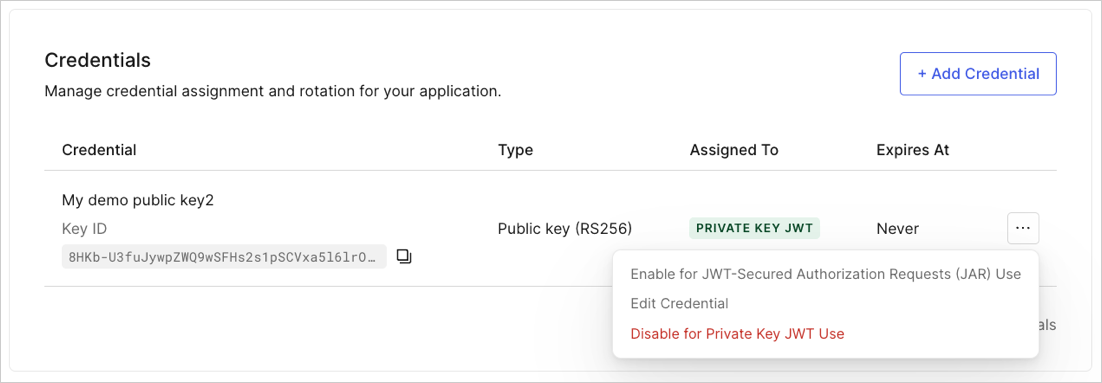 4. Select **Set an explicit expiry date for this Credential** and set a future date.
5. Select **Update Credential**.
#### Configure a new application for `private_key_jwt`
You can create a new application with `private_key_jwt` as the authentication method using the Management API. Make a `POST` call to the [`Create a Client`](https://auth0.com/docs/api/management/v2#!/Clients/get_clients) endpoint with the following payload:
```bash lines theme={null}
curl --location --request POST 'https://{domain}/api/v2/clients' \
--header 'Authorization: Bearer {managementApiAccessToken} \
--header 'Content-Type: application/json' \
--data-raw '{
"name": "{clientName}",
"app_type": "non_interactive",
"client_authentication_methods": {
"private_key_jwt": {
"credentials": [
{
"name": "{credentialName}",
"credential_type": "public_key",
"pem": "{credentialPublicKey}",
"alg": "{algorithm}",
"expires_at": "{expiresAt}"
}
]
},
"jwt_configuration": {
"alg": "RS256"
}
}
}'
```
| Parameter | Description |
| -------------------------- | --------------------------------------------------------------------------------------------------------------------------------------------------------------------------------------------------------------------------------------------------------------------------------- |
| `algorithm` | Algorithm used to sign assertions. Supported values are RS256, RS384 and PS256. If not specified, the algorithm will default to RS256. |
| `clientName` | Name for your new client. |
| `credentialName` | Name for the public key. |
| `expires_at` | Optional. Expiration date of the credential in ISO 8601 format. For example, `2020-08-20T19:10:06.299Z`. Once the expiration date passes, the credential is no longer valid. |
| `managementApiAccessToken` | [Access token for the Management API](/docs/secure/tokens/access-tokens/management-api-access-tokens) with the scope `create:credentials`. |
| `pem` | Public key, or x.509 certificate, encoded in PEM format. |
| `parse_expiry_from_cert` | Optional. A boolean that indicates that Auth0 should parse the expiry when provided a certificate. If a certificate is not provided, Auth0 will return an error. `parse_expiry_from_cert` and `expires_at` are also mutually exclusive. In this case, Auth0 will return an error. |
The public key PEM should be JSON escaped before being passed to Auth0, in our example, this is the content we need to pass:
`-----BEGIN PUBLIC KEY-----
MIIBIjANBgkqhkiG9w0BAQEFAAOCAQ8AMIIBCgKCAQEA53VzmIVVZZWyNm266l82
mnoDc9g/snXklax5kChEhqK/WnTUvuXP4Gd4THj8rchxgUGKXd4PF3SUcKyn/qPm
Tet0idVHk2PwP//FOVgYo5Lb04js0pgZkbyB/WjuMp1w+yMuSn0NYAP7Q9U7DfTb
jmox8OQt4tCB4m7UrJghGqT8jkPyZO/Ka6/XsyjTYPOUL3t3PD7JShVAgo1mAY6g
Sr4SORywIiuHsg+59ad7MXGy78LirhtqAcDECKF7VZpxMuEjMLg3o2yzNUeWI2Mg
IF+t0HbO1E387fvLcuSyai1yWbSr1PXyiB2aXyDpbD4u7d3ux4ahU2opH11lBqvx
+wIDAQAB -----END PUBLIC KEY-----`
The response contains the `client_id` property which will link your application to the resource server. The response also contains a generated `kid` for the credential you created. This will be used later to generate the `client_assertion`.
Auth0 follows the [JSON Web Key Thumbprint](https://datatracker.ietf.org/doc/html/rfc7638) standard to generate the kid of your credentials.
The kid consists of a base64URL encoded SHA256 digest of of the JWK representation of your public key.
#### Configure an existing application
You can also configure an existing application to use Private Key JWT Authentication with the Auth0 Management API. You will need to remove any values in the `token_endpoint_auth_method` field and create values in the `client_authentication_methods` field.
If you update an existing production application to authenticate with `private_key_jwt`, we recommend you securely store your current `client_secret` value for future reference.
After you configure private\_key\_jwt, you won't be able to access the client\_secret value unless you restore your application's configuration to use a Client Secret.
##### Create the credential resource
Once you have generated a key pair, create the credential resource. Make the following POST request to the Management API’s [`/clients`](https://auth0.com/docs/api/management/v2#!/Clients/post_clients) endpoint.
```bash lines theme={null}
curl --location --request POST 'https://{domain}/api/v2/clients/{clientId}/credentials' \
--header 'Authorization: Bearer {managementApiAccessToken} \
--header 'Content-Type: application/json' \
--data-raw '{
"name": "{credentialName}",
"credential_type": "public_key",
"pem": "{credentialPublicKey}",
"alg": "{algorithm}",
"expires_at ": "{expiresAt}",
}'
```
| Parameter | Description |
| -------------------------- | ---------------------------------------------------------------------------------------------------------------------------------------------------------------------------------------------------------------------------------------------------------------------------- |
| `algorithm` | Algorithm used to sign assertions. Supported values are RS256, RS384 and PS256. If not specified, the algorithm default is RS256. |
| `clientId` | ID of the application to be updated. |
| `credentialName` | Name of the public key. |
| `managementApiAccessToken` | [Access token for the Management API](/docs/secure/tokens/access-tokens/management-api-access-tokens) with the scope `create:credentials`. |
| `pem` | Public key, or x.509 certificate, encoded in PEM format. |
| `expires_at` | Optional. Expiration date of the credential in ISO 8601 format. For example, `2020-08-20T19:10:06.299Z`. Once the expiration date passes, the credential is no longer valid. |
| `parse_expiry_from_cert` | Optional. A boolean that indicates that Auth0 should parse the expiry when provided a certificate. If a certificate is not provided, Auth0 will return an error. `parse_expiry_from_cert` and `expires_at` are mutually exclusive. In this case, Auth0 will return an error. |
The PEM public key should be JSON-escaped before being passed to Auth0. In this example, the content we need to pass is:
```pem lines theme={null}
-----BEGIN PUBLIC KEY-----
MIIBIjANBgkqhkiG9w0BAQEFAAOCAQ8AMIIBCgKCAQEA53VzmIVVZZWyNm266l82
mnoDc9g/snXklax5kChEhqK/WnTUvuXP4Gd4THj8rchxgUGKXd4PF3SUcKyn/qPm
Tet0idVHk2PwP//FOVgYo5Lb04js0pgZkbyB/WjuMp1w+yMuSn0NYAP7Q9U7DfTb
jmox8OQt4tCB4m7UrJghGqT8jkPyZO/Ka6/XsyjTYPOUL3t3PD7JShVAgo1mAY6g
Sr4SORywIiuHsg+59ad7MXGy78LirhtqAcDECKF7VZpxMuEjMLg3o2yzNUeWI2Mg
IF+t0HbO1E387fvLcuSyai1yWbSr1PXyiB2aXyDpbD4u7d3ux4ahU2opH11lBqvx
+wIDAQAB
-----END PUBLIC KEY-----
```
A credential ID returns in the response. Use the ID for the next step.
##### Associate the credential
After you create the credential, associate it with your application. Your application uses these credentials during authentication with `private_key_jwt`.
Make a PATCH request to the Management API [`Update a Client`](https://auth0.com/docs/api/management/v2#!/Clients/patch_clients_by_id) endpoint:
```bash lines theme={null}
curl --location --request PATCH 'https://{domain}/api/v2/clients/{clientId} \
--header 'Authorization: Bearer {managementApiAccessToken} \
--header 'Content-Type: application/json' \
--data-raw '{
"token_endpoint_auth_method": null,
"client_authentication_methods": {
"private_key_jwt": {
"credentials": [{ "id": {credentialId} }]
}
}
}'
```
| Parameter | Description |
| -------------------------- | -------------------------------------------------------------------------------------------------------------------------------------------------------------- |
| `clientId` | ID of the application to be updated. |
| `managementApiAccessToken` | [Access token for the Management API](/docs/secure/tokens/access-tokens/management-api-access-tokens) with the scope `update:client` and `update:credentials`. |
| `credentialId` | ID of the credential you created. |
| `pem` | The public key in PEM format. |
Auth0 does not support use of HS256 as the applications’s JWT signing algorithm. You must have the `jwt_configuration.alg` field set to the RS256 algorithm. To learn how to change the signing algorithm, read [Change Application Signing Algorithms](/docs/get-started/applications/change-application-signing-algorithms).
#### Configure an application to use Client Secret authentication
To restore your application’s configuration to use a Client Secret, you must disable `client_authentication_methods` and re-enable `token_endpoint_auth_method` with the authentication method.
Once you have configured your authentication method as `client_secret`, your applications will no longer be able to authenticate using `private_key_jwt` until you have updated them to authenticate using `client_secret`.
**Example**
```bash lines theme={null}
curl --location --request PATCH 'https://{domain}/api/v2/clients/{clientId} \
--header 'Authorization: Bearer {managementApiAccessToken} \
--header 'Content-Type: application/json' \
--data-raw '{
"token_endpoint_auth_method": "{tokenEndpointAuthMethod}",
"client_authentication_methods": null
}'
```
| Parameter | Description |
| -------------------------- | --------------------------------------------------------------------------------------------------------------------------------------------------------------- |
| `clientId` | ID of the updated application. |
| `managementApiAccessToken` | [Access token for the Management API](/docs/secure/tokens/access-tokens/management-api-access-tokens) with the scopes `update:client` and `update:credentials`. |
| `tokenEndpointAuthMethod` | Final authentication method. For example: `client_secret_basic` or `client_secret_post`. |
#### Patch credentials with an expiration field
You can update an existing credential with an expiration date with the Management API [Update a credential](https://auth0.com/docs/api/management/v2#!/Clients/patch_credentials_by_credential_id) endpoint.
```bash lines theme={null}
curl --location --request PATCH 'https://{domain}/api/v2/clients/{clientId}/credentials/{credentialId} ' \
--header 'Authorization: Bearer {managementApiAccessToken} \
--header 'Content-Type: application/json' \
--data-raw '{
"expires_at": {expiresAt}
}'
```
| Parameter | Description |
| -------------------------- | -------------------------------------------------------------------------------------------------- |
| `managementApiAccessToken` | Access tokens for the Management API with the scopes ` update:credentials`. |
| `clientId` | The client you want to update. |
| `expires_at` | The expiration date of the credential in ISO 8601 format. For example, `2020-08-20T19:10:06.299Z`. |
The only field you can update is the `expires_at` field. The rest of the attributes are immutable and require you to rotate the credential to change.
## Credential limits
Auth0 enforces a minimum RSA key size of 2048 bits and a maximum key size of 4096 bits. Applications can have a maximum of two credentials configured.
## Rotate credentials
To prevent leaked keys, Auth0 recommends you periodically rotate the key pair. To learn how, read [Rotate Credentials](/docs/get-started/applications/rotate-credentials).
## Learn more
* [Application Credentials](/docs/secure/application-credentials)
* [Credential Settings](/docs/get-started/applications/credentials)
* [Authenticate with Private Key JWT](/docs/get-started/authentication-and-authorization-flow/authenticate-with-private-key-jwt)
4. Select **Set an explicit expiry date for this Credential** and set a future date.
5. Select **Update Credential**.
#### Configure a new application for `private_key_jwt`
You can create a new application with `private_key_jwt` as the authentication method using the Management API. Make a `POST` call to the [`Create a Client`](https://auth0.com/docs/api/management/v2#!/Clients/get_clients) endpoint with the following payload:
```bash lines theme={null}
curl --location --request POST 'https://{domain}/api/v2/clients' \
--header 'Authorization: Bearer {managementApiAccessToken} \
--header 'Content-Type: application/json' \
--data-raw '{
"name": "{clientName}",
"app_type": "non_interactive",
"client_authentication_methods": {
"private_key_jwt": {
"credentials": [
{
"name": "{credentialName}",
"credential_type": "public_key",
"pem": "{credentialPublicKey}",
"alg": "{algorithm}",
"expires_at": "{expiresAt}"
}
]
},
"jwt_configuration": {
"alg": "RS256"
}
}
}'
```
| Parameter | Description |
| -------------------------- | --------------------------------------------------------------------------------------------------------------------------------------------------------------------------------------------------------------------------------------------------------------------------------- |
| `algorithm` | Algorithm used to sign assertions. Supported values are RS256, RS384 and PS256. If not specified, the algorithm will default to RS256. |
| `clientName` | Name for your new client. |
| `credentialName` | Name for the public key. |
| `expires_at` | Optional. Expiration date of the credential in ISO 8601 format. For example, `2020-08-20T19:10:06.299Z`. Once the expiration date passes, the credential is no longer valid. |
| `managementApiAccessToken` | [Access token for the Management API](/docs/secure/tokens/access-tokens/management-api-access-tokens) with the scope `create:credentials`. |
| `pem` | Public key, or x.509 certificate, encoded in PEM format. |
| `parse_expiry_from_cert` | Optional. A boolean that indicates that Auth0 should parse the expiry when provided a certificate. If a certificate is not provided, Auth0 will return an error. `parse_expiry_from_cert` and `expires_at` are also mutually exclusive. In this case, Auth0 will return an error. |
The public key PEM should be JSON escaped before being passed to Auth0, in our example, this is the content we need to pass:
`-----BEGIN PUBLIC KEY-----
MIIBIjANBgkqhkiG9w0BAQEFAAOCAQ8AMIIBCgKCAQEA53VzmIVVZZWyNm266l82
mnoDc9g/snXklax5kChEhqK/WnTUvuXP4Gd4THj8rchxgUGKXd4PF3SUcKyn/qPm
Tet0idVHk2PwP//FOVgYo5Lb04js0pgZkbyB/WjuMp1w+yMuSn0NYAP7Q9U7DfTb
jmox8OQt4tCB4m7UrJghGqT8jkPyZO/Ka6/XsyjTYPOUL3t3PD7JShVAgo1mAY6g
Sr4SORywIiuHsg+59ad7MXGy78LirhtqAcDECKF7VZpxMuEjMLg3o2yzNUeWI2Mg
IF+t0HbO1E387fvLcuSyai1yWbSr1PXyiB2aXyDpbD4u7d3ux4ahU2opH11lBqvx
+wIDAQAB -----END PUBLIC KEY-----`
The response contains the `client_id` property which will link your application to the resource server. The response also contains a generated `kid` for the credential you created. This will be used later to generate the `client_assertion`.
Auth0 follows the [JSON Web Key Thumbprint](https://datatracker.ietf.org/doc/html/rfc7638) standard to generate the kid of your credentials.
The kid consists of a base64URL encoded SHA256 digest of of the JWK representation of your public key.
#### Configure an existing application
You can also configure an existing application to use Private Key JWT Authentication with the Auth0 Management API. You will need to remove any values in the `token_endpoint_auth_method` field and create values in the `client_authentication_methods` field.
If you update an existing production application to authenticate with `private_key_jwt`, we recommend you securely store your current `client_secret` value for future reference.
After you configure private\_key\_jwt, you won't be able to access the client\_secret value unless you restore your application's configuration to use a Client Secret.
##### Create the credential resource
Once you have generated a key pair, create the credential resource. Make the following POST request to the Management API’s [`/clients`](https://auth0.com/docs/api/management/v2#!/Clients/post_clients) endpoint.
```bash lines theme={null}
curl --location --request POST 'https://{domain}/api/v2/clients/{clientId}/credentials' \
--header 'Authorization: Bearer {managementApiAccessToken} \
--header 'Content-Type: application/json' \
--data-raw '{
"name": "{credentialName}",
"credential_type": "public_key",
"pem": "{credentialPublicKey}",
"alg": "{algorithm}",
"expires_at ": "{expiresAt}",
}'
```
| Parameter | Description |
| -------------------------- | ---------------------------------------------------------------------------------------------------------------------------------------------------------------------------------------------------------------------------------------------------------------------------- |
| `algorithm` | Algorithm used to sign assertions. Supported values are RS256, RS384 and PS256. If not specified, the algorithm default is RS256. |
| `clientId` | ID of the application to be updated. |
| `credentialName` | Name of the public key. |
| `managementApiAccessToken` | [Access token for the Management API](/docs/secure/tokens/access-tokens/management-api-access-tokens) with the scope `create:credentials`. |
| `pem` | Public key, or x.509 certificate, encoded in PEM format. |
| `expires_at` | Optional. Expiration date of the credential in ISO 8601 format. For example, `2020-08-20T19:10:06.299Z`. Once the expiration date passes, the credential is no longer valid. |
| `parse_expiry_from_cert` | Optional. A boolean that indicates that Auth0 should parse the expiry when provided a certificate. If a certificate is not provided, Auth0 will return an error. `parse_expiry_from_cert` and `expires_at` are mutually exclusive. In this case, Auth0 will return an error. |
The PEM public key should be JSON-escaped before being passed to Auth0. In this example, the content we need to pass is:
```pem lines theme={null}
-----BEGIN PUBLIC KEY-----
MIIBIjANBgkqhkiG9w0BAQEFAAOCAQ8AMIIBCgKCAQEA53VzmIVVZZWyNm266l82
mnoDc9g/snXklax5kChEhqK/WnTUvuXP4Gd4THj8rchxgUGKXd4PF3SUcKyn/qPm
Tet0idVHk2PwP//FOVgYo5Lb04js0pgZkbyB/WjuMp1w+yMuSn0NYAP7Q9U7DfTb
jmox8OQt4tCB4m7UrJghGqT8jkPyZO/Ka6/XsyjTYPOUL3t3PD7JShVAgo1mAY6g
Sr4SORywIiuHsg+59ad7MXGy78LirhtqAcDECKF7VZpxMuEjMLg3o2yzNUeWI2Mg
IF+t0HbO1E387fvLcuSyai1yWbSr1PXyiB2aXyDpbD4u7d3ux4ahU2opH11lBqvx
+wIDAQAB
-----END PUBLIC KEY-----
```
A credential ID returns in the response. Use the ID for the next step.
##### Associate the credential
After you create the credential, associate it with your application. Your application uses these credentials during authentication with `private_key_jwt`.
Make a PATCH request to the Management API [`Update a Client`](https://auth0.com/docs/api/management/v2#!/Clients/patch_clients_by_id) endpoint:
```bash lines theme={null}
curl --location --request PATCH 'https://{domain}/api/v2/clients/{clientId} \
--header 'Authorization: Bearer {managementApiAccessToken} \
--header 'Content-Type: application/json' \
--data-raw '{
"token_endpoint_auth_method": null,
"client_authentication_methods": {
"private_key_jwt": {
"credentials": [{ "id": {credentialId} }]
}
}
}'
```
| Parameter | Description |
| -------------------------- | -------------------------------------------------------------------------------------------------------------------------------------------------------------- |
| `clientId` | ID of the application to be updated. |
| `managementApiAccessToken` | [Access token for the Management API](/docs/secure/tokens/access-tokens/management-api-access-tokens) with the scope `update:client` and `update:credentials`. |
| `credentialId` | ID of the credential you created. |
| `pem` | The public key in PEM format. |
Auth0 does not support use of HS256 as the applications’s JWT signing algorithm. You must have the `jwt_configuration.alg` field set to the RS256 algorithm. To learn how to change the signing algorithm, read [Change Application Signing Algorithms](/docs/get-started/applications/change-application-signing-algorithms).
#### Configure an application to use Client Secret authentication
To restore your application’s configuration to use a Client Secret, you must disable `client_authentication_methods` and re-enable `token_endpoint_auth_method` with the authentication method.
Once you have configured your authentication method as `client_secret`, your applications will no longer be able to authenticate using `private_key_jwt` until you have updated them to authenticate using `client_secret`.
**Example**
```bash lines theme={null}
curl --location --request PATCH 'https://{domain}/api/v2/clients/{clientId} \
--header 'Authorization: Bearer {managementApiAccessToken} \
--header 'Content-Type: application/json' \
--data-raw '{
"token_endpoint_auth_method": "{tokenEndpointAuthMethod}",
"client_authentication_methods": null
}'
```
| Parameter | Description |
| -------------------------- | --------------------------------------------------------------------------------------------------------------------------------------------------------------- |
| `clientId` | ID of the updated application. |
| `managementApiAccessToken` | [Access token for the Management API](/docs/secure/tokens/access-tokens/management-api-access-tokens) with the scopes `update:client` and `update:credentials`. |
| `tokenEndpointAuthMethod` | Final authentication method. For example: `client_secret_basic` or `client_secret_post`. |
#### Patch credentials with an expiration field
You can update an existing credential with an expiration date with the Management API [Update a credential](https://auth0.com/docs/api/management/v2#!/Clients/patch_credentials_by_credential_id) endpoint.
```bash lines theme={null}
curl --location --request PATCH 'https://{domain}/api/v2/clients/{clientId}/credentials/{credentialId} ' \
--header 'Authorization: Bearer {managementApiAccessToken} \
--header 'Content-Type: application/json' \
--data-raw '{
"expires_at": {expiresAt}
}'
```
| Parameter | Description |
| -------------------------- | -------------------------------------------------------------------------------------------------- |
| `managementApiAccessToken` | Access tokens for the Management API with the scopes ` update:credentials`. |
| `clientId` | The client you want to update. |
| `expires_at` | The expiration date of the credential in ISO 8601 format. For example, `2020-08-20T19:10:06.299Z`. |
The only field you can update is the `expires_at` field. The rest of the attributes are immutable and require you to rotate the credential to change.
## Credential limits
Auth0 enforces a minimum RSA key size of 2048 bits and a maximum key size of 4096 bits. Applications can have a maximum of two credentials configured.
## Rotate credentials
To prevent leaked keys, Auth0 recommends you periodically rotate the key pair. To learn how, read [Rotate Credentials](/docs/get-started/applications/rotate-credentials).
## Learn more
* [Application Credentials](/docs/secure/application-credentials)
* [Credential Settings](/docs/get-started/applications/credentials)
* [Authenticate with Private Key JWT](/docs/get-started/authentication-and-authorization-flow/authenticate-with-private-key-jwt)