> ## Documentation Index
> Fetch the complete documentation index at: https://docs-dev-actions-triggers-prototype.mintlify.site/llms.txt
> Use this file to discover all available pages before exploring further.
# Multi-Resource Refresh Token
> Learn about Multi-resource refresh token
Multi-Resource Refresh Token is currently in Early Access. By using this feature, you agree to the applicable Free Trial terms in Okta’s [Master Subscription Agreement](https://www.okta.com/legal). To learn more about Auth0's product release cycle, read [Product Release Stages](https://auth0.com/docs/troubleshoot/product-lifecycle/product-release-stages).
Multi-Resource Refresh Tokens (MRRT) allows a single [refresh token](/docs/fr-ca/secure/tokens/refresh-tokens) to receive [access tokens](/docs/fr-ca/secure/tokens/access-tokens) for multiple [APIs](/docs/fr-ca/get-started/apis), each with their own scopes and permissions. MRRT builds on standard [OAuth 2.0](/docs/fr-ca/authenticate/protocols/oauth) behavior by allowing refresh tokens to maintain multiple authorization policies.
When an application exchanges a refresh token for an access token, it can select from a set of configured audience and scopes. By doing so, MRRT streamlines authentication flows by avoiding the need to get a new refresh token for each API.
When using MRRT, Auth0 merges two sources of authorization to determine what access token to issue during a refresh token exchange:
1. The audience and scopes granted in the original authentication flow.
2. The audience and scopes configured in the application’s MRRT policy.
This allows applications to reuse the refresh token not only for APIs requested at login, but also for additional APIs allowed in the MRRT policy.
**The key benefits of MRRT include**:
* A single refresh token, per application, to manage when controlling access to multiple APIs.
* No need to go through a full authorization flow every time your application needs to access a new API.
* Performance improvement and reduced load on the authorization server.
* Decrease risk of [rate limitation](/docs/fr-ca/troubleshoot/customer-support/operational-policies/rate-limit-policy) due to repeated full authorization code flows.
## How it works
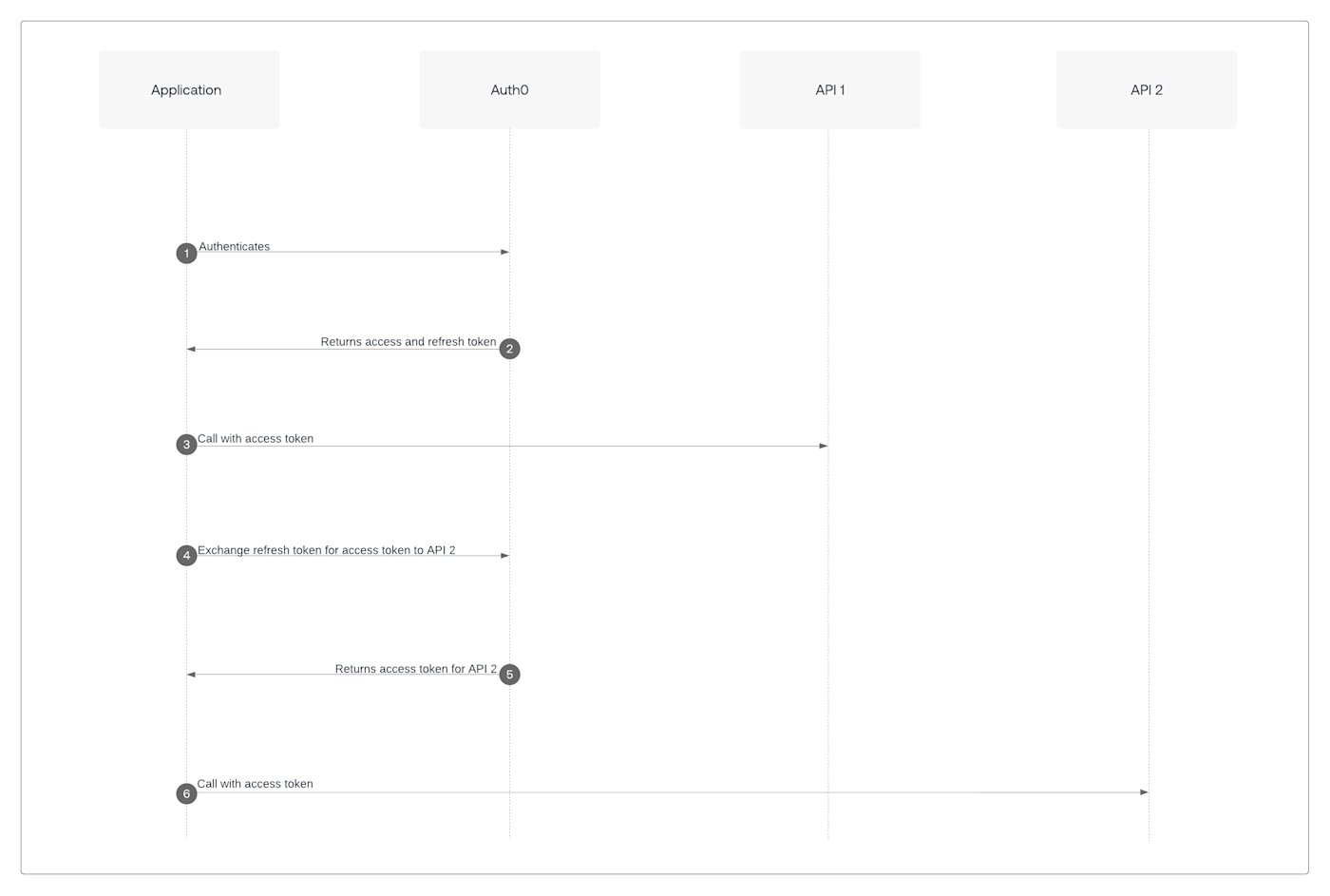 1. Application authenticates with Auth0.
2. Auth0 returns an access token and a multi-resource refresh token.
3. Application uses the access token to call API 1.
4. Application exchanges the multi-resource refresh token for access to API 2.
5. Auth0 returns a new access token scoped to API 2.
6. Application calls API 2 using the new access token.
For example, A native application authenticates the user and requests access to `https://api.example.com` audience. Then, the application needs access to the `https://billing.example.com` audience. If both APIs are included in the application’s MRRT policy, the application can exchange a refresh token for an access token for either API.
Learn how to [Configure and Implement Multi-resource refresh token](/docs/fr-ca/secure/tokens/refresh-tokens/multi-resource-refresh-token/configure-and-implement-multi-resource-refresh-token).
## Limitations
* Each access token issued through MRRT is scoped to a single API. If your application requires access to multiple APIs, you must request separate access tokens for each API.
* MRRT supports only [first-party applications](https://auth0.com/docs/get-started/applications/first-party-and-third-party-applications#first-party-applications).
* MRRT supports APIs configured to [allow skipping user consent](https://auth0.com/docs/get-started/applications/third-party-applications/user-consent-and-third-party-applications#skip-consent-for-first-party-applications).
* The Auth0 Management API can not be included in the MRRT policies.
1. Application authenticates with Auth0.
2. Auth0 returns an access token and a multi-resource refresh token.
3. Application uses the access token to call API 1.
4. Application exchanges the multi-resource refresh token for access to API 2.
5. Auth0 returns a new access token scoped to API 2.
6. Application calls API 2 using the new access token.
For example, A native application authenticates the user and requests access to `https://api.example.com` audience. Then, the application needs access to the `https://billing.example.com` audience. If both APIs are included in the application’s MRRT policy, the application can exchange a refresh token for an access token for either API.
Learn how to [Configure and Implement Multi-resource refresh token](/docs/fr-ca/secure/tokens/refresh-tokens/multi-resource-refresh-token/configure-and-implement-multi-resource-refresh-token).
## Limitations
* Each access token issued through MRRT is scoped to a single API. If your application requires access to multiple APIs, you must request separate access tokens for each API.
* MRRT supports only [first-party applications](https://auth0.com/docs/get-started/applications/first-party-and-third-party-applications#first-party-applications).
* MRRT supports APIs configured to [allow skipping user consent](https://auth0.com/docs/get-started/applications/third-party-applications/user-consent-and-third-party-applications#skip-consent-for-first-party-applications).
* The Auth0 Management API can not be included in the MRRT policies.