> ## Documentation Index
> Fetch the complete documentation index at: https://docs-dev-actions-triggers-prototype.mintlify.site/llms.txt
> Use this file to discover all available pages before exploring further.

# Introduction aux flux

> Cette section décrit comment utiliser les flux et les formulaires.

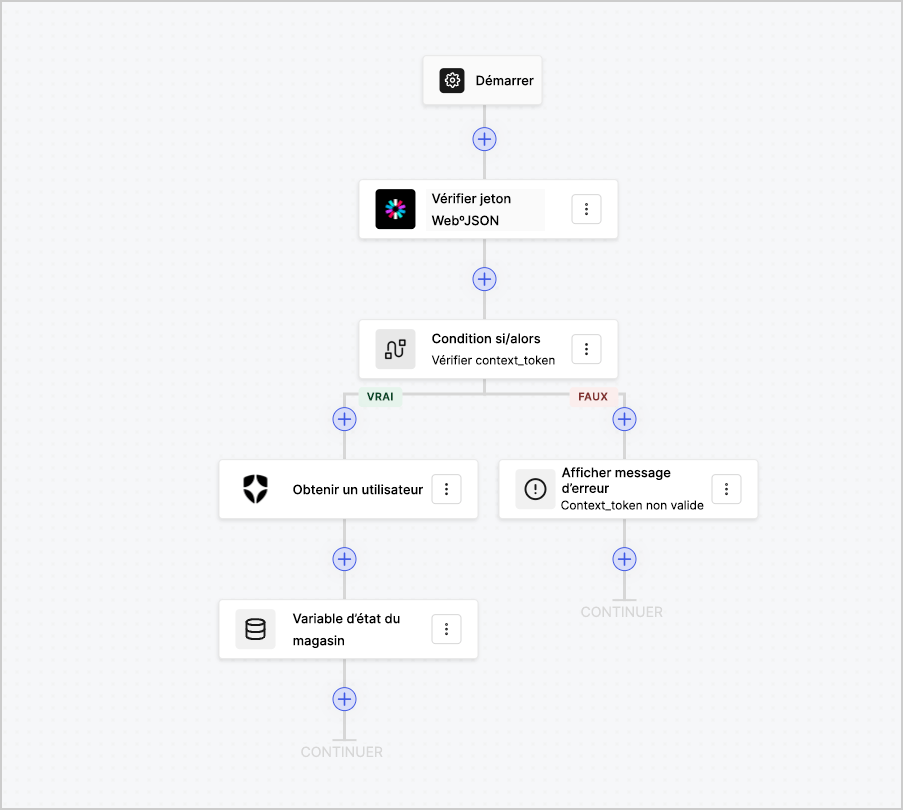
Les flux vous permettent de créer visuellement la logique côté serveur qui peut être exécutée dans vos formulaires et de gérer les informations recueillies, d’intégrer tout service avec une API ou de déclencher des automatisations.
<Frame>
  <img src="https://mintcdn.com/docs-dev-actions-triggers-prototype/mxRp7IkiVukPESZw/docs/images/fr-ca/cdy7uua7fh8z/6u6Huh5CbH3GEQJv3AH7cx/d334ea608b071acd6e77f424283e0234/Flows.png?fit=max&auto=format&n=mxRp7IkiVukPESZw&q=85&s=8ab362ee63d7d5e84ca39209faa90ee8" alt="Dashboard > Forms > Flows" data-og-width="903" width="903" data-og-height="810" height="810" data-path="docs/images/fr-ca/cdy7uua7fh8z/6u6Huh5CbH3GEQJv3AH7cx/d334ea608b071acd6e77f424283e0234/Flows.png" data-optimize="true" data-opv="3" srcset="https://mintcdn.com/docs-dev-actions-triggers-prototype/mxRp7IkiVukPESZw/docs/images/fr-ca/cdy7uua7fh8z/6u6Huh5CbH3GEQJv3AH7cx/d334ea608b071acd6e77f424283e0234/Flows.png?w=280&fit=max&auto=format&n=mxRp7IkiVukPESZw&q=85&s=3c2ac2a47c32205e1a2ff538983f8814 280w, https://mintcdn.com/docs-dev-actions-triggers-prototype/mxRp7IkiVukPESZw/docs/images/fr-ca/cdy7uua7fh8z/6u6Huh5CbH3GEQJv3AH7cx/d334ea608b071acd6e77f424283e0234/Flows.png?w=560&fit=max&auto=format&n=mxRp7IkiVukPESZw&q=85&s=02808f6a59127eb6d4dee3b4f5fa8e6b 560w, https://mintcdn.com/docs-dev-actions-triggers-prototype/mxRp7IkiVukPESZw/docs/images/fr-ca/cdy7uua7fh8z/6u6Huh5CbH3GEQJv3AH7cx/d334ea608b071acd6e77f424283e0234/Flows.png?w=840&fit=max&auto=format&n=mxRp7IkiVukPESZw&q=85&s=6be3e0aa297f1ff71fcac30cf370ec06 840w, https://mintcdn.com/docs-dev-actions-triggers-prototype/mxRp7IkiVukPESZw/docs/images/fr-ca/cdy7uua7fh8z/6u6Huh5CbH3GEQJv3AH7cx/d334ea608b071acd6e77f424283e0234/Flows.png?w=1100&fit=max&auto=format&n=mxRp7IkiVukPESZw&q=85&s=51ea12fd4150622e25e706653abc9a11 1100w, https://mintcdn.com/docs-dev-actions-triggers-prototype/mxRp7IkiVukPESZw/docs/images/fr-ca/cdy7uua7fh8z/6u6Huh5CbH3GEQJv3AH7cx/d334ea608b071acd6e77f424283e0234/Flows.png?w=1650&fit=max&auto=format&n=mxRp7IkiVukPESZw&q=85&s=e2c39f3f232cf7571a1836aa038892bd 1650w, https://mintcdn.com/docs-dev-actions-triggers-prototype/mxRp7IkiVukPESZw/docs/images/fr-ca/cdy7uua7fh8z/6u6Huh5CbH3GEQJv3AH7cx/d334ea608b071acd6e77f424283e0234/Flows.png?w=2500&fit=max&auto=format&n=mxRp7IkiVukPESZw&q=85&s=318fd99ca5ac3398592522b0227967c7 2500w" />
</Frame>

Vous pouvez utiliser les actions des flux avec votre formulaire pour :

* Créer des validations personnalisées côté serveur pour les étapes de votre formulaire.
* Intégrer votre propre API en effectuant des requêtes HTTP personnalisées.
* Intégrer des tiers en utilisant nos intégrations prêtes à l’emploi.
* Exécuter différentes logiques d’entreprise en fonction des saisies ou des propriétés de l’utilisateur.
* Valider les données à l’aide de jetons Web JSON.
