> ## Documentation Index
> Fetch the complete documentation index at: https://docs-dev-actions-triggers-prototype.mintlify.site/llms.txt
> Use this file to discover all available pages before exploring further.

> Configure an update policy form using Forms for Actions

# Use Cases: Configure an update policy form using Forms

<Card title="Before you start">
  1. Create a [Machine-to-Machine Application](/docs/get-started/auth0-overview/create-applications/machine-to-machine-apps) with the following scopes enabled:

  * `read:users`
  * `update:users`
  * `create:users`
  * `read:users_app_metadata`
  * `update:users_app_metadata`
  * `create:users_app_metadata`

  2. Add a [Vault connection](/docs/customize/forms/vault) using the M2M application credentials.
</Card>

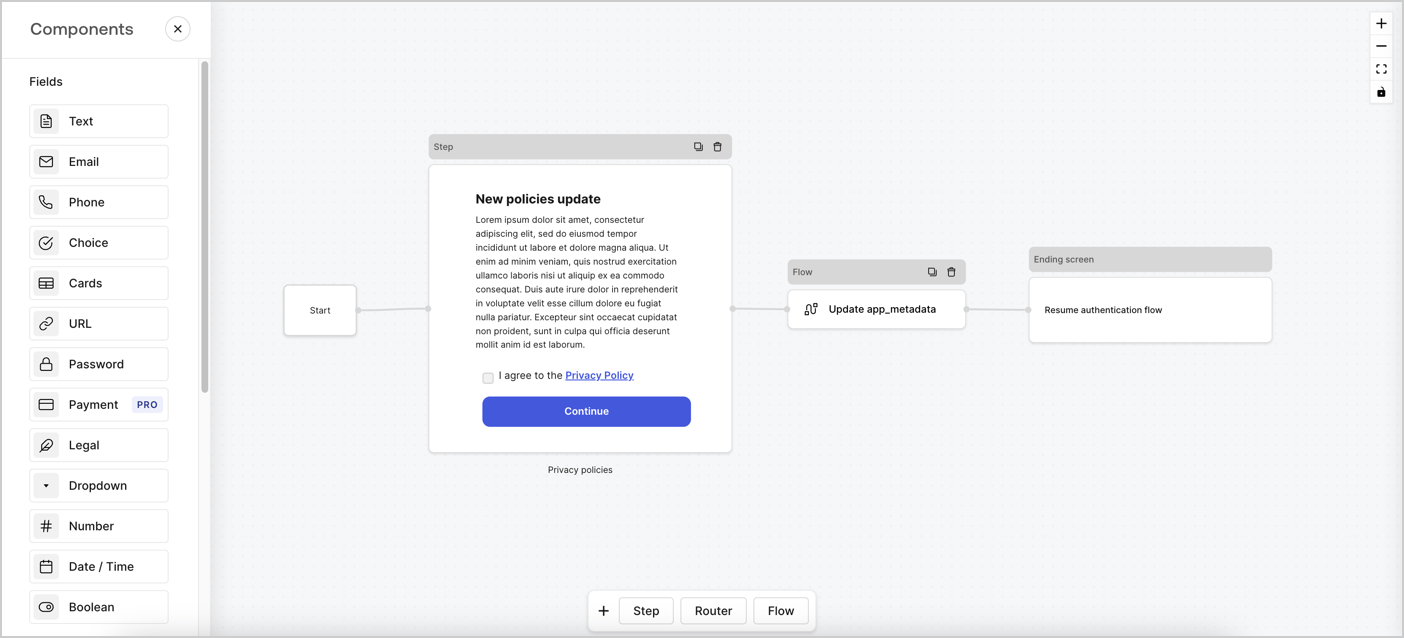
Forms for Actions allows you to create custom privacy policies flows and store the consent under the `app_metadata` object.
<Frame>
  <img src="https://mintcdn.com/docs-dev-actions-triggers-prototype/4MaQENhfcY-1egb6/docs/images/cdy7uua7fh8z/6i68dMvHDTijfRmSgN1x8Q/ad900e7d4c0fb34645921435472b8684/privavy-policy-form.png?fit=max&auto=format&n=4MaQENhfcY-1egb6&q=85&s=1b1d84a587768bf1e3eef13dcdd1df98" alt="Dashboard > Actions > Forms > Privacy policy use case" data-og-width="1404" width="1404" data-og-height="638" height="638" data-path="docs/images/cdy7uua7fh8z/6i68dMvHDTijfRmSgN1x8Q/ad900e7d4c0fb34645921435472b8684/privavy-policy-form.png" data-optimize="true" data-opv="3" srcset="https://mintcdn.com/docs-dev-actions-triggers-prototype/4MaQENhfcY-1egb6/docs/images/cdy7uua7fh8z/6i68dMvHDTijfRmSgN1x8Q/ad900e7d4c0fb34645921435472b8684/privavy-policy-form.png?w=280&fit=max&auto=format&n=4MaQENhfcY-1egb6&q=85&s=3fb8f66029e6bfb3f15756a41e575b8b 280w, https://mintcdn.com/docs-dev-actions-triggers-prototype/4MaQENhfcY-1egb6/docs/images/cdy7uua7fh8z/6i68dMvHDTijfRmSgN1x8Q/ad900e7d4c0fb34645921435472b8684/privavy-policy-form.png?w=560&fit=max&auto=format&n=4MaQENhfcY-1egb6&q=85&s=672970f44246b4900062044e0bc43709 560w, https://mintcdn.com/docs-dev-actions-triggers-prototype/4MaQENhfcY-1egb6/docs/images/cdy7uua7fh8z/6i68dMvHDTijfRmSgN1x8Q/ad900e7d4c0fb34645921435472b8684/privavy-policy-form.png?w=840&fit=max&auto=format&n=4MaQENhfcY-1egb6&q=85&s=e53e01a9edf644dc588b91017ca3bebb 840w, https://mintcdn.com/docs-dev-actions-triggers-prototype/4MaQENhfcY-1egb6/docs/images/cdy7uua7fh8z/6i68dMvHDTijfRmSgN1x8Q/ad900e7d4c0fb34645921435472b8684/privavy-policy-form.png?w=1100&fit=max&auto=format&n=4MaQENhfcY-1egb6&q=85&s=dab11edbd4c1a1014f36fa302bd3b7e4 1100w, https://mintcdn.com/docs-dev-actions-triggers-prototype/4MaQENhfcY-1egb6/docs/images/cdy7uua7fh8z/6i68dMvHDTijfRmSgN1x8Q/ad900e7d4c0fb34645921435472b8684/privavy-policy-form.png?w=1650&fit=max&auto=format&n=4MaQENhfcY-1egb6&q=85&s=7825d368e30b851d13f8f3728eb8c4f5 1650w, https://mintcdn.com/docs-dev-actions-triggers-prototype/4MaQENhfcY-1egb6/docs/images/cdy7uua7fh8z/6i68dMvHDTijfRmSgN1x8Q/ad900e7d4c0fb34645921435472b8684/privavy-policy-form.png?w=2500&fit=max&auto=format&n=4MaQENhfcY-1egb6&q=85&s=bbf3cbdb111de8680390d3e602341889 2500w" />
</Frame>

The sections below outline how you can create an Update Policy form using nodes and flows, along with steps for adding your form to a [Post Login](/docs/customize/actions/explore-triggers/signup-and-login-triggers/login-trigger) Action.

## Create a form from scratch

Follow these steps to create a form to gather information:

1. Open the Form editor by selecting **Auth0 Dashboard > Actions > Forms.**
2. Select **Create Form** > **Start from scratch**.

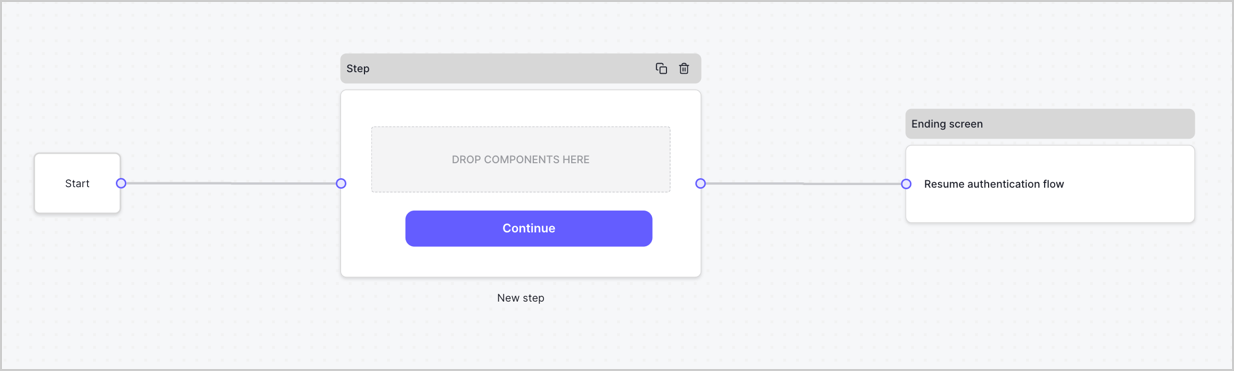
By default, a new form contains a Start node, a Step node, and an Ending screen node.
<Frame>
  <img src="https://mintcdn.com/docs-dev-actions-triggers-prototype/I9SBuhVKpyu444Ha/docs/images/cdy7uua7fh8z/2TZ9jSjgEcARFpULI6hz4R/a4319a1bd482f2ee5cc23100fdb2f42c/New-form-Forms-for-action-use-case.png?fit=max&auto=format&n=I9SBuhVKpyu444Ha&q=85&s=e2d0c5ec35f4b6259017923f0375ff3a" alt="Dashboard > Forms > Use Cases > Form" data-og-width="1234" width="1234" data-og-height="371" height="371" data-path="docs/images/cdy7uua7fh8z/2TZ9jSjgEcARFpULI6hz4R/a4319a1bd482f2ee5cc23100fdb2f42c/New-form-Forms-for-action-use-case.png" data-optimize="true" data-opv="3" srcset="https://mintcdn.com/docs-dev-actions-triggers-prototype/I9SBuhVKpyu444Ha/docs/images/cdy7uua7fh8z/2TZ9jSjgEcARFpULI6hz4R/a4319a1bd482f2ee5cc23100fdb2f42c/New-form-Forms-for-action-use-case.png?w=280&fit=max&auto=format&n=I9SBuhVKpyu444Ha&q=85&s=0ef1885900939c3ac156140825b14bb1 280w, https://mintcdn.com/docs-dev-actions-triggers-prototype/I9SBuhVKpyu444Ha/docs/images/cdy7uua7fh8z/2TZ9jSjgEcARFpULI6hz4R/a4319a1bd482f2ee5cc23100fdb2f42c/New-form-Forms-for-action-use-case.png?w=560&fit=max&auto=format&n=I9SBuhVKpyu444Ha&q=85&s=7107acb520e209456709bfe6ab846623 560w, https://mintcdn.com/docs-dev-actions-triggers-prototype/I9SBuhVKpyu444Ha/docs/images/cdy7uua7fh8z/2TZ9jSjgEcARFpULI6hz4R/a4319a1bd482f2ee5cc23100fdb2f42c/New-form-Forms-for-action-use-case.png?w=840&fit=max&auto=format&n=I9SBuhVKpyu444Ha&q=85&s=43b301dfedf138d37dadccde4c5e7419 840w, https://mintcdn.com/docs-dev-actions-triggers-prototype/I9SBuhVKpyu444Ha/docs/images/cdy7uua7fh8z/2TZ9jSjgEcARFpULI6hz4R/a4319a1bd482f2ee5cc23100fdb2f42c/New-form-Forms-for-action-use-case.png?w=1100&fit=max&auto=format&n=I9SBuhVKpyu444Ha&q=85&s=0f61ac389b488689990d6b4c4e6c9197 1100w, https://mintcdn.com/docs-dev-actions-triggers-prototype/I9SBuhVKpyu444Ha/docs/images/cdy7uua7fh8z/2TZ9jSjgEcARFpULI6hz4R/a4319a1bd482f2ee5cc23100fdb2f42c/New-form-Forms-for-action-use-case.png?w=1650&fit=max&auto=format&n=I9SBuhVKpyu444Ha&q=85&s=4a0a96a1cbdfb31ad3699b3752772d93 1650w, https://mintcdn.com/docs-dev-actions-triggers-prototype/I9SBuhVKpyu444Ha/docs/images/cdy7uua7fh8z/2TZ9jSjgEcARFpULI6hz4R/a4319a1bd482f2ee5cc23100fdb2f42c/New-form-Forms-for-action-use-case.png?w=2500&fit=max&auto=format&n=I9SBuhVKpyu444Ha&q=85&s=ba0ac526a427b5db1bfcaa2daf8a4271 2500w" />
</Frame>

### Configure the Step node

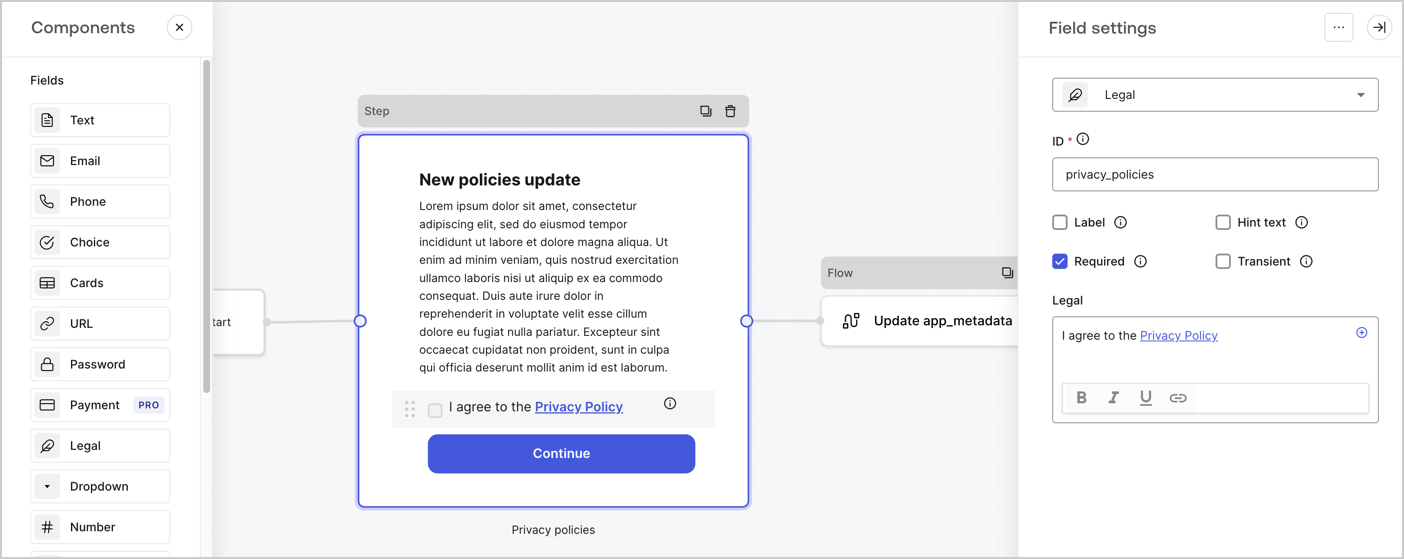
The Step node is the graphical interface visible to users. Add [Fields](/docs/customize/forms/nodes-and-components) to the Step node to collect the new agreement acceptance value by following these steps:

1. Drag a **Rich text** field from the **Components menu** into the **Step** node.

   * **Rich text**: Enter a description of your privacy policies updates.
   * Select **Save**.
2. Drag a **Legal** field into the **Step** node.

   * **ID**: Enter `privacy_policies`.
   * **Required**: Enable the checkbox.
   * **Legal**: Enter `I agree to the Privacy Policy`.
   * Select **Save**.
3. Select **Publish** to save.
<Frame>
  <img src="https://mintcdn.com/docs-dev-actions-triggers-prototype/8yG0sorggbq9bIbi/docs/images/cdy7uua7fh8z/59zFFjQjAnjogkc2QGIqqJ/0ad66b1b636544122aa4e65968b76c2c/privacy-policy-step-node.png?fit=max&auto=format&n=8yG0sorggbq9bIbi&q=85&s=f60b8d67fd79ca4d1e90c2ab1700fad7" alt="Dashboard > Actions > Forms > Use case privacy policy step node" data-og-width="1404" width="1404" data-og-height="559" height="559" data-path="docs/images/cdy7uua7fh8z/59zFFjQjAnjogkc2QGIqqJ/0ad66b1b636544122aa4e65968b76c2c/privacy-policy-step-node.png" data-optimize="true" data-opv="3" srcset="https://mintcdn.com/docs-dev-actions-triggers-prototype/8yG0sorggbq9bIbi/docs/images/cdy7uua7fh8z/59zFFjQjAnjogkc2QGIqqJ/0ad66b1b636544122aa4e65968b76c2c/privacy-policy-step-node.png?w=280&fit=max&auto=format&n=8yG0sorggbq9bIbi&q=85&s=5f152bac32039dd66a10241b87c02bc0 280w, https://mintcdn.com/docs-dev-actions-triggers-prototype/8yG0sorggbq9bIbi/docs/images/cdy7uua7fh8z/59zFFjQjAnjogkc2QGIqqJ/0ad66b1b636544122aa4e65968b76c2c/privacy-policy-step-node.png?w=560&fit=max&auto=format&n=8yG0sorggbq9bIbi&q=85&s=ebdce1932a9973fd18dd21826c8e7bac 560w, https://mintcdn.com/docs-dev-actions-triggers-prototype/8yG0sorggbq9bIbi/docs/images/cdy7uua7fh8z/59zFFjQjAnjogkc2QGIqqJ/0ad66b1b636544122aa4e65968b76c2c/privacy-policy-step-node.png?w=840&fit=max&auto=format&n=8yG0sorggbq9bIbi&q=85&s=7bf710dd6ffd085e704936015a71fc8c 840w, https://mintcdn.com/docs-dev-actions-triggers-prototype/8yG0sorggbq9bIbi/docs/images/cdy7uua7fh8z/59zFFjQjAnjogkc2QGIqqJ/0ad66b1b636544122aa4e65968b76c2c/privacy-policy-step-node.png?w=1100&fit=max&auto=format&n=8yG0sorggbq9bIbi&q=85&s=54f2846488472969b9fda7215c84c486 1100w, https://mintcdn.com/docs-dev-actions-triggers-prototype/8yG0sorggbq9bIbi/docs/images/cdy7uua7fh8z/59zFFjQjAnjogkc2QGIqqJ/0ad66b1b636544122aa4e65968b76c2c/privacy-policy-step-node.png?w=1650&fit=max&auto=format&n=8yG0sorggbq9bIbi&q=85&s=8023b8cf23b5ca7e9fd91b6cb2648284 1650w, https://mintcdn.com/docs-dev-actions-triggers-prototype/8yG0sorggbq9bIbi/docs/images/cdy7uua7fh8z/59zFFjQjAnjogkc2QGIqqJ/0ad66b1b636544122aa4e65968b76c2c/privacy-policy-step-node.png?w=2500&fit=max&auto=format&n=8yG0sorggbq9bIbi&q=85&s=23a5749c5f0da73927e74851c89696a3 2500w" />
</Frame>

### Configure the Flow node

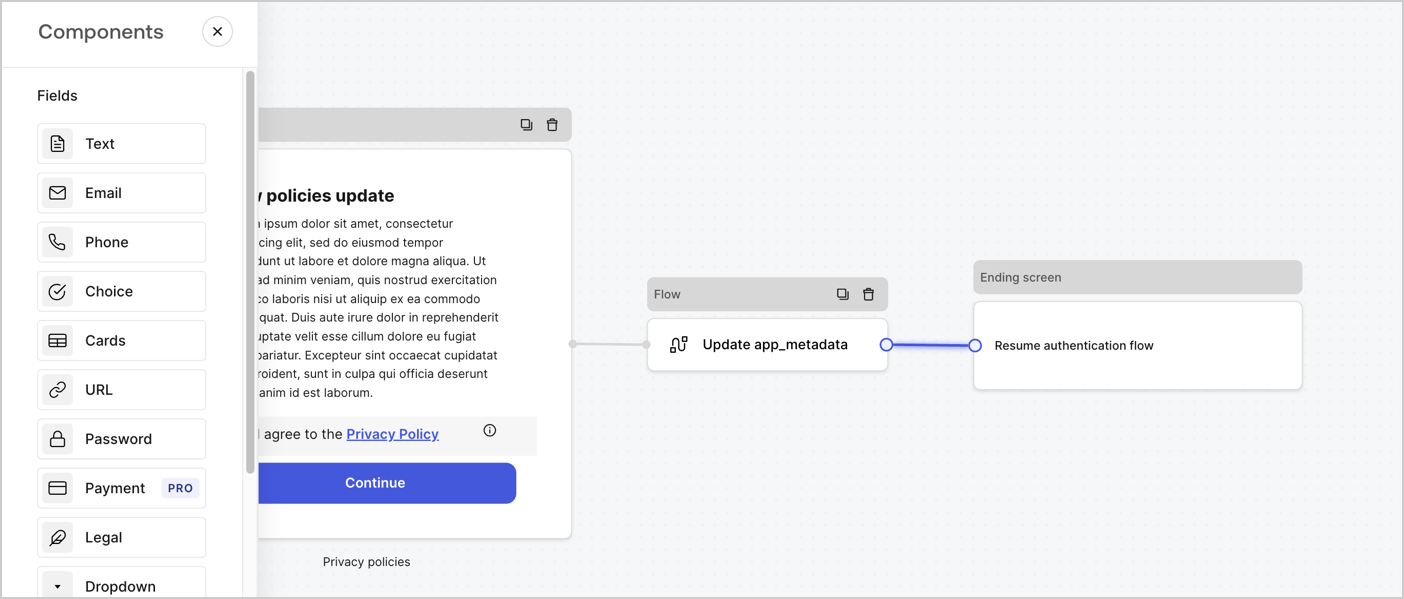
Add a **Flow** node after the **Step** node to update the `app_metadata` and resume the authentication flow by following these steps:

1. Select **Flow** from the bottom of the Form editor.
2. Remove the existing link between the **Step** and **Ending Screen** nodes.
3. Select the new **Flow** > **Click to add a flow** > **Create a new flow.**

   * Enter `Update app_metadata` in the **Name** field.
   * Select **Create**.
   * Select **Save**.
4. Link the **Flow** node to the **Step** and **Ending Screen** nodes as pictured below.
5. Select **Publish** to save.
<Frame>
  <img src="https://mintcdn.com/docs-dev-actions-triggers-prototype/4MaQENhfcY-1egb6/docs/images/cdy7uua7fh8z/6YIkzm7SrpM9LW76AXuRzh/353c518fe82bbaa440836da1d83596d6/link-policies.png?fit=max&auto=format&n=4MaQENhfcY-1egb6&q=85&s=181f54d65cf8eeda6d87b091f980601a" alt="Dashboard > Actions > Forms > Form" data-og-width="1404" width="1404" data-og-height="599" height="599" data-path="docs/images/cdy7uua7fh8z/6YIkzm7SrpM9LW76AXuRzh/353c518fe82bbaa440836da1d83596d6/link-policies.png" data-optimize="true" data-opv="3" srcset="https://mintcdn.com/docs-dev-actions-triggers-prototype/4MaQENhfcY-1egb6/docs/images/cdy7uua7fh8z/6YIkzm7SrpM9LW76AXuRzh/353c518fe82bbaa440836da1d83596d6/link-policies.png?w=280&fit=max&auto=format&n=4MaQENhfcY-1egb6&q=85&s=26bb90903c3f30690882b667657b7a0d 280w, https://mintcdn.com/docs-dev-actions-triggers-prototype/4MaQENhfcY-1egb6/docs/images/cdy7uua7fh8z/6YIkzm7SrpM9LW76AXuRzh/353c518fe82bbaa440836da1d83596d6/link-policies.png?w=560&fit=max&auto=format&n=4MaQENhfcY-1egb6&q=85&s=f830b4ff86c28f4f07d7ed15375c9298 560w, https://mintcdn.com/docs-dev-actions-triggers-prototype/4MaQENhfcY-1egb6/docs/images/cdy7uua7fh8z/6YIkzm7SrpM9LW76AXuRzh/353c518fe82bbaa440836da1d83596d6/link-policies.png?w=840&fit=max&auto=format&n=4MaQENhfcY-1egb6&q=85&s=37e050862d6513077829dbf0fc247c51 840w, https://mintcdn.com/docs-dev-actions-triggers-prototype/4MaQENhfcY-1egb6/docs/images/cdy7uua7fh8z/6YIkzm7SrpM9LW76AXuRzh/353c518fe82bbaa440836da1d83596d6/link-policies.png?w=1100&fit=max&auto=format&n=4MaQENhfcY-1egb6&q=85&s=c5e4bc933f7b0547a94bda1de1665595 1100w, https://mintcdn.com/docs-dev-actions-triggers-prototype/4MaQENhfcY-1egb6/docs/images/cdy7uua7fh8z/6YIkzm7SrpM9LW76AXuRzh/353c518fe82bbaa440836da1d83596d6/link-policies.png?w=1650&fit=max&auto=format&n=4MaQENhfcY-1egb6&q=85&s=63adf51aa252c42948341199dade0733 1650w, https://mintcdn.com/docs-dev-actions-triggers-prototype/4MaQENhfcY-1egb6/docs/images/cdy7uua7fh8z/6YIkzm7SrpM9LW76AXuRzh/353c518fe82bbaa440836da1d83596d6/link-policies.png?w=2500&fit=max&auto=format&n=4MaQENhfcY-1egb6&q=85&s=380c4ced350c9ee314e8a1cbb1c60c75 2500w" />
</Frame>

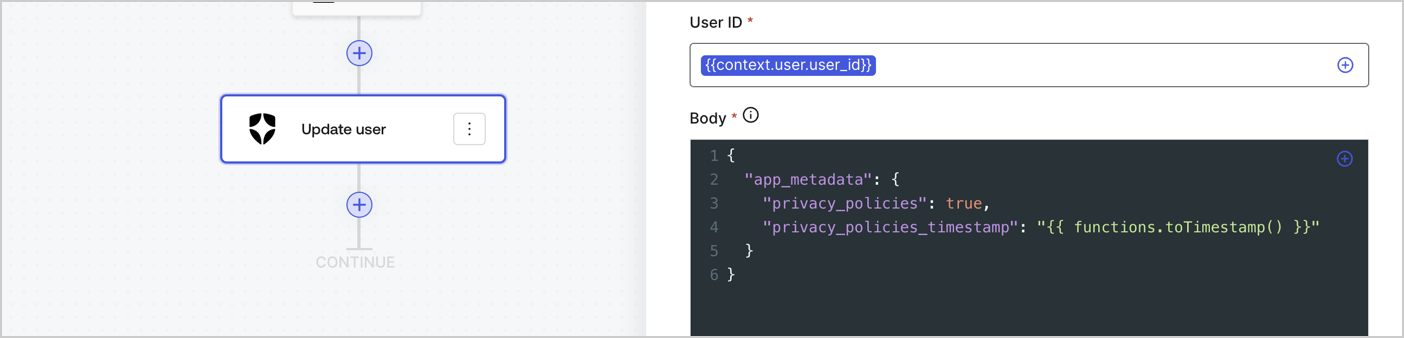
Add an Auth0 Update user action to the flow by following these steps:

1. Select the **Flow** **Update app\_metadata** > **Edit flow** to open the Flow editor in a new tab.
2. Below the StartAction, select the **+** icon to add an **Update user** action. Complete the fields below, then select **Save** to continue.

   * **Connection**: Select from the dropdown the Vault connection to your M2M application.

   * **User ID**: Enter `{{context.user.user_id}}`.

   * **Body**: Copy and paste the following code to update the app\_metadata with the privacy\_policies and privacy\_policies\_timestamp properties.

     ```text lines theme={null}
     {
       "app_metadata": {
         "privacy_policies": true,
         "privacy_policies_timestamp": "{{ functions.toTimestamp() }}"
       }
     }
     ```

   * Select **Save**.
3. Select **Publish** to save.
<Frame>
  <img src="https://mintcdn.com/docs-dev-actions-triggers-prototype/nRTYX19FsgfcTLla/docs/images/cdy7uua7fh8z/CvMNIwWrOUwaFW4X3G28p/1fb70ae57a20749d9ffaaba8dc0b7e26/update-user-privacy.png?fit=max&auto=format&n=nRTYX19FsgfcTLla&q=85&s=6e348e1233829362700f318e794db370" alt="Dashboard > Actions > Forms > User case privacy policy code" data-og-width="1404" width="1404" data-og-height="338" height="338" data-path="docs/images/cdy7uua7fh8z/CvMNIwWrOUwaFW4X3G28p/1fb70ae57a20749d9ffaaba8dc0b7e26/update-user-privacy.png" data-optimize="true" data-opv="3" srcset="https://mintcdn.com/docs-dev-actions-triggers-prototype/nRTYX19FsgfcTLla/docs/images/cdy7uua7fh8z/CvMNIwWrOUwaFW4X3G28p/1fb70ae57a20749d9ffaaba8dc0b7e26/update-user-privacy.png?w=280&fit=max&auto=format&n=nRTYX19FsgfcTLla&q=85&s=6090d3657e307f2e0fef3e82dc28351b 280w, https://mintcdn.com/docs-dev-actions-triggers-prototype/nRTYX19FsgfcTLla/docs/images/cdy7uua7fh8z/CvMNIwWrOUwaFW4X3G28p/1fb70ae57a20749d9ffaaba8dc0b7e26/update-user-privacy.png?w=560&fit=max&auto=format&n=nRTYX19FsgfcTLla&q=85&s=96f43df09dc97286f8cc1419394e23e7 560w, https://mintcdn.com/docs-dev-actions-triggers-prototype/nRTYX19FsgfcTLla/docs/images/cdy7uua7fh8z/CvMNIwWrOUwaFW4X3G28p/1fb70ae57a20749d9ffaaba8dc0b7e26/update-user-privacy.png?w=840&fit=max&auto=format&n=nRTYX19FsgfcTLla&q=85&s=e9d3d6e58126e7b124c16b2df841f470 840w, https://mintcdn.com/docs-dev-actions-triggers-prototype/nRTYX19FsgfcTLla/docs/images/cdy7uua7fh8z/CvMNIwWrOUwaFW4X3G28p/1fb70ae57a20749d9ffaaba8dc0b7e26/update-user-privacy.png?w=1100&fit=max&auto=format&n=nRTYX19FsgfcTLla&q=85&s=08fc04cb34838693eb92a7853d1cdfb5 1100w, https://mintcdn.com/docs-dev-actions-triggers-prototype/nRTYX19FsgfcTLla/docs/images/cdy7uua7fh8z/CvMNIwWrOUwaFW4X3G28p/1fb70ae57a20749d9ffaaba8dc0b7e26/update-user-privacy.png?w=1650&fit=max&auto=format&n=nRTYX19FsgfcTLla&q=85&s=3fd6c44252931619c0f13eab8b757977 1650w, https://mintcdn.com/docs-dev-actions-triggers-prototype/nRTYX19FsgfcTLla/docs/images/cdy7uua7fh8z/CvMNIwWrOUwaFW4X3G28p/1fb70ae57a20749d9ffaaba8dc0b7e26/update-user-privacy.png?w=2500&fit=max&auto=format&n=nRTYX19FsgfcTLla&q=85&s=e41a79a68a0f63ad7aa3f5a060cbc2c4 2500w" />
</Frame>

<Callout icon="file-lines" color="#0EA5E9" iconType="regular">
  The flow **Update app\_metadata** adds a `privacy_policies true` value to the app`_metadata` object and also generates a timestamp with a [helper function.](/docs/customize/forms/variables)
</Callout>

## Retrieve the form render code

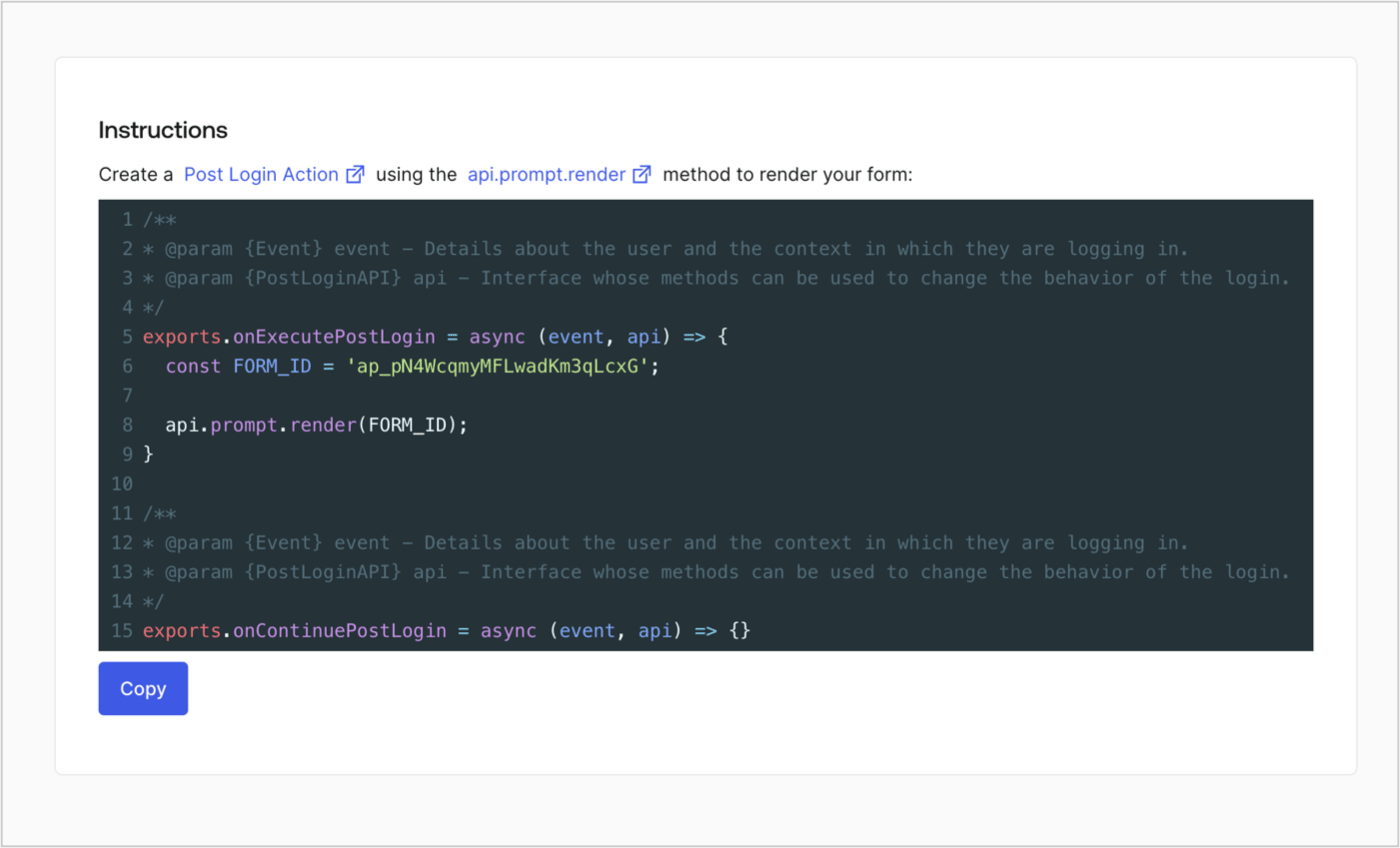
Retrieve your form render code to visually render the form with a custom Post Login Action by following these steps:

* From the Form editor, select **`<> Render`**.
* Select **Copy**.
<Frame>
  <img src="https://mintcdn.com/docs-dev-actions-triggers-prototype/M4e_wjkc6eywZ_wO/docs/images/cdy7uua7fh8z/2EIUzc539sq9lwoTKbjoJv/496a864c0fc44a782c9cadca119dbfb0/embed.png?fit=max&auto=format&n=M4e_wjkc6eywZ_wO&q=85&s=26d0ed97e5bad3c91934bffe41b5b886" alt="Dashboard > Actions > Forms > Form > Embed" data-og-width="1400" width="1400" data-og-height="848" height="848" data-path="docs/images/cdy7uua7fh8z/2EIUzc539sq9lwoTKbjoJv/496a864c0fc44a782c9cadca119dbfb0/embed.png" data-optimize="true" data-opv="3" srcset="https://mintcdn.com/docs-dev-actions-triggers-prototype/M4e_wjkc6eywZ_wO/docs/images/cdy7uua7fh8z/2EIUzc539sq9lwoTKbjoJv/496a864c0fc44a782c9cadca119dbfb0/embed.png?w=280&fit=max&auto=format&n=M4e_wjkc6eywZ_wO&q=85&s=31917b5fe98e18ba486bb39a1c7383b4 280w, https://mintcdn.com/docs-dev-actions-triggers-prototype/M4e_wjkc6eywZ_wO/docs/images/cdy7uua7fh8z/2EIUzc539sq9lwoTKbjoJv/496a864c0fc44a782c9cadca119dbfb0/embed.png?w=560&fit=max&auto=format&n=M4e_wjkc6eywZ_wO&q=85&s=934a61c3d049a7ceabd3fbb3373c9bd8 560w, https://mintcdn.com/docs-dev-actions-triggers-prototype/M4e_wjkc6eywZ_wO/docs/images/cdy7uua7fh8z/2EIUzc539sq9lwoTKbjoJv/496a864c0fc44a782c9cadca119dbfb0/embed.png?w=840&fit=max&auto=format&n=M4e_wjkc6eywZ_wO&q=85&s=6c552755ce9e817d579addeb913c5d5e 840w, https://mintcdn.com/docs-dev-actions-triggers-prototype/M4e_wjkc6eywZ_wO/docs/images/cdy7uua7fh8z/2EIUzc539sq9lwoTKbjoJv/496a864c0fc44a782c9cadca119dbfb0/embed.png?w=1100&fit=max&auto=format&n=M4e_wjkc6eywZ_wO&q=85&s=178540fb4aec40e3f7fb323366194b84 1100w, https://mintcdn.com/docs-dev-actions-triggers-prototype/M4e_wjkc6eywZ_wO/docs/images/cdy7uua7fh8z/2EIUzc539sq9lwoTKbjoJv/496a864c0fc44a782c9cadca119dbfb0/embed.png?w=1650&fit=max&auto=format&n=M4e_wjkc6eywZ_wO&q=85&s=b02ca48383060eb1327795b9bd08187f 1650w, https://mintcdn.com/docs-dev-actions-triggers-prototype/M4e_wjkc6eywZ_wO/docs/images/cdy7uua7fh8z/2EIUzc539sq9lwoTKbjoJv/496a864c0fc44a782c9cadca119dbfb0/embed.png?w=2500&fit=max&auto=format&n=M4e_wjkc6eywZ_wO&q=85&s=6e85f0af7adedeaf490d81ff74463f62 2500w" />
</Frame>

## Create a Post Login Action

Create a post-login Action to render your form by following these steps:

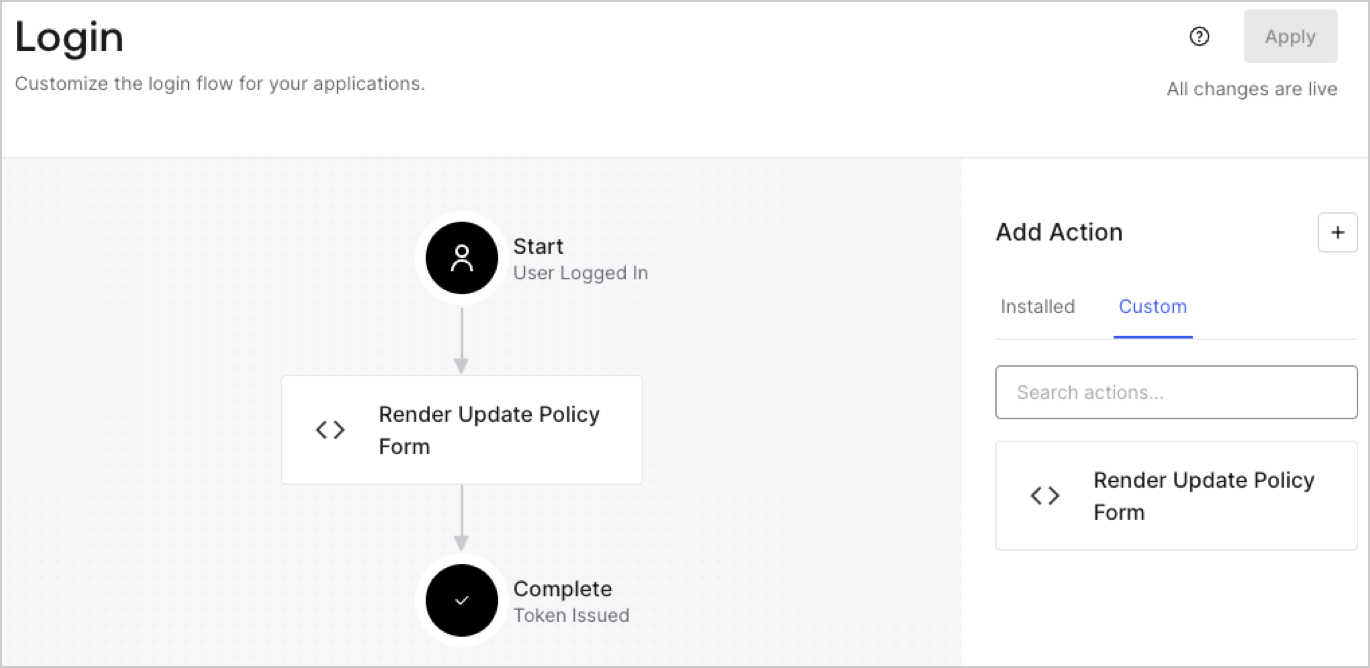
1. Navigate to **Auth0 Dashboard > Actions > Flows > Login.**
2. Select the **+** icon and Select **Build from scratch**:

   * **Name**: Enter `Render Update Policy Form`.
   * **Trigger**: Select `Login / Post Login`.
   * **Runtime**: Select the recommended version.
3. Select **Create**.

To configure the post-login Action:

1. Delete the existing code from the Code editor.
2. Paste the form render code into the Code editor.
3. Edit the code to define the conditional logic that will render the form.

   ```javascript lines theme={null}
   /**
   * @param {Event} event - Details about the user and the context in which they are logging in.
   * @param {PostLoginAPI} api - Interface whose methods can be used to change the behavior of the login.
   */
   exports.onExecutePostLogin = async (event, api) => {
     const FORM_ID = 'REPLACE_WITH_YOUR_FORM_ID';

     if (event.user.app_metadata.privacy_policies !== true) {
       api.prompt.render(FORM_ID);
     }
   }

   exports.onContinuePostLogin = async (event, api) => { }
   ```

   <Callout icon="file-lines" color="#0EA5E9" iconType="regular">
     The example code above will render the form when a user is missing the app metadata `privacy_policies` property.
   </Callout>
4. Select **Deploy.**
5. Drag and Drop the **Render Update Policy Form** Action to the **Login** flow.
   <Frame>
     <img src="https://mintcdn.com/docs-dev-actions-triggers-prototype/aEQNasKiS5oso5hx/docs/images/cdy7uua7fh8z/5TOwDgevZsBqd7yZynUYWU/41ca909dc3007aed4f40ff794a05efa5/postlogin.png?fit=max&auto=format&n=aEQNasKiS5oso5hx&q=85&s=54a5476fe5d69c7c60b17f0e39eb5164" alt="Dashboard > Forms > Use Case > Render update policy form login action" data-og-width="1370" width="1370" data-og-height="668" height="668" data-path="docs/images/cdy7uua7fh8z/5TOwDgevZsBqd7yZynUYWU/41ca909dc3007aed4f40ff794a05efa5/postlogin.png" data-optimize="true" data-opv="3" srcset="https://mintcdn.com/docs-dev-actions-triggers-prototype/aEQNasKiS5oso5hx/docs/images/cdy7uua7fh8z/5TOwDgevZsBqd7yZynUYWU/41ca909dc3007aed4f40ff794a05efa5/postlogin.png?w=280&fit=max&auto=format&n=aEQNasKiS5oso5hx&q=85&s=e6befaa0a248784b11f9b1ee1bc7212a 280w, https://mintcdn.com/docs-dev-actions-triggers-prototype/aEQNasKiS5oso5hx/docs/images/cdy7uua7fh8z/5TOwDgevZsBqd7yZynUYWU/41ca909dc3007aed4f40ff794a05efa5/postlogin.png?w=560&fit=max&auto=format&n=aEQNasKiS5oso5hx&q=85&s=8666c51b2177b8ca2ec8c71a77dba730 560w, https://mintcdn.com/docs-dev-actions-triggers-prototype/aEQNasKiS5oso5hx/docs/images/cdy7uua7fh8z/5TOwDgevZsBqd7yZynUYWU/41ca909dc3007aed4f40ff794a05efa5/postlogin.png?w=840&fit=max&auto=format&n=aEQNasKiS5oso5hx&q=85&s=452cd401de5251bd2d030e707cb94613 840w, https://mintcdn.com/docs-dev-actions-triggers-prototype/aEQNasKiS5oso5hx/docs/images/cdy7uua7fh8z/5TOwDgevZsBqd7yZynUYWU/41ca909dc3007aed4f40ff794a05efa5/postlogin.png?w=1100&fit=max&auto=format&n=aEQNasKiS5oso5hx&q=85&s=d78953410e07d25c49b538884982c529 1100w, https://mintcdn.com/docs-dev-actions-triggers-prototype/aEQNasKiS5oso5hx/docs/images/cdy7uua7fh8z/5TOwDgevZsBqd7yZynUYWU/41ca909dc3007aed4f40ff794a05efa5/postlogin.png?w=1650&fit=max&auto=format&n=aEQNasKiS5oso5hx&q=85&s=445b5b05ee9e750e8f7b14bfcec7650a 1650w, https://mintcdn.com/docs-dev-actions-triggers-prototype/aEQNasKiS5oso5hx/docs/images/cdy7uua7fh8z/5TOwDgevZsBqd7yZynUYWU/41ca909dc3007aed4f40ff794a05efa5/postlogin.png?w=2500&fit=max&auto=format&n=aEQNasKiS5oso5hx&q=85&s=a245689a1cabb3f2c4f40df76e621613 2500w" />
   </Frame>
6. Select **Apply.**

### Test implementation

Test the implementation by following these steps:

1. Log in with an existing user whose app`_metadata` attribute `privacy_policies` does not have a value.
2. The post-login Action in the Login flow will render the form and prompt for acceptance.
3. Select **Auth0 Dashboard > User Management > Users,** locate the user and verify that the `app_metadata` attribute `privacy_policies` contains a `true` value and a timestamp.
