> ## Documentation Index
> Fetch the complete documentation index at: https://docs-dev-actions-triggers-prototype.mintlify.site/llms.txt
> Use this file to discover all available pages before exploring further.
> Learn how to configure the Authorization Extension.
# Configure Authorization Extension
Auth0 provides two ways to implement role-based access control (RBAC), which you can use in place of or in combination with your API's own internal access control system:
* [Authorization Core](/docs/manage-users/access-control/rbac)
* [Authorization Extension](/docs/customize/extensions/authorization-extension)
The Authorization Core feature set matches the functionality of the Authorization Extension, improves performance and scalability, and provides a more flexible RBAC system than the Authorization Extension.
Currently, both implement the key features of RBAC and allow you to restrict the custom scopes defined for an API to those that have been assigned to the user as permissions.
Before the extension can enforce your authorization logic, you need to configure how it will behave during the login transaction. Your configuration settings will be captured in a [rule](/docs/customize/rules) that executes during runtime.
## Prerequisites
[Install the Authorization Extension](/docs/customize/extensions/authorization-extension/migrate-to-authorization-extension-v2)
## Configure extension
1. Go to [Auth0 Dashboard > Extensions](https://manage.auth0.com/#/extensions), and select **Auth0 Authorization**.
2. Choose **Configuration** at the top right of the **Authorization Dashboard**.
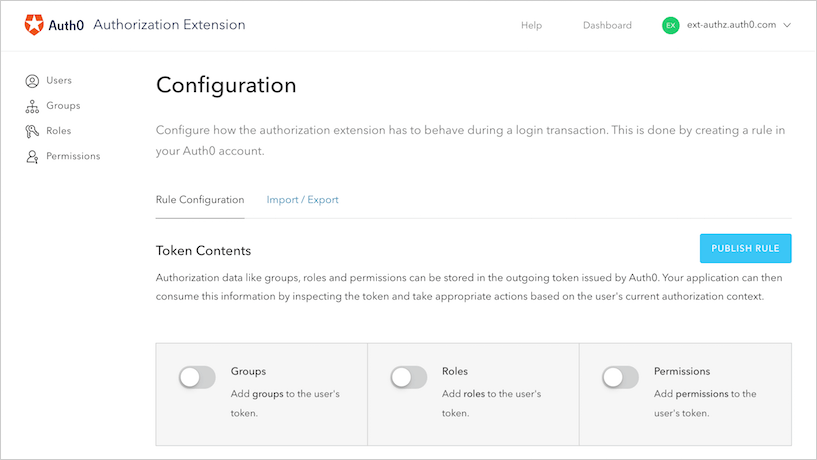
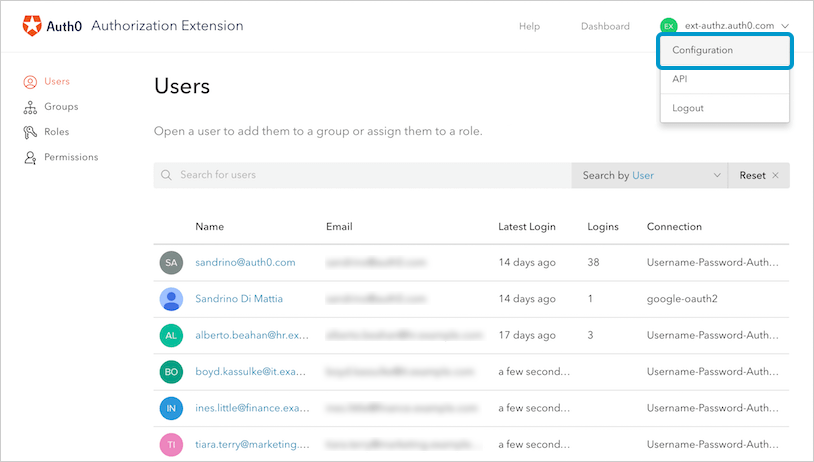 3. This brings you to the **Rule Configuration** section of the **Configuration** page. All of the changes you make in the sections under **Token Contents**, such as those related to groups, roles, and permissions, will be reflected in the rule you export at the completion of this step.
 ### ApiKey
The rule uses the ApiKey to communicate with the Authorization Extension API and get the policy. The ApiKey is stored as a rule config and will be created automatically when the rule is published. To rotate the ApiKey, click the **Rotate** button; when the ApiKey is rotated, the rule config will be updated automatically.
## Add authorization information to the token issued
You can store authorization data like groups, roles, or permissions in the outgoing token issued by Auth0. Your application can then consume this information by inspecting the token and take appropriate actions based on the user's current authorization context.
To add groups, roles, and/or permissions information to the outgoing token, enable the slider next to the option you want to be included.
Storing too much data in the token may cause performance issues or even prevent the issuance of the token. Be sure to store only what you need. If you need a large amount of user data readily available, consider using persistence instead of adding the data to the token.
### Merge authorization data from IdP
You might have users that receive groups, roles, or permissions from the identity provider (IdP) you're using, such as Active Directory. If you want to merge these items (to preserve them) with the ones defined in the Authorization Extension, make sure you enable the appropriate **Passthrough** options. Enable the slider next to the appropriate merges you want enabled.
### Store authorization information in user profiles
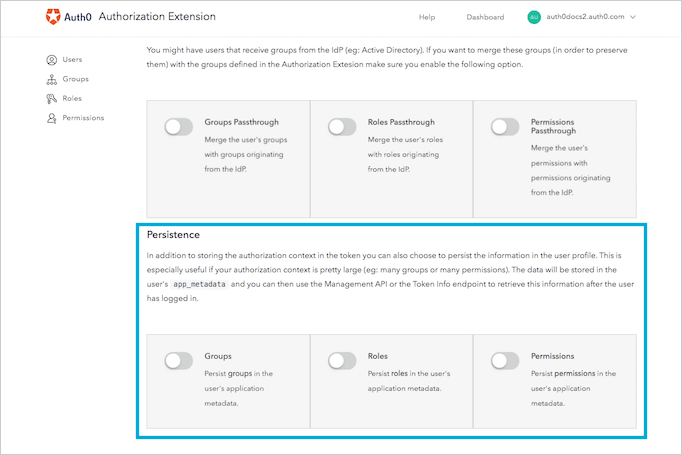
If your authorization context is large (for example, the user might belong to many groups or have been granted many permissions), you might find it useful to store some of the authorization content in the users' profiles. This allows you to store less information in the token, which means you're less likely to see performance-related issues or even problems with token issuance. **Persistence** is the process by which you store groups, roles, and permissions information in the users' profiles.
The data will be stored in the user's `app_metadata` field, and you can then use the Management API or the [Dashboard](https://manage.auth0.com/#/users) to retrieve this information after the user has logged in.
### ApiKey
The rule uses the ApiKey to communicate with the Authorization Extension API and get the policy. The ApiKey is stored as a rule config and will be created automatically when the rule is published. To rotate the ApiKey, click the **Rotate** button; when the ApiKey is rotated, the rule config will be updated automatically.
## Add authorization information to the token issued
You can store authorization data like groups, roles, or permissions in the outgoing token issued by Auth0. Your application can then consume this information by inspecting the token and take appropriate actions based on the user's current authorization context.
To add groups, roles, and/or permissions information to the outgoing token, enable the slider next to the option you want to be included.
Storing too much data in the token may cause performance issues or even prevent the issuance of the token. Be sure to store only what you need. If you need a large amount of user data readily available, consider using persistence instead of adding the data to the token.
### Merge authorization data from IdP
You might have users that receive groups, roles, or permissions from the identity provider (IdP) you're using, such as Active Directory. If you want to merge these items (to preserve them) with the ones defined in the Authorization Extension, make sure you enable the appropriate **Passthrough** options. Enable the slider next to the appropriate merges you want enabled.
### Store authorization information in user profiles
If your authorization context is large (for example, the user might belong to many groups or have been granted many permissions), you might find it useful to store some of the authorization content in the users' profiles. This allows you to store less information in the token, which means you're less likely to see performance-related issues or even problems with token issuance. **Persistence** is the process by which you store groups, roles, and permissions information in the users' profiles.
The data will be stored in the user's `app_metadata` field, and you can then use the Management API or the [Dashboard](https://manage.auth0.com/#/users) to retrieve this information after the user has logged in.
 ## Save changes to rule
Once you've configured your rule, click **Publish Rule**. This creates a rule for your tenant that executes after each user login.
### View rule
If you'd like to see the rule you've created, you can do so at [Auth0 Dashboard > Auth Pipeline > Rules](https://manage.auth0.com/#/rules).
You can open the rule to see the exact rules configuration.
## Learn more
* [Import and Export Authorization Extension Data](/docs/customize/extensions/authorization-extension/import-and-export-authorization-extension-data)
* [Enable API Access to Authorization Extension](/docs/customize/extensions/authorization-extension/enable-api-access-to-authorization-extension)
* [Use Rules with the Authorization Extension](/docs/customize/extensions/authorization-extension/use-rules-with-the-authorization-extension)
* [Set Up Users in Authorization Extension Dashboard](/docs/customize/extensions/authorization-extension/set-up-authorization-extension-users)
* [Migrate to Authorization Extension v2](/docs/customize/extensions/authorization-extension/migrate-to-authorization-extension-v2)
## Save changes to rule
Once you've configured your rule, click **Publish Rule**. This creates a rule for your tenant that executes after each user login.
### View rule
If you'd like to see the rule you've created, you can do so at [Auth0 Dashboard > Auth Pipeline > Rules](https://manage.auth0.com/#/rules).
You can open the rule to see the exact rules configuration.
## Learn more
* [Import and Export Authorization Extension Data](/docs/customize/extensions/authorization-extension/import-and-export-authorization-extension-data)
* [Enable API Access to Authorization Extension](/docs/customize/extensions/authorization-extension/enable-api-access-to-authorization-extension)
* [Use Rules with the Authorization Extension](/docs/customize/extensions/authorization-extension/use-rules-with-the-authorization-extension)
* [Set Up Users in Authorization Extension Dashboard](/docs/customize/extensions/authorization-extension/set-up-authorization-extension-users)
* [Migrate to Authorization Extension v2](/docs/customize/extensions/authorization-extension/migrate-to-authorization-extension-v2)