> ## Documentation Index
> Fetch the complete documentation index at: https://docs-dev-actions-triggers-prototype.mintlify.site/llms.txt
> Use this file to discover all available pages before exploring further.
> Describes how to redirect users with the legacy logout endpoint.
# Redirect Users with Alternative Logout
export const AuthCodeBlock = ({filename, icon, language, highlight, children}) => {
const [displayText, setDisplayText] = useState(children);
const [copyText, setCopyText] = useState(children);
const wrapperRef = React.useRef(null);
useEffect(() => {
let unsubscribe = null;
function init() {
if (!window.autorun || !window.rootStore) {
return;
}
unsubscribe = window.autorun(() => {
let processedChildrenForDisplay = children;
let processedChildrenForCopy = children;
for (const [key, value] of window.rootStore.variableStore.values.entries()) {
const escapedKey = key.replaceAll(/[.*+?^${}()|[\]\\]/g, (String.raw)`\$&`);
let displayValue = value;
if (key === "{yourClientSecret}" && value !== "{yourClientSecret}") {
displayValue = value.substring(0, 3) + "*****MASKED*****";
}
processedChildrenForDisplay = processedChildrenForDisplay.replaceAll(new RegExp(escapedKey, "g"), displayValue);
processedChildrenForCopy = processedChildrenForCopy.replaceAll(new RegExp(escapedKey, "g"), value);
}
setDisplayText(processedChildrenForDisplay);
setCopyText(processedChildrenForCopy);
});
}
if (window.rootStore) {
init();
} else {
window.addEventListener("adu:storeReady", init);
}
return () => {
window.removeEventListener("adu:storeReady", init);
unsubscribe?.();
};
}, [children]);
useEffect(() => {
if (!wrapperRef.current) return;
const originalWriteText = navigator.clipboard.writeText.bind(navigator.clipboard);
let isOverriding = false;
const handleClick = e => {
const button = e.target.closest('[data-testid="copy-code-button"]');
if (!button || !wrapperRef.current.contains(button)) return;
isOverriding = true;
navigator.clipboard.writeText = text => {
if (isOverriding) {
isOverriding = false;
navigator.clipboard.writeText = originalWriteText;
return originalWriteText(copyText);
}
return originalWriteText(text);
};
setTimeout(() => {
if (isOverriding) {
isOverriding = false;
navigator.clipboard.writeText = originalWriteText;
}
}, 100);
};
const wrapper = wrapperRef.current;
wrapper.addEventListener('click', handleClick, true);
return () => {
wrapper.removeEventListener('click', handleClick, true);
if (navigator.clipboard.writeText !== originalWriteText) {
navigator.clipboard.writeText = originalWriteText;
}
};
}, [copyText]);
return
{displayText}
;
};
You can redirect users to a specific URL after they logout. You will need to register the redirect URL in your tenant or application settings. Auth0 only redirects to allow list URLs after logout. If you need different redirects for each application, you can add the URLs to the allow list in your application settings.
1. Add a `returnTo` query string parameter with the target URL as the value. Encode the target URL being passed in. For example, to redirect the user to `https://www.example.com` after logout, make the following request:
`https://{yourDomain}/v2/logout?returnTo=https%3A%2F%2Fwww.example.com`.
2. Add the non-encoded `returnTo` URL (for example, `https://www.example.com`) as an **Allowed Logout URLs** in one of two places:
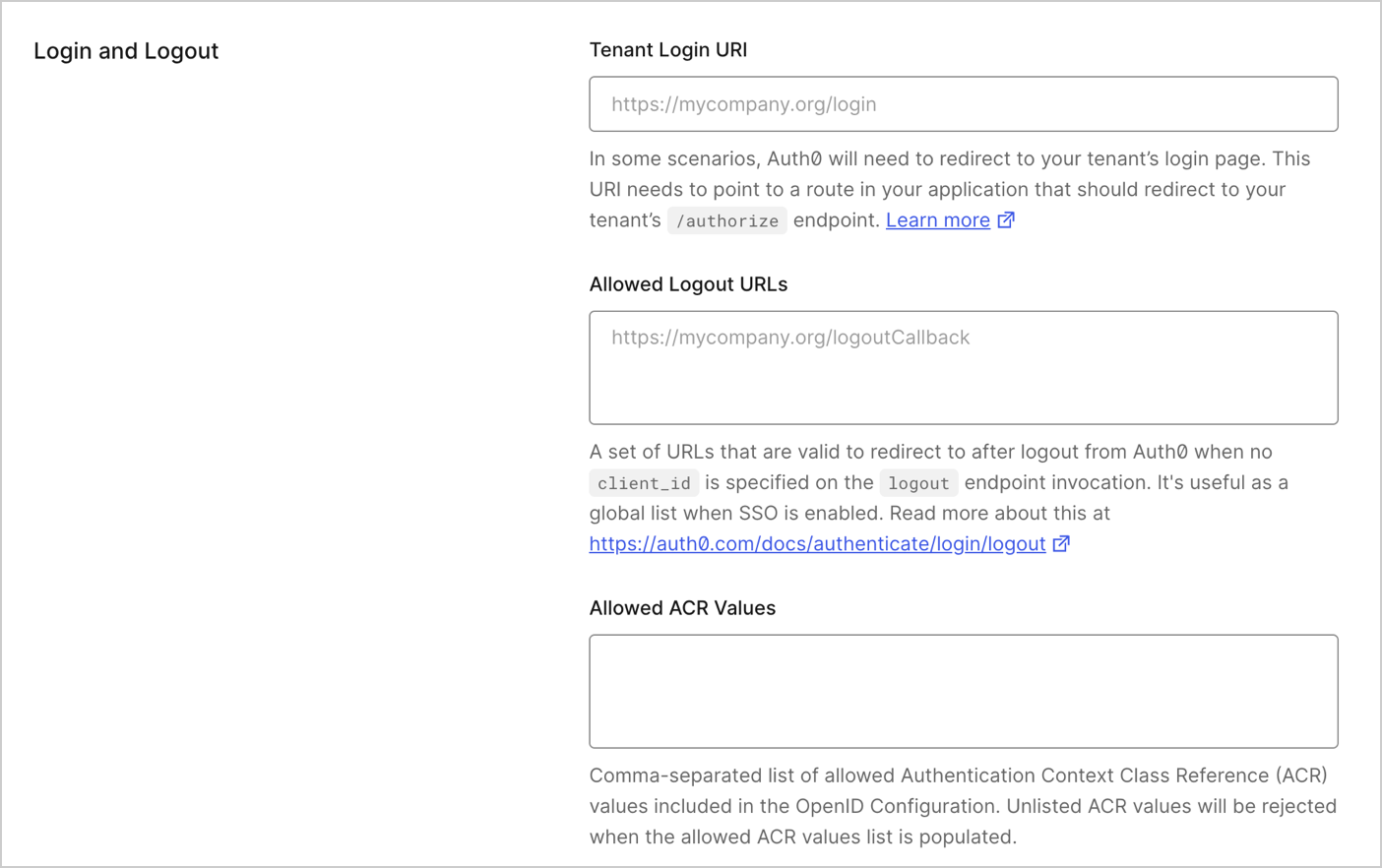
* **Tenant Settings**: For logout requests that do not include the `client_id` parameter, you must add the `returnTo` URL to the **Allowed Logout URLs** list in the [Advanced tab of your Tenant Settings](https://manage.auth0.com/#/tenant/advanced).
To add a list of URLs that the user may be redirected to after logging out at the tenant level, go to the [Tenant Settings > Advanced](https://manage.auth0.com/#/tenant/advanced) of the Auth0 Dashboard.
 * **Auth0 Application Settings**: For logout requests that include the `client_id` parameter, you must add the `returnTo` URL to the **Allowed Logout URLs** list in the **Settings** tab of the associated Auth0 application(s).
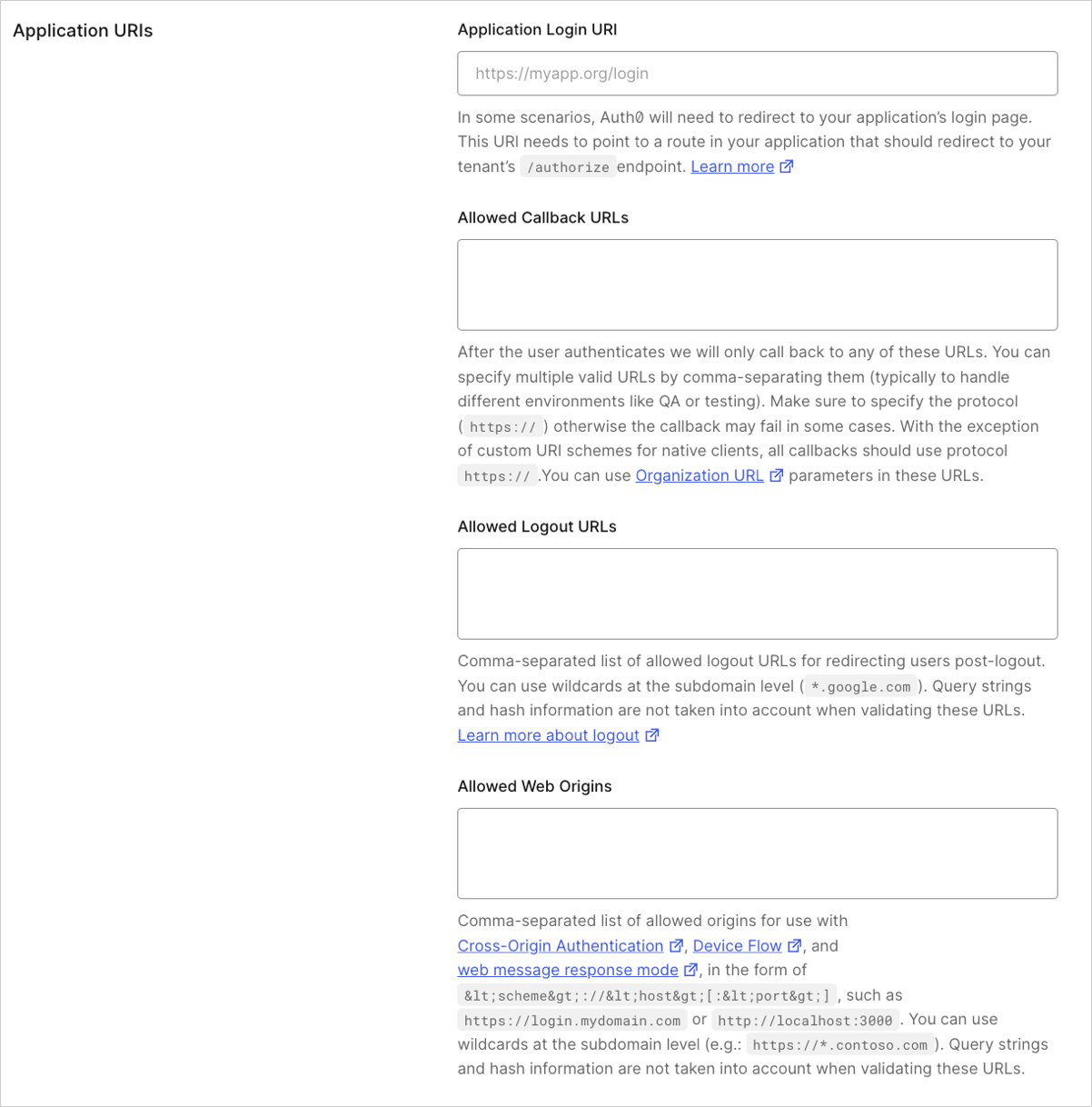 When providing the URL list, you can:
1. Specify multiple, valid, comma-separated URLs.
2. Use `*` as a [wildcard for subdomains](/docs/get-started/applications/wildcards-for-subdomains) (such as `http://*.example.com`).
If the `client_id` parameter is included and the `returnTo` URL is not set, the server returns the user to the first Allowed Logout URLs set in the Dashboard.
In order to avoid validation errors, make sure that you include the protocol part of the URL. For example, setting the value to `*.example.com` will result in a validation error, so you should use `http://*.example.com` instead.
To redirect using Auth0's `oidc/logout` endpoint, read [Use OIDC Endpoint to Log Users Out of Auth0](/docs/authenticate/login/logout/log-users-out-of-auth0).
## Federated logouts
[Several providers](/docs/authenticate/login/logout/log-users-out-of-idps#federated-logout-support) support federated logout.
To redirect users from applications using federated logout, initiate federated logout with the following endpoint:
`https://{yourDomain}/v2/logout?federated`
You are responsible for ensuring your application terminates the user session before redirecting.
When the user reaches the `/logout` endpoint, Auth0 terminates the Auth0 session, redirects the user to the Identity Providers logout endpoint, and terminates the session with the Identity Provider.
## Limitations
* The validation of URLs provided as values to the `returnTo` parameter, the query string, and hash information provided as part of the URL are not taken into account.
* The behavior of federated logouts with social providers is inconsistent. Each provider will handle the `returnTo` parameter differently and for some it will not work. Please check your social provider's settings to ensure that they will accept the `returnTo` parameter and how it will behave.
* The URLs provided in the **Allowed Logout URLs** list are case-sensitive, so the URL used for logouts must match the case of the logout URL configured on the dashboard. However, do note that the scheme and host parts are case insensitive. For example, if your URL is `http://www.Example.Com/FooHoo.html`, the `http://www.Example.Com` portion is case insensitive, while the `FooHoo.html` portion is case sensitive.
If you are working with social identity providers such as Google or Facebook, you must set your `Client ID` and `Secret` for these providers in the [Dashboard](https://manage.auth0.com/#) for the logout to function properly.
## Additional requirements for Facebook
Use the `returnTo` parameter to specify how to redirect the user after logout.
Not all IdPs support `returnTo`.
For Facebook, the example code below uses the `returnTo` parameter and specifies a website for the redirect.
export const codeExample = `https://{yourDomain}/v2/logout?federated&
returnTo=https://{yourDomain}/logout?returnTo=http://www.example.com
&access_token={facebookAccessToken}`;
## Learn more
* [Log Users Out of Applications](/docs/authenticate/login/logout/log-users-out-of-applications)
* [Log Users Out of Auth0 with OIDC Endpoint](/docs/authenticate/login/logout/log-users-out-of-auth0)
* [Log Users Out of Identity Providers](/docs/authenticate/login/logout/log-users-out-of-idps)
* [Log Users Out of SAML Identity Providers](/docs/authenticate/login/logout/log-users-out-of-saml-idps)
When providing the URL list, you can:
1. Specify multiple, valid, comma-separated URLs.
2. Use `*` as a [wildcard for subdomains](/docs/get-started/applications/wildcards-for-subdomains) (such as `http://*.example.com`).
If the `client_id` parameter is included and the `returnTo` URL is not set, the server returns the user to the first Allowed Logout URLs set in the Dashboard.
In order to avoid validation errors, make sure that you include the protocol part of the URL. For example, setting the value to `*.example.com` will result in a validation error, so you should use `http://*.example.com` instead.
To redirect using Auth0's `oidc/logout` endpoint, read [Use OIDC Endpoint to Log Users Out of Auth0](/docs/authenticate/login/logout/log-users-out-of-auth0).
## Federated logouts
[Several providers](/docs/authenticate/login/logout/log-users-out-of-idps#federated-logout-support) support federated logout.
To redirect users from applications using federated logout, initiate federated logout with the following endpoint:
`https://{yourDomain}/v2/logout?federated`
You are responsible for ensuring your application terminates the user session before redirecting.
When the user reaches the `/logout` endpoint, Auth0 terminates the Auth0 session, redirects the user to the Identity Providers logout endpoint, and terminates the session with the Identity Provider.
## Limitations
* The validation of URLs provided as values to the `returnTo` parameter, the query string, and hash information provided as part of the URL are not taken into account.
* The behavior of federated logouts with social providers is inconsistent. Each provider will handle the `returnTo` parameter differently and for some it will not work. Please check your social provider's settings to ensure that they will accept the `returnTo` parameter and how it will behave.
* The URLs provided in the **Allowed Logout URLs** list are case-sensitive, so the URL used for logouts must match the case of the logout URL configured on the dashboard. However, do note that the scheme and host parts are case insensitive. For example, if your URL is `http://www.Example.Com/FooHoo.html`, the `http://www.Example.Com` portion is case insensitive, while the `FooHoo.html` portion is case sensitive.
If you are working with social identity providers such as Google or Facebook, you must set your `Client ID` and `Secret` for these providers in the [Dashboard](https://manage.auth0.com/#) for the logout to function properly.
## Additional requirements for Facebook
Use the `returnTo` parameter to specify how to redirect the user after logout.
Not all IdPs support `returnTo`.
For Facebook, the example code below uses the `returnTo` parameter and specifies a website for the redirect.
export const codeExample = `https://{yourDomain}/v2/logout?federated&
returnTo=https://{yourDomain}/logout?returnTo=http://www.example.com
&access_token={facebookAccessToken}`;
## Learn more
* [Log Users Out of Applications](/docs/authenticate/login/logout/log-users-out-of-applications)
* [Log Users Out of Auth0 with OIDC Endpoint](/docs/authenticate/login/logout/log-users-out-of-auth0)
* [Log Users Out of Identity Providers](/docs/authenticate/login/logout/log-users-out-of-idps)
* [Log Users Out of SAML Identity Providers](/docs/authenticate/login/logout/log-users-out-of-saml-idps)